


Key Takeaways
- A Storyblocks downloader helps creators save stock videos, images, and audio for offline editing
- Most Storyblocks downloader tools are free and require no registration
- A Storyblocks video downloader can extract HD and 4K content from Storyblocks listings
- Legal considerations matter—only download with a valid Storyblocks login or subscription
- A Storyblocks free trial lets you test the platform before committing
- Official downloads through Storyblocks login provide watermark-free files with full usage rights
- SwifDoo PDF helps you organize and manage downloaded stock media assets into PDF portfolios
Part 1: What Is Storyblocks Downloader and Is It Legal to Use?
A Storyblocks downloader is a tool that helps creators save media content from Storyblocks for later editing. It connects with your Storyblocks account or extracts media links to make licensed files easier to access. The tool is used to speed up collecting assets from the stock footage library.
Types of content supported by Storyblocks downloader:
- Stock Videos: HD and 4K clips, b-roll, intros, outros, and backgrounds
- Audio Tracks: Background music and sound effects from audio blocks
- Images: Stock photos and graphics for thumbnails, banners, and presentations
- Templates: Video layouts, titles, and graphics
Is Using a Storyblocks Downloader Legal?
The answer depends on whether you have a valid subscription. If you have an active Storyblocks login and subscription, downloading content through official channels is completely legal and gives you full usage rights for personal or commercial projects.
However, using a third-party Storyblocks video downloader without a subscription violates Storyblocks' terms of service and copyright law, and it can result in account suspension or legal consequences.
The bottom line: a Storyblocks downloader is only legal when you use it to download content you have properly licensed.
How to Avoid the Risks When Using Storyblocks Downloader?
Given the legal and security risks of third-party Storyblocks downloader tools, take practical steps to protect yourself. Whether you're using a Storyblocks downloader free option for testing or a paid service, these measures can help you avoid potential problems.
- Use an official Storyblocks account when possible via Storyblocks login
- Avoid entering personal information on third-party sites
- Use an ad blocker to prevent malicious ads
- Download only what you're licensed to use
- Scan files before opening
- Verify that the tool respects copyright and doesn't encourage illegal downloads
SwifDoo PDF News has a special section dedicated to introducing downloader tools for stock media. If you want to know more channels to download media resources, check this list:
- Best VSCO Downloader HD: Save Photos & Profile Pictures in 2026
- Pngtree Downloader: Best Tools & Legal Ways to Download Images
- Alamy Photo Downloader – Download Alamy Images Without Watermarks
- GettyImages Downloader 4K: Top Tools for High-Res Visuals in 2026
Part 2: Best Storyblocks Video Downloader Tools Compared
Now that you understand what these tools do and the legal implications, let's compare the best options available. This section gives you a quick overview of each tool's strengths and weaknesses.
| Tool | Type | Platform | Bulk Download | Quality | Ease of Use | Best For |
|---|---|---|---|---|---|---|
| Steptodown | Online | Web | No | HD/4K | Easy | Quick downloads |
| Beatsnoop | Online | Web | No | HD/4K | Easy | Video downloads |
| FliFlik | Online | Web | No | HD/4K | Easy | Videos, images, audio |
| Downpic | Online | Web | No | HD | Easy | Image downloads |
| GitHub Tool | Desktop | CLI | Yes | HD | Difficult | Bulk downloads |
iStock Downloader 4K: Download iStock Images & Videos Without Watermark
Use the iStock downloader 4K tool to free download iStock videos, photos, and vectors without a watermark. Just copy, paste, and download from iStock.
READ MORE >Part 3: Storyblocks Downloader Online Tools
Online tools are the most convenient option for quick Storyblocks downloads. They work directly in your browser, require no installation, and are often free. Their operation is quite common: just copy the Storyblocks video or image link and paste it into the downloader tool. Then you can download Storyblocks free.
Here are the best Storyblocks downloader options we tested.
Tool 1: Steptodown Storyblocks Downloader
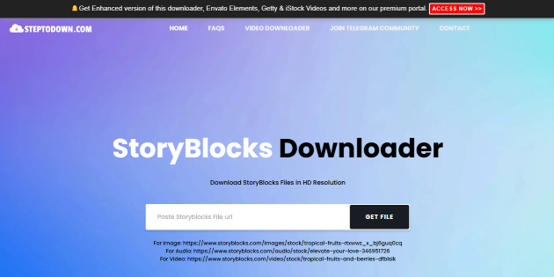
Steptodown offers a straightforward online method to download Storyblocks video media without complexity. Users can paste a Storyblocks video, audio, or image link into the Storyblocks downloader and fetch files.
UI Details:
The Steptodown interface is minimalist—a single input field where you paste the Storyblocks URL, and a "Get File" button. The design is clean with no distracting elements, focusing entirely on the download function. The site includes a clear disclaimer stating it is not affiliated with Storyblocks and does not host any media on its server.
What It Does Well:
Steptodown offers a straightforward online method to download Storyblocks video media without complexity. Users can paste a Storyblocks video, audio, or image link into the Storyblocks downloader and fetch files. The site delivers media through an API, ensuring fast processing.
What It Can't Solve:
Steptodown does not remove watermarks. If the source file is a watermarked preview, you'll get a watermarked download. It also lacks bulk download capabilities, so you'll need to repeat the process for each file.
User Feedback:
Users have mentioned that Steptodown is a "decent option for quick downloads," though some noted that ads can be annoying without an ad blocker. The site's disclaimer clearly states it is not affiliated with Storyblocks.
- Simple web form interface
- No registration required
- Supports multiple media types
- HD and 4K quality options
- Clean, focused design
- No bulk download feature
- Does not remove watermarks
- May have ads
- Limited to single downloads
Best for: Users seeking a reliable and fast Storyblocks downloader for single video downloads.
Tool 2: Beatsnoop Storyblocks Downloader
This Storyblocks downloader Beatsnoop focuses on stock media content. It enables downloading premium stock videos without watermarks.
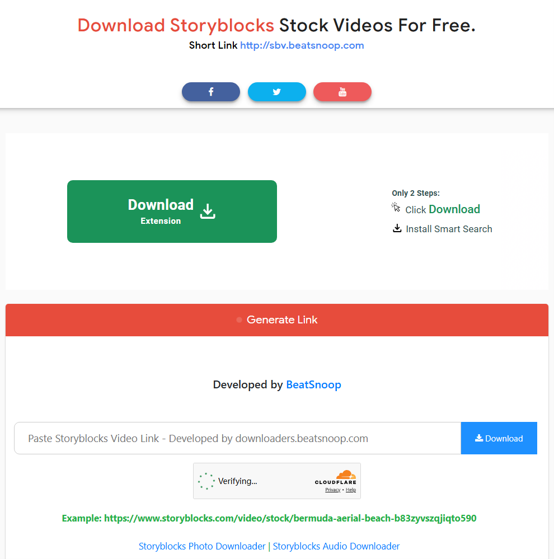
Beatsnoop also offers two other downloaders for Storyblocks – Storyblocks photo downloader and Storyblocks audio downloader. You can switch to them by clicking the link listed on the page.
UI Details:
Beatsnoop features an ultra-minimalist interface—just a single input box at the top of the page with the instruction "Paste the URL in the input box above and click on download." The rest of the page is dedicated to explaining features and answering FAQs. The design is clean and focuses on simplicity.
What It Does Well:
Beatsnoop is a specialized Storyblocks downloader Beatsnoop tool for Storyblocks, focusing on stock video, audio, and photo content. It enables downloading premium stock videos without watermarks. The site claims "no limits on the number of stock videos you can download" and offers "ultra-fast downloading speed." It works on all devices and browsers.
What It Can't Solve:
Beatsnoop is limited to video downloads only, but you can switch to two other pages for image and audio downloads. It does not support templates. The watermark removal claim should be verified—most tools simply grab whatever file Storyblocks serves.
User Feedback:
The site emphasizes being "completely free with unlimited downloads" and "no need of registration." It positions itself as safe and secure, claiming to value user privacy.
- Specialized for Storyblocks video content
- Claims unlimited downloads
- No registration required
- Works on all devices and browsers
- Ultra-fast download speed claimed
- Limited to video downloads only
- Does not support images or templates
- Watermark removal claim unverified
- May have ads
Tool 3: FliFlik for Storyblocks Media Download
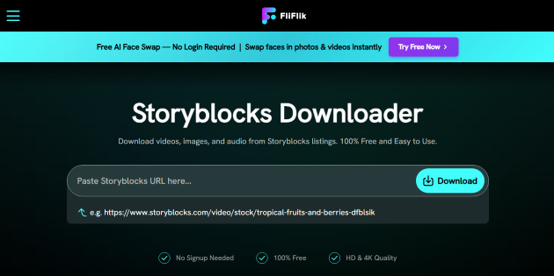
FliFlik is a versatile online Storyblocks downloader that supports downloading from multiple stock media sites, including Storyblocks. It allows downloading Storyblocks images, videos, and audio in various resolutions and formats.
UI Details:
FliFlik presents a modern, polished interface with clear sections for videos, images, and audio downloads. The page includes user testimonials and a step-by-step guide, making it feel more professional than some competitors. The design uses a clean layout with distinct sections for each media type.
What It Does Well:
FliFlik is a versatile Storyblocks video downloader that supports downloading videos, images, and audio from Storyblocks. It offers HD and 4K quality downloads and works on any device, including Windows, Mac, Android, iPhone, Chrome, Edge, Firefox, and Safari. The site includes a Storyblocks audio downloader feature for extracting music tracks and sound effects.
What It Can't Solve:
While FliFlik claims to "download Storyblocks video without watermark," this should be verified. Most tools simply grab whatever file Storyblocks serves. If the source is a watermarked preview, the downloader will not remove it.
User Feedback:
The site features user testimonials: "This Storyblocks downloader saves me a lot of time when collecting video clips for my projects" (Alex Morgan) and "I love how simple this tool is. The storyblocks video downloader process is fast, and it works perfectly when I need references for my creative projects" (Emma Wilson).
- Supports videos, images, and audio
- HD and 4K quality options
- Works on all devices and browsers
- User testimonials add credibility
- 3-step download process
- Dedicated sections for each media type
- Watermark removal claim needs verification
- No bulk download feature
- May have ads
Tool 4: Downpic Storyblocks Image Downloader
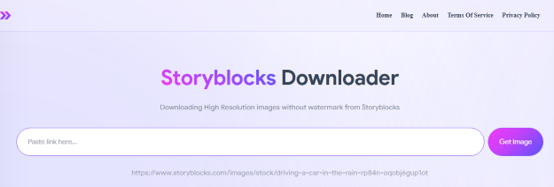
Downpic is a dedicated Storyblocks downloader that focuses on image downloads. It's ideal for users who need stock images and stock photos from Storyblocks.
UI Details:
Downpic features a clean, step-by-step interface with numbered instructions. The design is minimal, with a single input field and a "Get Image" button. The site includes an example URL to help users understand the format. The interface is focused entirely on image downloads.
What It Does Well:
Downpic is a dedicated Storyblocks photo downloader that focuses on image downloads. It's ideal for users who need stock images and stock photos from Storyblocks. The tool claims to download "high-resolution images without watermark" and works on all devices, including Android, iOS, Macs, PCs, iPhones, Huawei, and tablets.
What It Can't Solve:
Downpic is limited to images only. It does not support video, audio, or templates. The watermark removal claim should be verified—the site states it will "eliminate the watermark" but this is technically challenging.
User Feedback:
The site emphasizes ease of use: "With just a few clicks, you can download high-resolution images without watermarks." It also notes that users don't need to create an account and that the tool is completely free.
- Dedicated image downloader
- High-resolution output claimed
- Simple interface
- No registration required
- Works on all devices
- Limited to images only
- Does not support video or audio
- Watermark removal claim unverified
- May have ads
How to Unblur Chegg Answers: Homeworkify alternatives & Safer Methods
Learn how to unblur Chegg with easy steps. Find Homeworkify alternatives to see Chegg answers free and explore safe methods to download Chegg to PDFs.
READ MORE >Part 4: Storyblocks Downloader GitHub Tool for Desktop
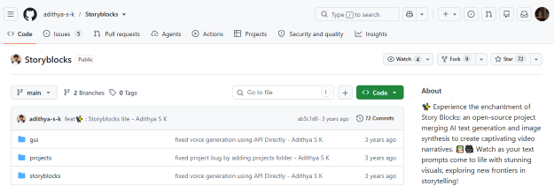
One popular option is a Python-based CLI tool that scrapes and downloads media from Storyblocks. This Storyblocks downloader GitHub solution is ideal for users who need bulk downloads.
What It Does Well:
This Python-based CLI tool scrapes and downloads media from Storyblocks. It's ideal for users who need bulk downloads. The script can handle multiple assets at once and preserves original quality. It's a Storyblocks HD downloader that maintains high resolution throughout the download process.
What It Can't Solve:
This tool requires Python and command-line knowledge. It's not for casual users. It also may break when Storyblocks updates its API. The tool does not remove watermarks—it downloads whatever file Storyblocks serves.
User Feedback:
GitHub users have praised this tool for its reliability, though some noted that it requires occasional updates when Storyblocks changes its API. The repository includes documentation for setup and usage.
- Free and open-source
- Bulk download capability
- Supports photos, videos, and audio
- HD quality output
- Active maintenance
- Requires Python and technical knowledge
- Command-line only
- May break with Storyblocks updates
- No watermark removal
Top 7 Tools to Remove Watermark in 2024
Do you want to remove watermark from photo, video, PDF, or another type of file? Read this article to get 7 best watermark removing tools.
READ MORE >Part 5: How to Download Storyblocks Photo and Video Without Watermark
After testing third-party tools, we strongly recommend using official Storyblocks methods for downloading content without watermarks, because official downloads are 100% legal, provide the highest quality files, and ensure you have full usage rights. Third-party downloaders may seem convenient, but they often fail to remove watermarks and can expose you to legal risks.
Method 1: Direct Web Download
The safest and most reliable way to download Storyblocks content without watermarks is through the official website. This method requires a valid subscription.
Affordable Storyblocks Subscription Plans
| Plan | Pricing | Monthly Credits | Notes |
|---|---|---|---|
| Essentials | $21/month | 3,000 Credits | Perfect for occasional users |
| Unlimited All Access | $30/month | 4,500 Credits | Best value for regular users |
Step 1: Go to Storyblocks and complete your Storyblocks login.
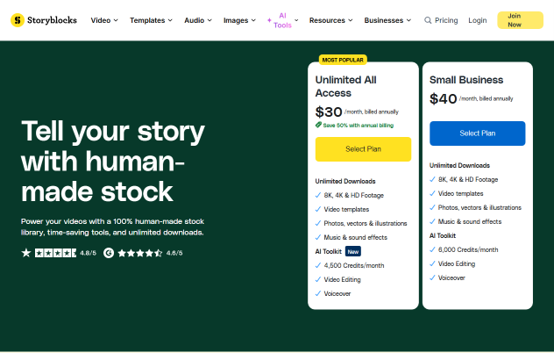
Step 2: Navigate to the media you want to download.
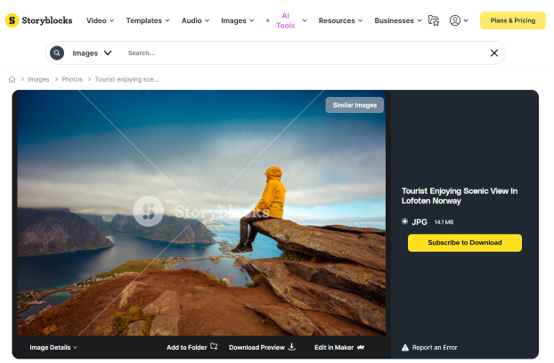
Step 3: Click the "Download" button after you subscribe to Storyblocks.
Step 4: Choose your preferred resolution (HD or 4K) and select your format (MP4, MOV, etc.)
Step 5: Save the file to your device.
Method 2: Adobe Creative Cloud Plugin
For users with a Storyblocks Pro Plan, the Adobe Creative Cloud plugin offers a seamless workflow.
Step 1: Complete your Storyblocks login and ensure you have the Pro Plan.
Step 2: Open Adobe Premiere Pro or After Effects and access the Storyblocks plugin from the panel.
Step 3: Search for your desired media and drag and drop directly into your timeline.
Step 4: The asset is automatically downloaded without watermarks
Part 7: What to Do After Downloading Storyblocks Assets?
Try to organize Storyblocks media with SwifDoo PDF. As a designer, you need an individual stock video site library where every idea and inspiration can be shown clearly.
If you want to make the most of your downloaded assets, try this powerful, all-in-one PDF editor that helps you organize and manage your downloaded Storyblocks assets. Unlike basic PDF tools, SwifDoo PDF offers advanced features specifically useful for creative workflows.
How to create a Storyblocks portfolio with SwifDoo PDF?
Step 1: Download and install SwifDoo PDF.
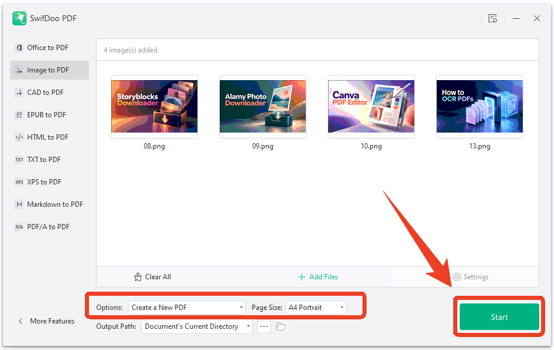
Step 2: Open SwifDoo PDF and click Image to PDF.
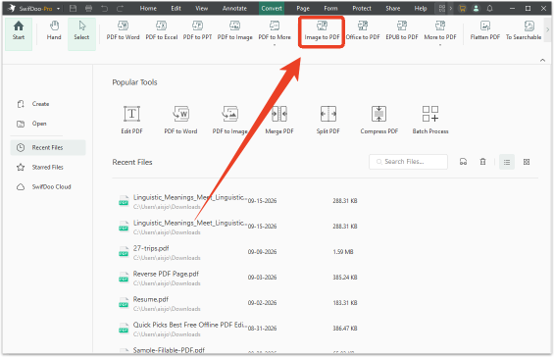
Step 3: Add your downloaded Storyblocks images and arrange them in your preferred order.
Step 4: Choose Create a New PDF and set the page size. Then click Start to create your portfolio.
Conclusion
According to the above information we have provided, you can select the best Storyblocks downloader based on your needs. For quick downloads, try Steptodown or Beatsnoop. For images, Downpic is a solid choice. For bulk downloads, GitHub scripts provide the most control.
Always respect creators and only download public content for personal use. After downloading, use SwifDoo PDF to organize, edit, and enhance your Storyblocks collection into a professional library.


