


Quick Summary: HelloSign vs DocuSign
The quick summary below shows which users each platform is best for, helping you evaluate HelloSign vs DocuSign based on your workflow needs and business size.
Choose HelloSign (Dropbox Sign) if:
- You are a freelancer or a small business
- You need a hassle-free, intuitive platform for signing documents
- You seek a simple, easy-to-navigate interface for smooth signatures
- You use cloud platforms like Dropbox for smooth integration
Choose DocuSign if:
- You need enterprise-grade workflow automation.
- You deal with many documents and complex approval processes.
- You require advanced security and compliance features for regulated industries.
- You want extensive integrations with CRM and business software like Salesforce or Microsoft 365.
If you need to edit and electronically sign a PDF, SwifDoo PDF is an excellent choice thanks to its rich set of editing features. Adding signatures, filling forms, and editing documents becomes quick and easy. What's more, it enables signing secured PDFs, keeping your documents safe and fully usable.
What Is HelloSign?
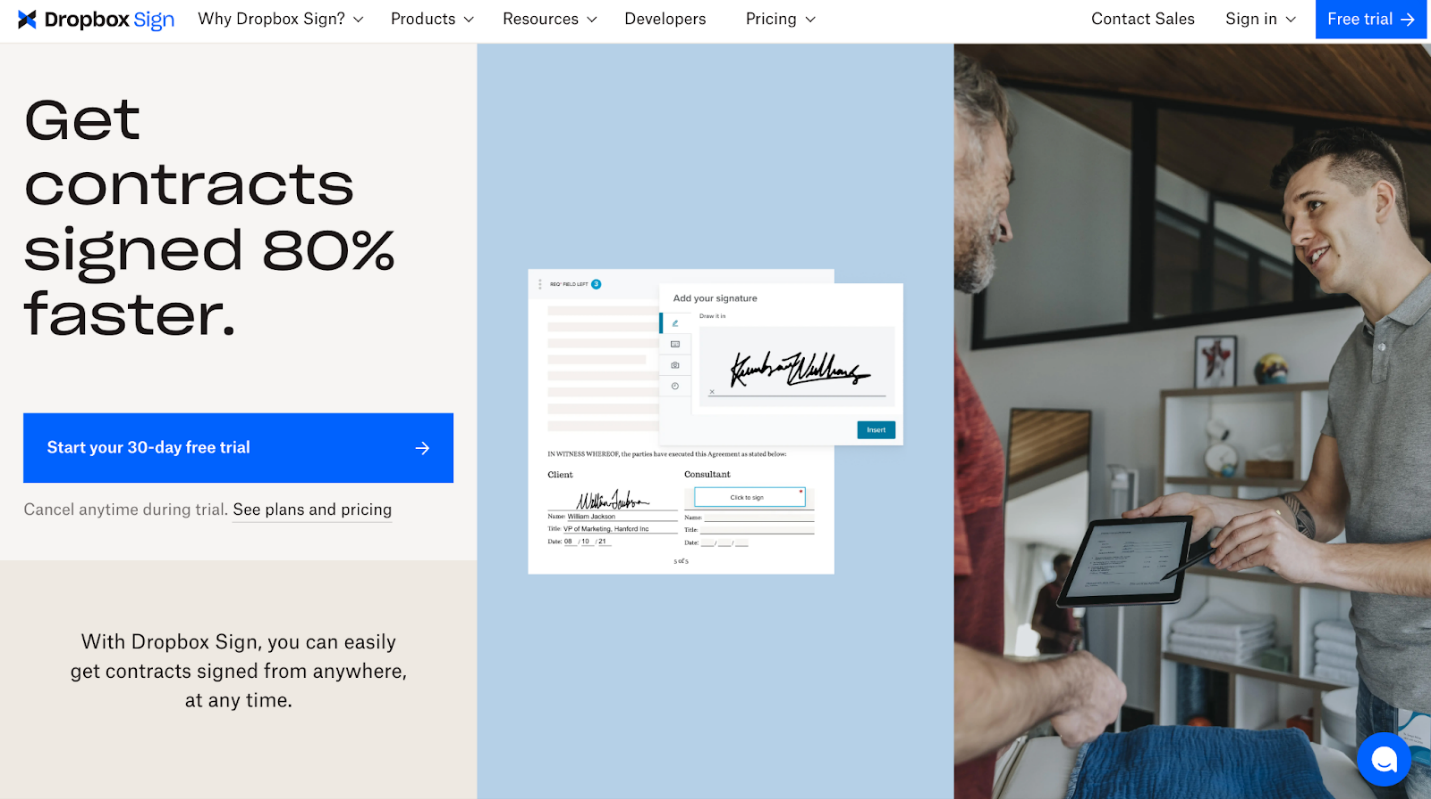
HelloSign, now called Dropbox Sign, provides an easy-to-use platform for efficient electronic signature workflows. It allows individuals and businesses to easily sign a contract online without printing or scanning. With its intuitive interface, Dropbox Sign simplifies document management and accelerates the signing process.
Key features of HelloSign:
- API Access. Seamlessly add electronic signature functionality to your apps or workflows.
- Template Library. Save and reuse document templates to speed up signing.
- Audit Trail. Keep a record of every action on your documents for accountability.
- Team Management. Manage users, assign roles, and control access effectively.
- Custom Branding. Give documents a professional touch by adding your logo and brand colors.
- In-Person Signing. Collect signatures directly on a device when meeting clients face-to-face.
What Is DocuSign?
DocuSign is a top digital transaction platform that lets you securely DocuSign a PDF or other documents online. It provides powerful tools for businesses of all sizes to handle contracts and approvals smoothly. DocuSign uses advanced security and compliance measures to make every signature legally binding and fully traceable.
Key features of DocuSign:
- Advanced workflow automation. Streamline complex signing processes with automated routing and approvals.
- Mobile-Friendly Signing. Sign, send, and handle your documents from any device, anywhere.
- Robust Security & Compliance. Achieve regulatory compliance through encryption, authentication, and full audit tracking.
- Template Management. Build reusable templates to streamline repetitive document processes.
- Integrations. Integrate smoothly with platforms like Salesforce, Microsoft 365, and Google Workspace.
- Real-Time Notifications. Monitor document progress and get instant notifications when signatures are done.
HelloSign vs DocuSign: Feature Comparison
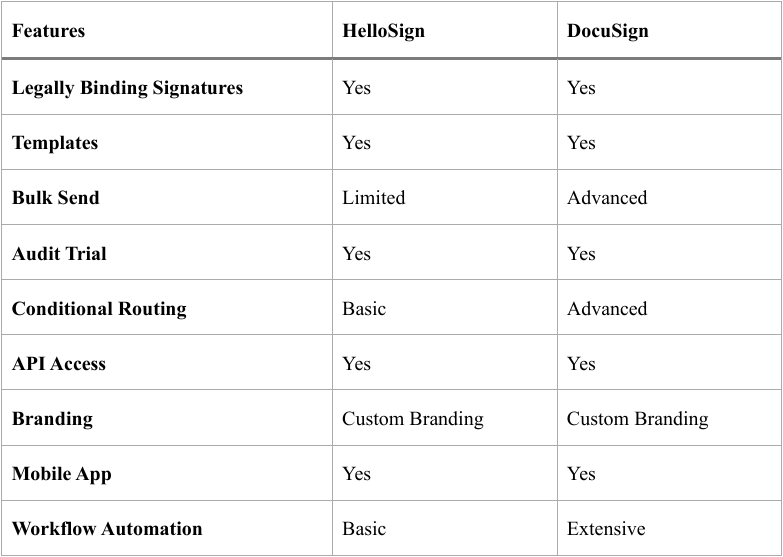
To help you make an informed choice, this section compares HelloSign vs DocuSign features side by side, highlighting their features and unique strengths. By examining these features, you can quickly determine which platform best fits your workflow and signing needs.
Core Features Comparison Table
HelloSign vs DocuSign Pricing
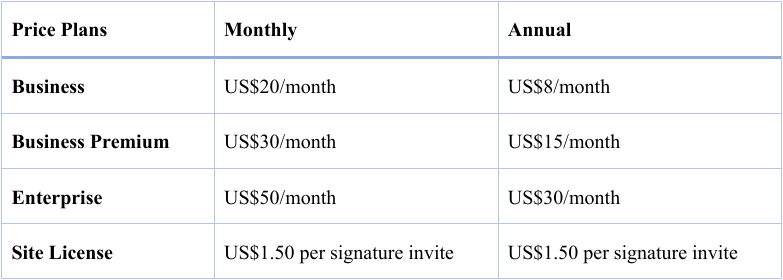
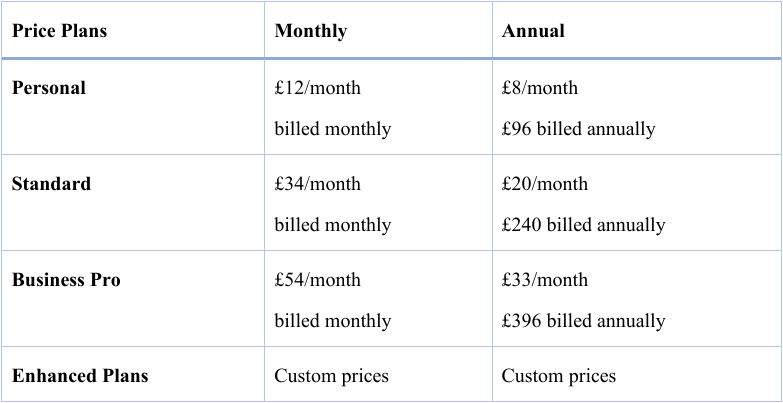
Here’s a quick look at how HelloSign vs DocuSign pricing stacks up. So you can see pricing differences and pick the plan that suits your requirements.
HelloSign Pricing
DocuSign Pricing
Which Is More Affordable
- For individuals. HelloSign tends to be more affordable, with simple plans perfect for individual users.
- For small businesses. HelloSign (Dropbox Sign) generally remains more cost-effective with essential features and simpler pricing.
- For large enterprises. DocuSign tends to be more expensive. Still, advanced workflow automation, compliance tools, and scalability make the higher cost worthwhile for big organizations.
HelloSign vs DocuSign: Ease of Use
HelloSign (Dropbox Sign) offers an easy-to-navigate interface, making document signing and sending quick and simple for newcomers. Its simple structure and easy configuration let users handle tasks efficiently without difficulty.
DocuSign offers a feature-packed interface that can seem complex initially, especially for beginners, yet excels at managing detailed workflows. Users who become familiar with it enjoy the organized dashboard and tailored options for intricate, multi-step processes.
DocuSign vs HelloSign Security
When it comes to security, both DocuSign and HelloSign rank among the best electronic signature software options, offering encryption and compliance with major global standards. DocuSign generally offers more advanced enterprise-grade security controls. It includes advanced authentication methods, support for global certificate authorities, and more robust compliance frameworks, making it ideal for regulated industries.
HelloSign also provides robust protection with SSL encryption, audit trails, and SOC‑2 compliance. This makes it secure for everyday business needs. While both tools ensure signatures remain legally valid and tamper-proof, DocuSign provides additional confidence to bigger organizations through extensive security certifications and access controls.
DocuSign vs HelloSign: Integrations and Automation
DocuSign provides wide-ranging integrations with tools like Salesforce, Microsoft 365, and Google Workspace. This makes it ideal for businesses that need e-signatures embedded in complex workflows. HelloSign (Dropbox Sign) connects with essential platforms like Google Workspace, Dropbox, and Slack, supporting simpler workflows.
Regarding automation, DocuSign excels with multi-step signing sequences, conditional routing, and automated triggers, while HelloSign provides basic automation and reusable templates, making it best for straightforward, smaller-scale signing processes.
DocuSign vs HelloSign: Pros and Cons
Below is a clear look at the strengths and weaknesses of both tools to help you weigh your options. Here, we’ll examine what each platform excels at and where it lags. This makes it straightforward to pick the one that suits your business and workflow.
DocuSign Pros and Cons
Pros
- Extremely intuitive for signers, facilitating quick turnaround times for contracts.
- Widely trusted, providing strong security features and full audit trails (ESIGN/eIDAS compliant).
- Integrates seamlessly with major, enterprise-level software like Salesforce, Google Drive, and various HRIS systems.
- Suitable across industries and adaptable for businesses of all sizes, including real estate-specific offerings.
Cons
- Viewed as more expensive than alternatives, particularly for smaller companies.
- Tiered pricing is inconsistent, often paired with strong promotion of premium features.
- Users report inconsistent, poor customer service, along with occasional system glitches and slow loading times.
- Limited ability to edit documents once uploaded and restricted, template, and customization.
- The free version is highly restrictive, often limited to five agreements per month.
HelloSign Pros and Cons
Pros
- Highly intuitive interface, making it simple for both senders and signers.
- Seamless integration with Dropbox, Google Drive, and HubSpot.
- Adheres to all major e-signature regulations.
- Enables personalized branding and template creation.
- Offers automated alerts for signature follow-ups.
Cons
- May be costly, particularly for smaller or occasional users.
- Offers fewer third-party integrations than larger competitors like DocuSign.
- Some users find organization, tracking, and searching for signed documents to be cumbersome.
- There are complaints about delayed or unresponsive support.
- Requires a stable internet connection to perform properly.
Final Verdict
That's all, friends. In the HelloSign vs DocuSign matchup, both platforms deliver reliable e-signature services, yet they serve distinct user needs. HelloSign (Dropbox Sign) is ideal for freelancers and small businesses seeking simplicity and affordability. In contrast, DocuSign shines for big organizations needing robust automation, extensive integrations, and strong compliance features. Knowing their features, costs, and usability allows you to select the tool that best matches your business requirements.



