Claude is widely praised for its exceptional reasoning, long-context understanding, and high-quality writing. On the other hand, Copilot offers seamless integration with Microsoft 365 apps, making it a good, natural choice for professionals already invested in the Microsoft ecosystem. So, which AI assistant should you choose? Claude or Copilot? In the following content, I will offer an overview of Claude and Copilot and display a feature-by-feature comparison of them. After reading this article, you can make the right choice.
Quick Overview of Claude vs Copilot
Before getting into the in-depth side-by-side comparison of Copilot and Claude, you can refer to the quick overview of how Claude AI and Microsoft Copilot compare.
|
Feature |
Claude |
Copilot |
|
Developer |
Anthropic |
Microsoft |
|
Primary Focus |
Reasoning, writing, and document analysis |
Productivity and Microsoft 365 |
|
AI Model |
Claude family of models |
GPT-based models with Microsoft AI technologies |
|
Web Search |
Yes |
Yes |
|
File Upload & Analysis |
Excellent |
Good |
|
Long Document Support |
Excellent |
Good |
|
Writing Quality |
Excellent |
Very Good |
|
Coding Assistant |
Excellent |
Very Good |
|
Microsoft 365 Integration |
No |
Excellent |
|
Windows Integration |
No |
Yes |
|
Free Plan |
Yes |
Yes |
What Is Claude

Claude is an excellent AI assistant developed by Anthropic, a company focused on building AI systems. Since its launch, Claude has become one of the most popular ChatGPT alternatives owing to its natural writing style, thoughtful responses, and ability to process lengthy documents.
In addition, Claude can maintain context across extensive discussions and analyze large files, making it especially valuable for professionals handling research reports, legal documents, technical manuals, or books.
What Is Copilot
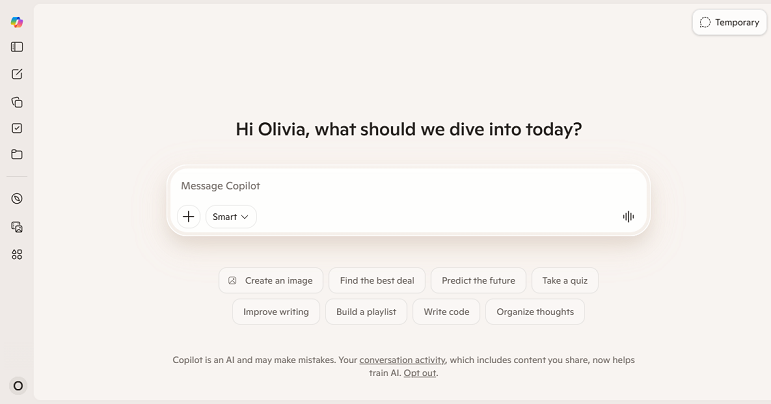
Copilot is Microsoft’s AI-powered assistant designed to enhance productivity across Windows and Microsoft 365. What’s more, Copilot integrates directly into applications such as Word, Excel, and Outlook, allowing you to complete tasks without leaving your workflow. If you are already using Microsoft 365, Copilot can be a good choice.
Copilot vs Gemini: Which AI Assistant Should You Choose?
Copilot vs Gemini: which AI assistant is better? Let’s compare Microsoft Copilot and Google Gemini side by side and make the right decision.
READ MORE >Claude vs Copilot: Feature-by-Feature Comparison
Both Claude and Microsoft Copilot are capable AI assistants, but they excel in different areas. In this section, let’s have a look at their feature-by-feature comparison.
#AI Model & Reasoning
Winner: Claude
A reliable AI assistant with exceptional reasoning capabilities can help us solve complex problems, brainstorm ideas, or analyze information with a logical, well-structured response.
Claude is widely recognized for its strong reasoning abilities, including:
- Breaking down complex problems into logical steps
- Understanding nuanced questions
- Maintaining context in long conversations
- Explaining difficult concepts clearly
- Identifying assumptions and alternative viewpoints
Meanwhile, its responses are often detailed and thoughtful, making it a great choice for research, strategic planning, and technical discussions.
On the other hand, Copilot also performs well in reasoning tasks, especially when paired with Microsoft 365 data and web search. However, its responses tend to be more concise and action-oriented, prioritizing over in-depth analysis.
#Writing Quality
Winner: Claude
If writing quality is your top priority, Claude delivers more natural and refined results. You can use Claude to create natural, engaging, and well-organized writing. Moreover, it can follow complex instructions well and maintain a consistent writing style throughout lengthy documents. Totally, it performs exceptionally well for:
- Blog articles
- Long-form reports
- Business proposals
- Creative writing
- Email drafting
- Editing and rewriting
- Tone adjustments
On the other hand, Copilot shines inside Microsoft Word and Outlook. It can:
- Draft professional emails
- Rewrite paragraphs
- Summarize documents
- Improve business writing
Although Copilot's writing quality is strong, it generally focuses on workplace productivity rather than on polished long-form content.
#Coding Assistance
Winner: Claude for General Coding
Winner: Copilot for Microsoft Development Environment
Claude can be the winner in general coding, debugging, and technical explanations, since it offers more comprehensive assistance. It performs well across a wide range of programming tasks, including:
- Writing code from scratch
- Debugging
- Refactoring
- Explaining algorithms
- Reviewing code
- Generating documentation
If you primarily use Microsoft’s developer tools and GitHub, Copilot integrates more naturally into your workflow. Meanwhile, it is especially useful when:
- Writing scripts for Microsoft tools
- Automating workflows
- Working within Visual Studio and GitHub environments
- Integrating code with Microsoft services
#Research & Web Search
Winner: Copilot
Copilot benefits from Microsoft’s search technologies and real-time web access. You can enjoy a smooth search experience and get up-to-date answers. Meanwhile, Copilot is particularly good at:
- Current events
- Product research
- News summaries
- Fact checking
- Finding recent information
Like Copilot, Claude can also search the web and provide well-organized summaries. However, its strength lies in interpreting information rather than simply retrieving it.
#File Upload & PDF Analysis
Winner: Claude
Some of you use AI assistants to summarize lengthy reports, analyze PDFs, or extract key information. Document analysis is one of Claude’s biggest strengths, which can:
- Read lengthy PDFs
- Compare multiple documents
- Identify key findings
- Answer detailed questions
- Summarize research papers
- Extract specific information from long reports
If you need to analyze, summarize, or rewrite PDFs, you can also try SwifDoo PDF, an excellent AI-powered PDF editor. Meanwhile, it enables you to chat with PDFs and read PDFs aloud.
Copilot can also analyze files, particularly documents stored in Microsoft 365. However, it is generally better suited for productivity tasks than for in-depth document analysis.
#Image Generation
Winner: Copilot
If you frequently create visual content, select Copilot. Its AI-powered image generation capability allows you to create illustrations, marketing graphics, concept art, and presentation visuals using simple text prompts.
However, Claude currently focuses on text-based tasks and doesn’t include native AI image generation.

Claude vs Perplexity: Which AI Assistant Should You Choose
Claude vs Perplexity: which AI assistant should be your choice? Read this article to learn the side-by-side comparison between Claude and Perplexity.
READ MORE >Claude vs Copilot: Pros and Cons
What’s more, understanding their advantages and limitations can also help us decide which AI assistant better suits our needs. Here, let’s have a look.
Pros and Cons of Claude
Pros:
- provide excellent reasoning and problem-solving capabilities
- Produces natural, high-quality writing
- Handles long documents and PDFs
- Strong coding, debugging, and technical explanations
- Create content, brainstorm ideas, and conduct research
- The free plan is available
Cons:
- No native Microsoft 365 integration
- No built-in AI image generation
- Collaboration features are less extensive than Microsoft's enterprise ecosystem
- Some advanced capabilities require a paid subscription
Pros and Cons of Copilot
Pros:
- Seamless integration with Microsoft Word, Excel, PowerPoint, Outlook, and Teams
- Excellent productivity features for business users
- Built-in AI image generation
- Real-time web search capabilities
- Enterprise-grade security and compliance
- Familiar experience for Windows and Microsoft 365 users
- Free version available
Cons:
- The best experience depends on the Microsoft ecosystem
- Advanced Microsoft 365 AI features may require additional subscriptions
- Less suitable for analyzing lengthy research documents
Claude vs Copilot vs ChatGPT
Many of you also compare ChatGPT to Claude and Copilot. While all three are capable AI assistants, each has a different focus. Here’s a simple comparison table for your reference:
|
Feature |
Claude |
Microsoft Copilot |
ChatGPT |
|
Writing Quality |
⭐⭐⭐⭐⭐ |
⭐⭐⭐⭐☆ |
⭐⭐⭐⭐⭐ |
|
Reasoning |
⭐⭐⭐⭐⭐ |
⭐⭐⭐⭐☆ |
⭐⭐⭐⭐⭐ |
|
Coding |
⭐⭐⭐⭐⭐ |
⭐⭐⭐⭐☆ |
⭐⭐⭐⭐⭐ |
|
Web Search |
⭐⭐⭐⭐☆ |
⭐⭐⭐⭐⭐ |
⭐⭐⭐⭐⭐ |
|
Long Document Analysis |
⭐⭐⭐⭐⭐ |
⭐⭐⭐⭐☆ |
⭐⭐⭐⭐⭐ |
|
Microsoft 365 Integration |
⭐⭐☆☆☆ |
⭐⭐⭐⭐⭐ |
⭐⭐⭐☆☆ |
|
Image Generation |
⭐☆☆☆☆ |
⭐⭐⭐⭐⭐ |
⭐⭐⭐⭐⭐ |
|
Data Analysis |
⭐⭐⭐⭐☆ |
⭐⭐⭐⭐⭐ |
⭐⭐⭐⭐⭐ |
|
Best For |
Research & writing |
Workplace productivity |
All-around AI assistance |
Final Words
Claude vs Copilot: which AI assistant is better? After comparing their features, we can conclude that neither AI assistant is objectively "better." The right choice depends on your workflow. If you work with writing, research, coding, or analyzing long documents, Claude should be your first choice. However, if you spend most of your day in Word, Excel, or Windows, select Microsoft Copilot.
By the way, if you need to edit and summarize PDFs, consider SwifDoo PDF.