


Can ChatGPT Read PDFs?
Can ChatGPT read PDFs? The short answer is: Yes, ChatGPT can read PDF files. But how it works depends on the method you use. What can ChatGPT do with PDF files? You can use it to perform the following tasks:
- Summarize the PDF files
- Extract key insights from the PDF file
- Answer questions based on the content
- Translate the content in PDFs
Those features make ChatGPT a powerful tool.
How to Use ChatGPT to Read PDFs
How many ways can you use to read and analyze PDFs in ChatGPT? Here are 2 methods for handling and processing PDFs. In the following content, let’s check them one by one.
- Use the built-in feature to upload a PDF to ChatGPT
- Copy-paste text from the PDF file
Method 1. Upload PDF Directly to ChatGPT
Before starting the guide, please make sure your version of ChatGPT supports uploading PDFs. According to ChatGPT, ChatGPT-4o enables you to upload PDF files directly from your computer and Google Drive. How to upload a PDF to ChatGPT and analyze it? Here, let’s follow the exact steps below.
Step 1. Open your ChatGPT.
Step 2. Click the file upload icon (a plus icon) or the paperclip icon in the chat interface. Next, select to upload your PDF file from your device or cloud services.
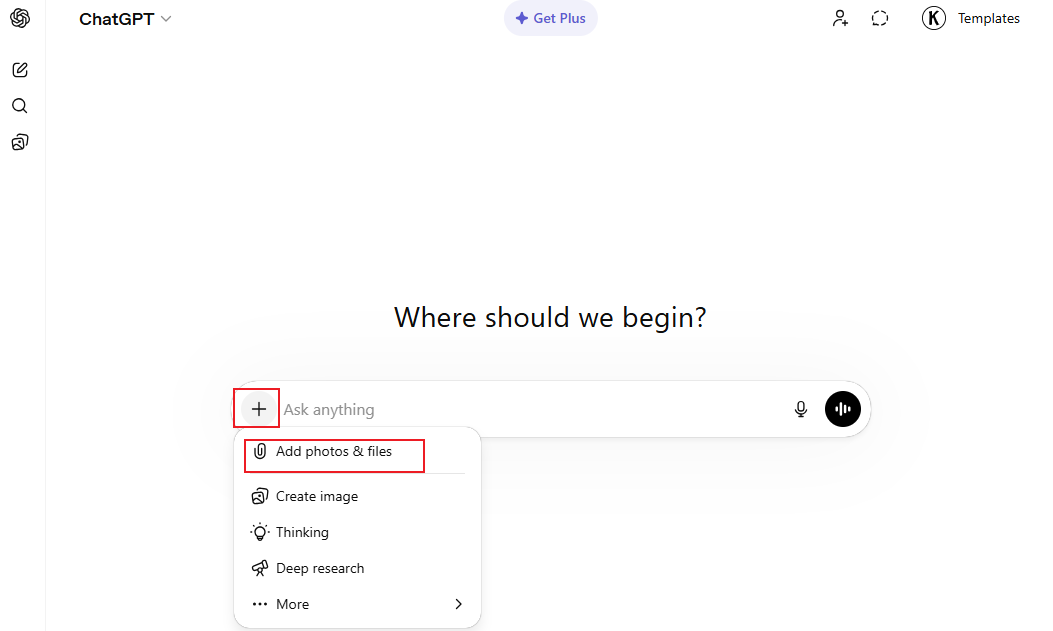
Step 3. Then, ask the questions for the PDF, such as “Summarize this PDF”, “Extract all headings”, or “What are the key points?”.
Step 4. Finally, press Enter to enable ChatGPT to read and analyze the PDF according to your prompt.
Method 2. Copy and Paste PDF Text into ChatGPT
If the version of your ChatGPT doesn’t support file uploads, you can copy the text from the PDF and then paste it into ChatGPT. Then ask ChatGPT for analysis, translation, explanation, or other options. To copy text from the PDF, you can open it with SwifDoo PDF, Google Chrome, or Adobe Acrobat Reader.
This method is best for short documents or specific sections. If your PDF file is large, this method is not fit for your needs.
Limitations of ChatGPT When Reading PDFs
Although ChatGPT is a powerful AI tool, it is not a dedicated tool for PDFs. It still has some boundaries when reading PDFs.
- File size limits: According to ChatGPT, the maximum file size you can upload is 512MB. More importantly, this limit is for paid plans. Fewer files on the free tier.
- Context limit: ChatGPT can’t always handle complex tasks perfectly.
- OCR feature: Though ChatGPT has built-in OCR to handle scanned PDFs, it’s limited and not accurate. In some cases, the result can be better if you convert scanned PDF pages to images.
Read Scanned PDFs with SwifDoo PDF
Acknowledged by almost all users, ChatGPT is a powerful AI assistant. However, it is not a dedicated PDF tool. If you need to handle PDFs with AI-powered features, use an AI PDF editor. SwifDoo PDF is a good choice, which has the built-in SwifDoo AI feature.
The SwifDoo AI feature allows you to summarize, translate, explain, proofread, rewrite, and chat with PDFs efficiently. To some degree, SwifDoo PDF is a good alternative to ChatGPT for analyzing PDFs. Additionally, SwifDoo PDF is equipped with OCR to recognize text in scanned PDFs. It can enhance the accuracy of analyzing PDFs. How to read a scanned PDF using SwifDoo PDF. Follow the steps below.
Step 1. Download and install SwifDoo PDF on your Windows PC.
Step 2. Launch this reliable AI-powered PDF tool and click Open to import the PDF you want to analyze.
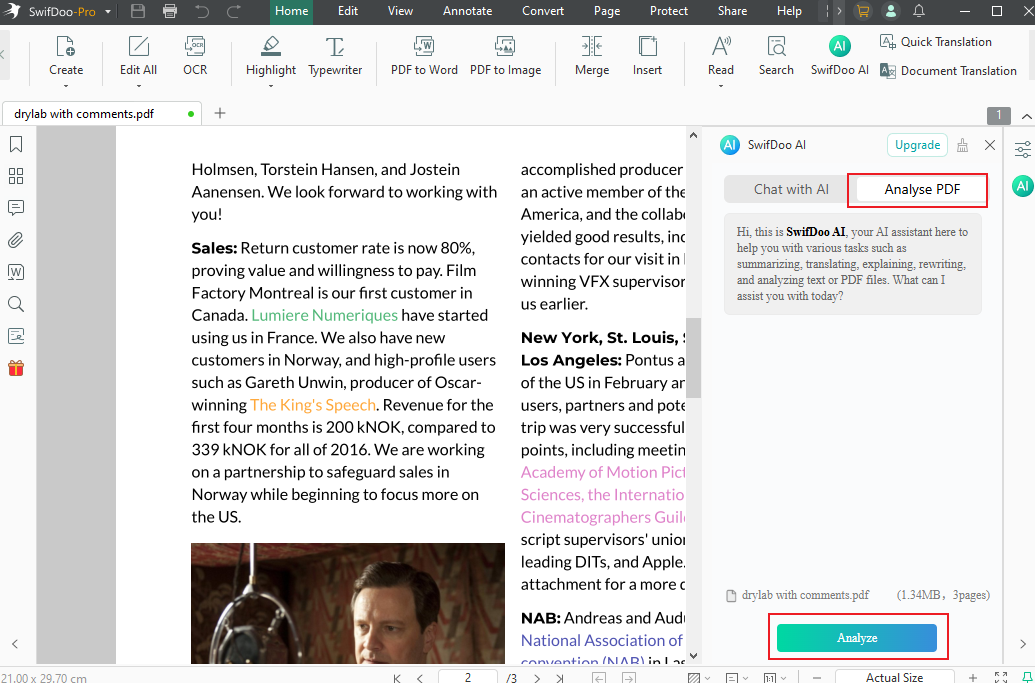
Step 3. Click the SwifDoo AI option in the top toolbar or right sidebar.
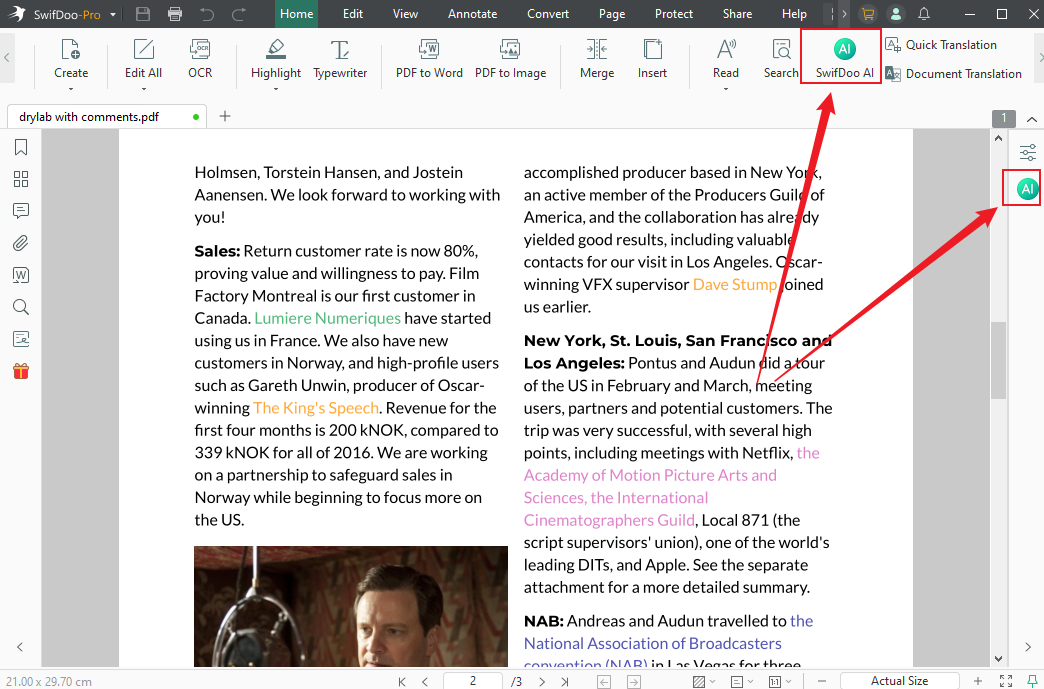
Step 4. Select Chat with AI or Analyze PDF. If you select the Chat with AI option, you can choose to translate, rewrite, proofread, summarize, or explain certain text in the PDF.
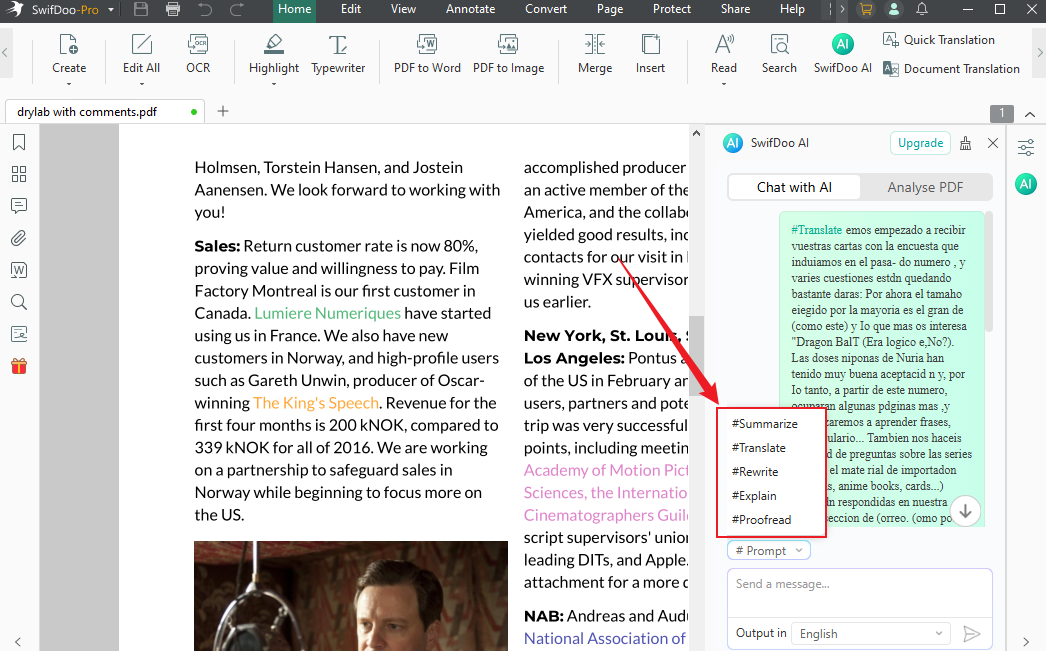
If you want to analyze the whole PDF file, switch to Analyze PDF and click the Analyze button.
Final Words
Can ChatGPT read PDFs? After reading this article, we know the answer is positive. We can upload PDFs to ChatGPT, either directly or indirectly, for analysis. In the content above, I have outlined the exact steps. Hopefully, this guide can be helpful to you. If you need a professional PDF tool to edit and analyze PDF files, SwifDoo PDF would be the better choice.



