


What Is SwifDoo PDF
As one of the best PDF editors designed to help users view, edit, convert, and manage PDF files with ease, SwifDoo PDF offers a smooth and efficient experience. Its simple interface and efficient performance make it perfect for users of all experience levels. With a strong focus on productivity and affordability, it delivers essential PDF tools without unnecessary complexity.
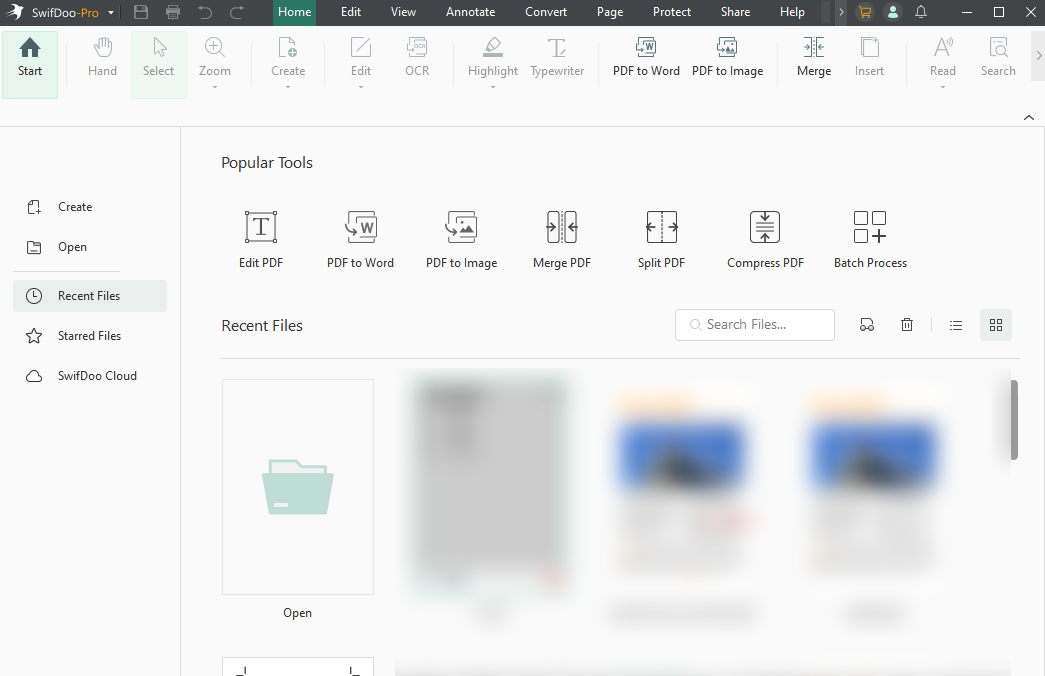
Key Highlights of SwifDoo PDF:
- Create, Convert, and Compress: Create and convert PDFs to/from many file types, and compress them easily in high quality.
- Edit and Annotate: Offers smooth text and image editing with rich annotation tools.
- OCR: Delivers fast and accurate text recognition for scanned and image-based PDFs.
- Security: Comes with security features including password encryption, redaction, and digital signatures to ensure file safety.
- Quick Translate: Offers high-accuracy translations of selected text into 100+ languages, useful for multi-language documents.
- SwifDoo Cloud and Sharing: Gives 10GB cloud storage for cross-device use and simple sharing via email or cloud services.
- AI Features: Includes AI tools (SwifDoo AI) for summarization, translation, rewriting, proofreading, analyzing, and chatting with PDF files.
- Customer Support: Delivers responsive email support and helpful documentation for troubleshooting and guidance.
What Is Adobe Acrobat
Adobe Acrobat is a trusted PDF tool for creating, editing, converting, and safeguarding PDF files. In the Adobe Acrobat vs Adobe Reader debate, Acrobat provides full editing, OCR, and collaboration features, whereas Reader is for basic viewing and commenting. Favored by professionals, Adobe Acrobat delivers reliable tools for working with complex PDF tasks.
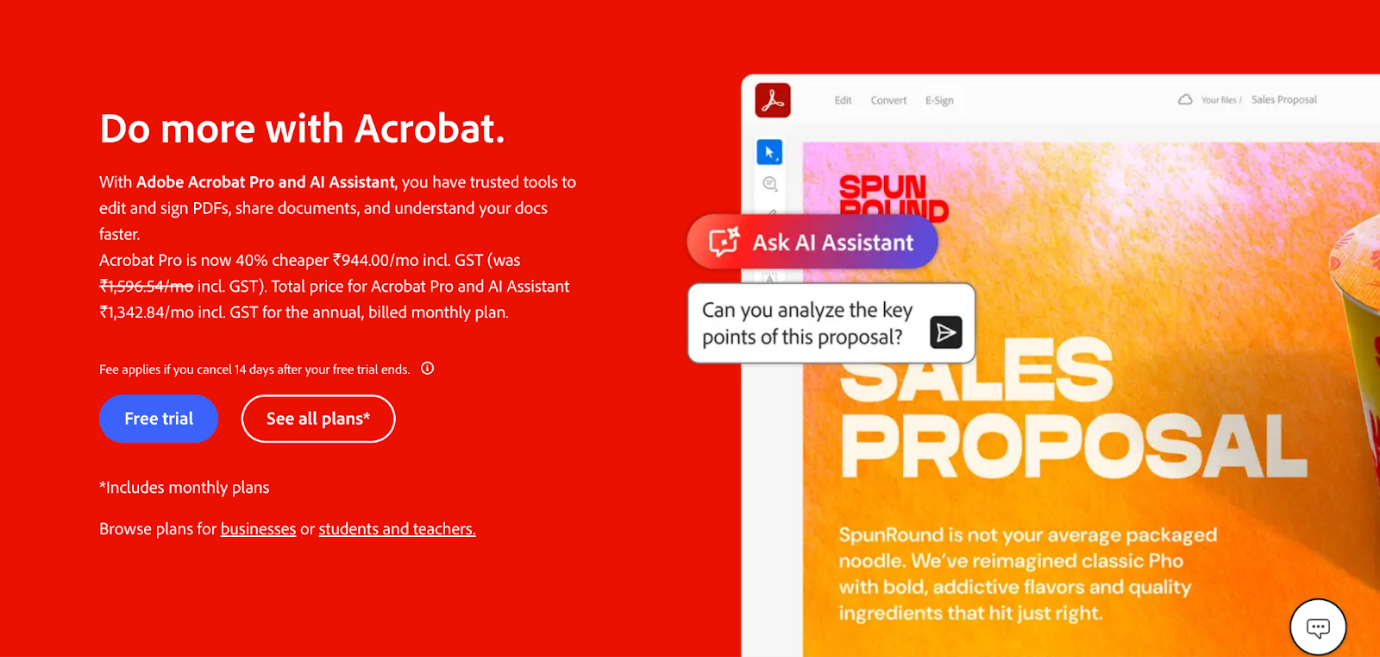
Key Highlights of Adobe Acrobat:
- Advanced PDF Editing and Organization: Easily edit text, replace images, reorder, delete, or rotate pages in PDFs.
- AI Assistant: Summarize long documents, get key insights, and ask questions using a chat-style interface.
- PDF Conversion: Convert files to/from Microsoft Word, Excel, PowerPoint, and images (JPG, PNG), as well as converting HTML to interactive PDFs.
- E-Signatures & Forms: Collect legally binding e-signatures, track signature status in real-time, and create fillable web forms.
- Security and Protection: Protect files by redacting content, setting passwords, and managing access.
- Collaboration: Enable file sharing to support collaborative commenting and annotation, and boost efficiency.
- Scanned Document Enhancement: Turn scans into searchable, editable PDFs using OCR.
- Cross-Platform Accessibility: Access your tools anywhere—desktop, mobile, or browser— with cloud storage included.
SwifDoo PDF vs Adobe Acrobat: Side-by-Side Comparison
With both tools covered, let’s see how they stack up against each other. Compare SwifDoo PDF and Adobe Acrobat in this section to see how they differ in features, performance, pricing, and usability. Use this comparison to determine which PDF editor best meets your needs.
#Ease of Use and User Interface
SwifDoo PDF focuses on simplicity, making it accessible and easy to navigate. Wondering, “Is SwifDoo PDF easy to use?” Its tidy interface and clear toolbar make it simple, even for beginners. A few clicks give full access, making it a user-friendly PDF editor for beginners.
Adobe Acrobat, in contrast, provides a professional interface packed with advanced tools. Although powerful, it presents a steep learning curve for new users. Beginners might struggle initially, yet skilled users gain from its broad features and customization for managing complex PDF work.
Winner: SwifDoo PDF (beginner-friendly interface)
#Features for PDFs
SwifDoo PDF includes flexible tools to manage PDFs. You can OCR PDFs to edit scanned documents, annotate PDFs with notes, highlights, and shapes, edit content, convert formats, compress files, manage pages, and translate text. Its features are designed for both casual users and professionals seeking a lightweight yet capable PDF editor.
On the contrary, Adobe Acrobat provides a comprehensive toolkit for professional PDF workflows. With the ability to edit scanned PDFs, users can make image-based documents fully editable. For collaboration across devices, it integrates with cloud services like Adobe Document Cloud, Google Drive, and OneDrive. Additionally, it allows you to create fillable PDFs and use advanced tools to edit and review documents on any device.
When looking at Adobe Acrobat vs SwifDoo PDF features, both deliver robust tools, though their focus varies. SwifDoo PDF excels at lightweight, easy-to-use editing, annotation, and file management; conversely, Adobe Acrobat offers a broader range of professional-grade features and cloud integration for advanced workflows. Your choice depends on whether you prioritize simplicity or comprehensive, enterprise-level functionality.
Winner: SwifDoo PDF (for simplicity and essential tools) and Adobe Acrobat (overall feature depth and professional capabilities).
#Performance and System Requirements
When selecting a PDF editor, performance and system efficiency are key, particularly with large files or heavy use. SwifDoo PDF and Adobe Acrobat are compared here in terms of performance, responsiveness, resource usage, and system requirements to determine which runs more smoothly.
SwifDoo PDF Performance and System Requirements:
Lightweight and speedy, SwifDoo PDF handles files efficiently without putting a strain on your computer. With low resource usage, it handles everyday editing smoothly, even on less capable devices.
System Requirements
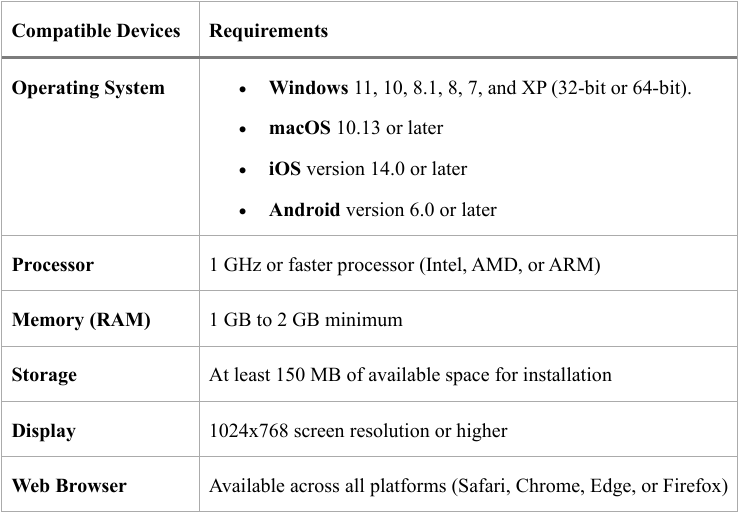
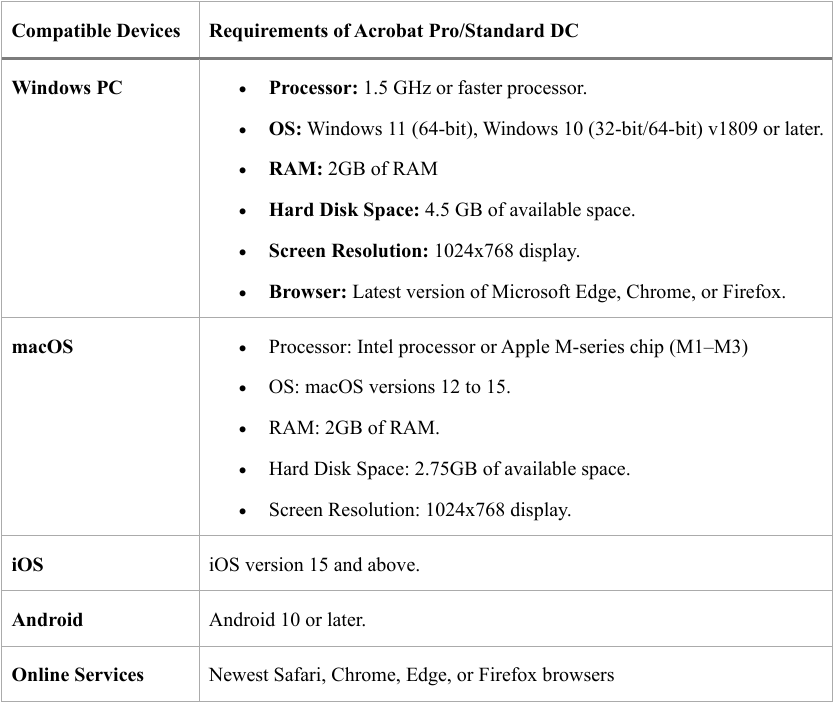
Adobe Acrobat Performance and System Requirements:
Adobe Acrobat is feature-rich but heavier, which can result in slower startup and occasional lag when working with large or graphics-intensive PDFs. It demands more system resources, so it works best on high-performance computers or in professional settings.
System Requirements
Winner: SwifDoo PDF (lightweight design and low resource usage).
#Price and Plans
Price is a crucial consideration for PDF editors, affecting both short-term use and long-term value. In this section, we compare the price and subscription choices of SwifDoo PDF and Adobe Acrobat to see which offers better value.
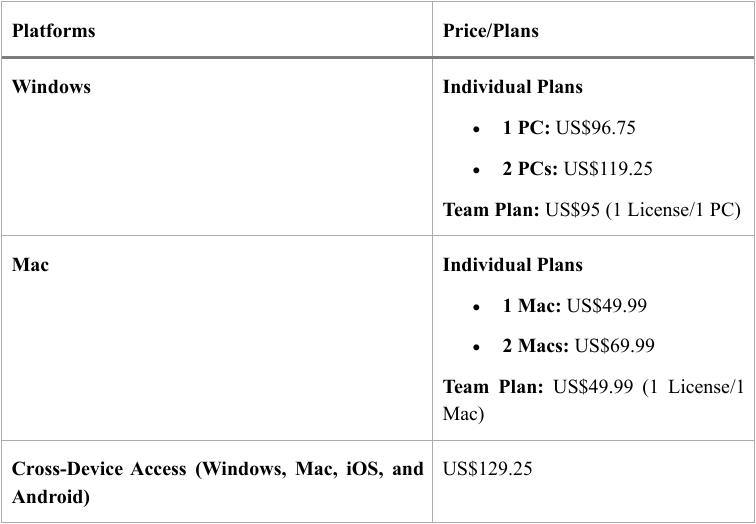
SwifDoo PDF Pricing:
- Free trial available: 7-day full-featured access.
- Affordable paid plans.
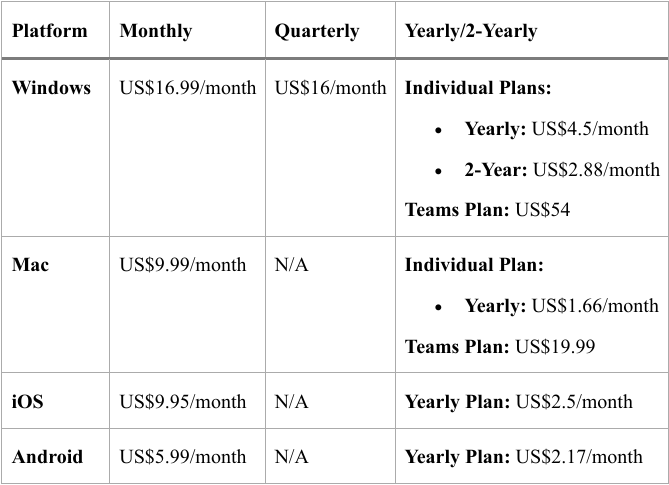
- One-time license option.
Adobe Acrobat Pricing:
- Free trial available: 7 days.
- Price plans for different users.
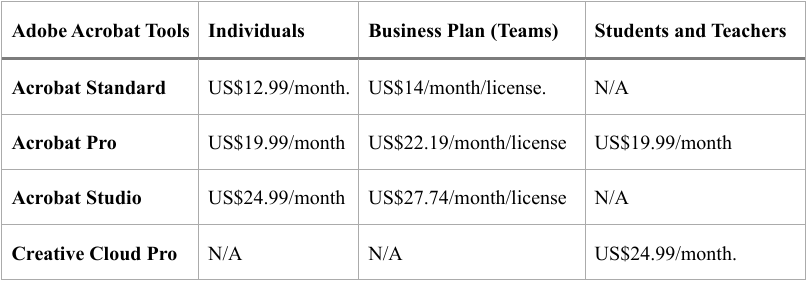
In a nutshell, SwifDoo PDF is more cost-effective and offers flexible payment options. Unlike one-time licensing, Adobe Acrobat is offered on a subscription basis, serving users who require advanced functionality and consistent updates.
Winner: SwifDoo PDF (full-featured free trial and adaptable plans for different user requirements).
SwifDoo PDF vs Adobe Acrobat: Pros and Cons
Following a detailed comparison of SwifDoo PDF and Adobe Acrobat’s main features, we break down their pros and cons to show strengths and drawbacks. Knowing the advantages and drawbacks helps you pick a PDF editor that best suits your priorities in usability, features, and efficiency.
Let us explore what each tool does best and where they fall short.
SwifDoo PDF Pros and Cons
Pros:
- Includes a modern, easy-to-use interface with quick loading for large documents.
- Includes robust editing, annotation, OCR (for scanned files), compression, merging, splitting, and electronic signature capabilities.
- Does not consume high system resources, keeping computers running smoothly.
- Provides a cost-effective PDF handling experience with a range of more affordable subscription and licensing options.
- Includes AI for summarizing, translating, proofreading, and rewriting documents.
- Offers strong local processing to protect user data.
Cons:
- The Mac version of SwifDoo PDF has fewer features compared to the Windows version.
- Offers only a 7-day free trial, though all features are fully accessible.
Adobe Acrobat Pros and Cons
Pros:
- Users can easily edit text, rearrange pages, convert files, and manage documents in one place.
- Offers trusted, secure electronic signature features and document protection.
- Consistent interface and functionality across desktop and mobile devices.
- Excellent font-matching technology and text recognition (OCR) for scanned documents.
- Efficient cloud-based collaboration and file sharing.
Cons:
- Pricy, especially for simple use, since many features aren’t free.
- It can be laggy, resource-intensive, or unstable when working with big documents.
- The interface can feel confusing or too complex, with a steep learning curve.
- The frequent UI changes can disrupt workflows.
- Full functionality is only in the Pro version; the free version is restricted.
- AI tools can seem unnecessary and intrusive to some people.
SwifDoo PDF vs Adobe Acrobat: Which One to Choose
After examining key aspects, it’s time to determine which PDF editor suits you best. Selecting a PDF editor depends on your particular tasks and preferences. Here, we’ll show who gains the most from SwifDoo PDF versus Adobe Acrobat, considering usability, features, and cost.
SwifDoo PDF is best for:
- Students and educators.
- Small business.
- Anyone looking for an Adobe Acrobat alternative.
- People looking for fast, reliable PDF tools for everyday use.
- Teams that want affordable yearly or one-time plans.
- Users who prioritize simplicity and essential PDF features.
Adobe Acrobat is ideal for:
- Large organizations and enterprises.
- Professionals dealing with detailed PDFs and form creation.
- Users who need advanced editing, collaboration, and security tools.
- Teams needing seamless cloud integration across multiple devices.
- Businesses that depend on digital signatures and compliance requirements.
Final Verdict
That’s all, friends. When comparing SwifDoo PDF vs Adobe Acrobat, the right choice depends on your priorities. Thanks to its user-friendly design, low cost, and core tools, SwifDoo PDF fits students, small businesses, and casual users perfectly.
Adobe Acrobat, however, delivers advanced tools, cloud integration, and professional-grade features ideal for large organizations and power users. Evaluating your workflow, budget, and required features helps you find the right PDF editor.



