


What Is iLovePDF Translate PDF?
iLovePDF Translate PDF is an AI-powered online tool that translates full PDF documents while preserving formatting, layout, and document structure as closely as possible. It supports both text-based and scanned PDFs through built-in Optical Character Recognition (OCR).
Although it's an online tool to translate from PDF document, which may trigger concerns about privacy security, iLovePDF claims that they applies encrypted file transfers and structured security controls. Files are automatically deleted after 2 hours, and the service is GDPR compliant with ISO/IEC 27001:2017 certification. It's still worth noting that all files must be uploaded to the cloud for processing, which is an important factor if you're working with sensitive documents.
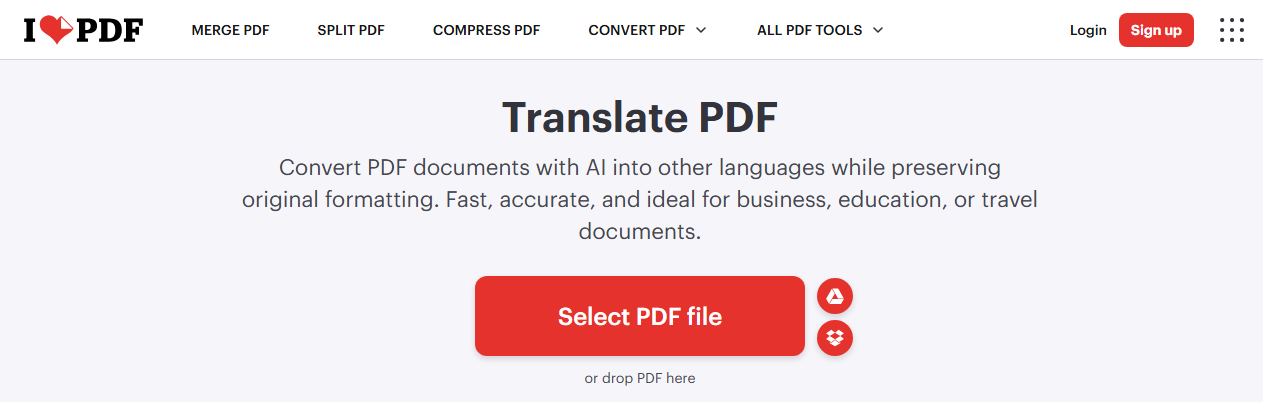
iLovePDF Translate PDF Key features include:
-
Formatting preservation: Layout, images, tables, and fonts stay in place
-
Wide language support: Text recognition in over 120 languages; translation into 25 global languages including English, Spanish, French, German, Arabic, Chinese, Japanese, Korean, Russian, and Hindi
-
Web-based & free cloud processing: iLovePDF offers a quick, zero-installation solution for users who need to translate PDF online free directly from their web browser.
-
Intelligent AI text recognition: By incorporating advanced algorithms, the PDF translate AI engine scans documents to preserve context and deliver natural-sounding phrasing.
-
Intuitive & user-friendly workflow: iLovePDF features a minimalist drag-and-drop interface connected directly to cloud storage platforms like Google Drive and Dropbox.
Is iLovePDF Safe? 2026 Comprehensive Security & Privacy Review
Is iLovePDF safe? Our 2026 review covers security certifications, GDPR compliance, file handling practices, and the best privacy-focused alternatives.
READ MORE >iLovePDF Translate PDF Free vs Premium Plan
iLovePDF offers a free tier, but it comes with significant restrictions that may not suit regular users.
|
Feature |
Free Plan |
Premium Plan |
|---|---|---|
|
Daily translation limit |
1 free task per day |
2,000 AI credits/month |
|
File size limit |
Up to 15 MB |
Up to 200 MB |
|
OCR for scanned PDFs |
Included |
Included |
|
Batch translation |
No |
No |
|
Formatting preservation |
Yes |
Yes |
If you need more than one translate PDF task per day, you'll need to purchase AI credits or upgrade to Premium, but note that even Premium users have a monthly cap.
The core limitations of the iLovePDF translate PDF workflow:
Although iLovePDF's translation feature is a convenient option for the average user, it has clear limitations.
-
File size and daily caps: The 15 MB limit for free users is restrictive for many real-world documents. While Premium allows up to 200 MB, you're still limited by the monthly AI credit allocation.
-
Scanned PDFs need OCR: While iLovePDF includes OCR, the free version's daily task limit applies to all translations. For image-heavy PDFs, the one-task-per-day limit can be especially frustrating.
-
Translation quality depends on language and structure: Translation quality may vary depending on language pair, formatting complexity, or industry-specific terminology.
-
Privacy concerns: Your document is uploaded to third-party servers, which is problematic for confidential contracts or legal files.
-
Formatting limitations: If the original font is unavailable, visually similar fonts may be used to preserve overall appearance. Complex multi-column layouts may experience some shifts.
How to Translate a PDF Online Free?
How to translate PDF document? iLovePDF translate PDF service can translate scanned PDF and text-based PDF.
Step 1: Go to the online translate PDF tool and click Select PDF file to upload your document. It supports Google Drive and Dropbox uploads.
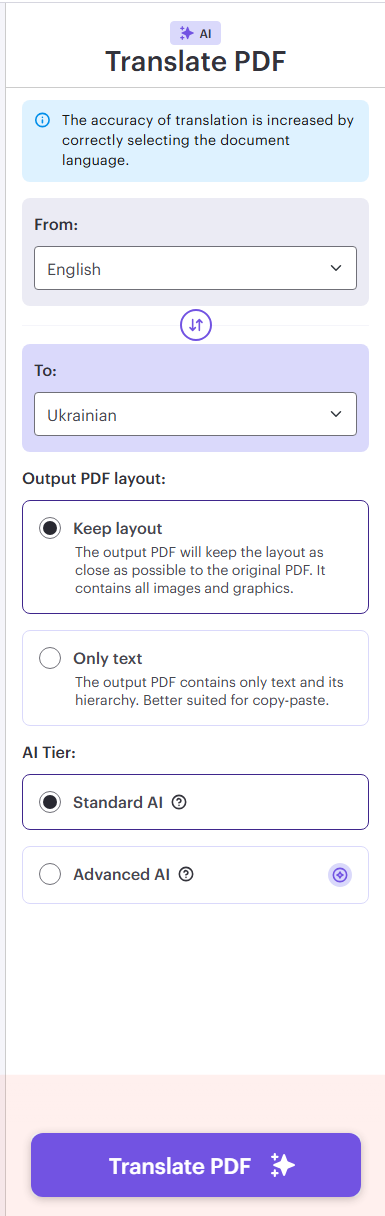
Step 2: Choose your document text language and the target language. Check your output PDF layout and AI tier.
Step 3: Click Translate PDF to start.
SwifDoo PDF Translate AI: A Complete PDF Translation Solution
SwifDoo PDF takes a fundamentally different approach to PDF translation. Instead of relying on a web browser and a third-party API, it delivers PDF translate AI capabilities directly on your desktop.
What Is SwifDoo PDF's AI Translation?
SwifDoo PDF's AI translation feature is built directly into the desktop application. It uses advanced neural machine translation to convert text between dozens of languages while preserving the original document's layout, formatting, and structure. Unlike online tools that extract text, translate it, and dump it back into a generic template, SwifDoo PDF's engine understands the context of your document and translates intelligently.
If you need to translate PDF to english from German, French, Spanish, Chinese, Japanese, or dozens of other languages, SwifDoo PDF handles it seamlessly. The reverse direction works just as well.
Three Translation Modes
SwifDoo PDF offers flexibility that online tools simply can't match:
-
Full-page translation: Translate the entire document at once, preserving the original layout.
-
Selected text translation: Highlight a specific paragraph or section and translate only that portion, perfect for quick reference or partial understanding.
-
PDF translate AI: Chat with SwifDoo PDF AI to deal with all kinds of translation tasks. SwifDoo AI works with ChatGPT 4.0 versions, which allows better performance in understanding and generating text while maintaining the PDF format.
Translation Language Coverage
SwifDoo PDF supports translation across 100+ languages, including:
-
European languages: English, German, French, Spanish, Italian, Portuguese, Dutch, Russian
-
Asian languages: Chinese (Simplified & Traditional), Japanese, Korean, Hindi, Thai, Vietnamese
-
Middle Eastern languages: Arabic, Hebrew, Turkish
-
And many more, including regional variants
This broad coverage means you can translate PDF file content to almost any language you need, all from a single application.
Key Features That Make SwifDoo's PDF Translate AI Stand Out
What separates SwifDoo from online tools like iLovePDF? The answer lies in five key differentiators that transform the translation experience.
Format Preservation
The most common complaint about online PDF translation is that the output looks nothing like the original. Tables become misaligned, images disappear, and text flows into awkward blocks. SwifDoo's AI translation engine was built with format preservation as a core priority. When you translate PDF document content with SwifDoo PDF, the tables stay as tables, the images remain in place, and the overall page structure mirrors the original.
OCR + AI Translation
Most web-based tools have trouble with scanned PDFs (digitized paper, faxes, etc. including photos taken of documents). The text in these files is embedded within images, so simple translators like iLovePDF will get them wrong or fail to translate them altogether. SwifDoo PDF Translator pairs high-quality OCR with AI-based translation by combining the two functionalities to automatically extract embedded text from image-based files and instantly translate them into readable and editable documents.
Local Processing & Privacy
Whenever you use a web-based PDF translator, your files are uploaded to third-party servers. For many users, that's unacceptable. Contracts, legal filings, medical records, and internal business documents often contain confidential information that should never be uploaded to a third-party server.
SwifDoo PDF keeps your entire workflow offline. Documents are processed locally on your machine and never touch an external cloud, giving corporate, legal, and healthcare professionals total peace of mind.
True Multilingual Capability
While basic online tools handle standard European languages reasonably well, they often stumble over complex grammar, non-Latin scripts, and regional nuances. Whether you're translating English PDFs into Hindi or working across South Asian, Southeast Asian, or Middle Eastern language pairs, SwifDoo’s AI handles localized phrasing and technical jargon with high precision, making it a reliable choice for global business expansion.
SwifDoo PDF Translate AI vs. Online iLovePDF Translate AI
To help you make an informed decision, here's a detailed comparison between SwifDoo PDF and iLovePDF translation.
|
Feature |
SwifDoo PDF |
iLovePDF Translate |
|---|---|---|
|
Translation Type |
Advanced AI |
Online AI (cloud) |
|
Scanned PDF Support |
Built-in OCR + translate |
Included |
|
Languages Supported |
100+ |
100+ |
|
Data Privacy |
High — files never leave device |
Low — uploaded to servers |
|
Daily Limits |
None |
1 free translation/day |
|
Preserve Formatting |
Excellent — keeps original layout |
Yes — text may lose structure |
|
AI Accuracy |
High — context-aware neural MT |
Medium — generic Google MT |
|
Additional AI Features |
Summarize, proofread, chat with PDF |
No |
|
Platform |
Windows, macOS, iOS, Android |
Web-based |
|
Pricing |
One-time purchase |
Freemium / Subscription |
How to Translate a PDF with SwifDoo PDF Translate AI
How to translate a PDF? With SwifDoo PDF AI, everything gets easier. The interface is designed for efficiency, and most users can complete their first translation within minutes of installing the software.
How to translate words from a PDF document?
Step 1: Download and install SwifDoo PDF and launch it.
Step 2: Open the PDF you want to translate. You can open files directly from your computer, or drag and drop them into the application window.
Step 3: Select the specific text and click on the Quick Translation icon from the pop-up box.
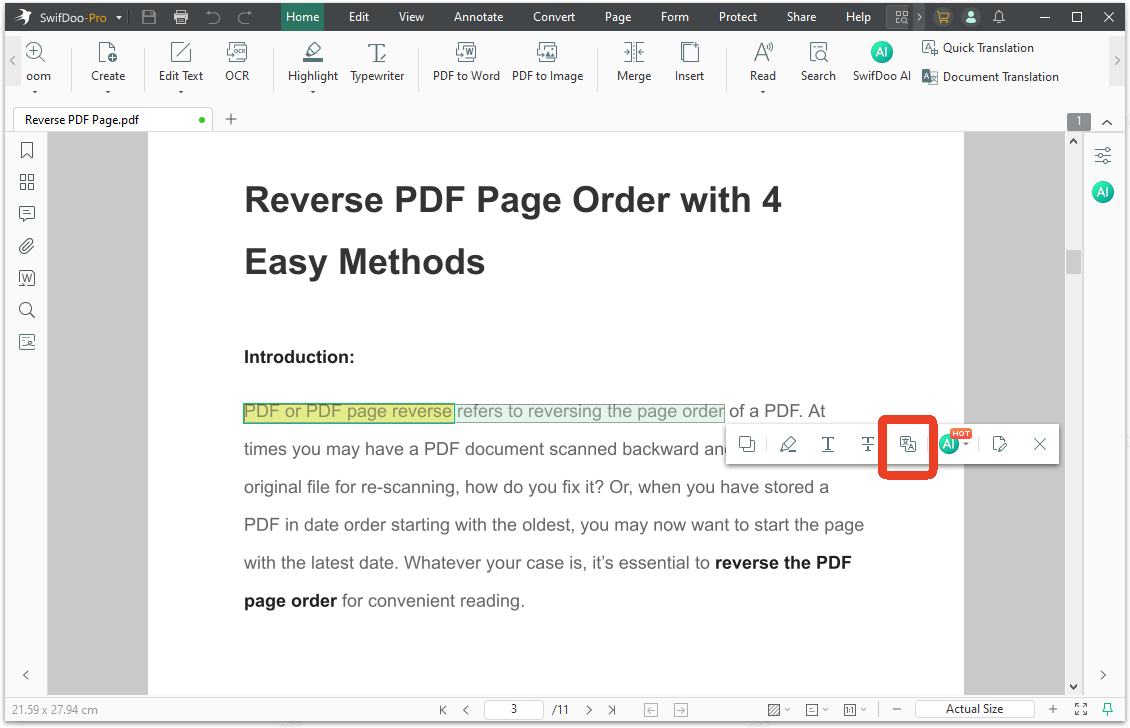
Step 4: Then choose the target language for your translation. The translate AI will identify the source language automatically.
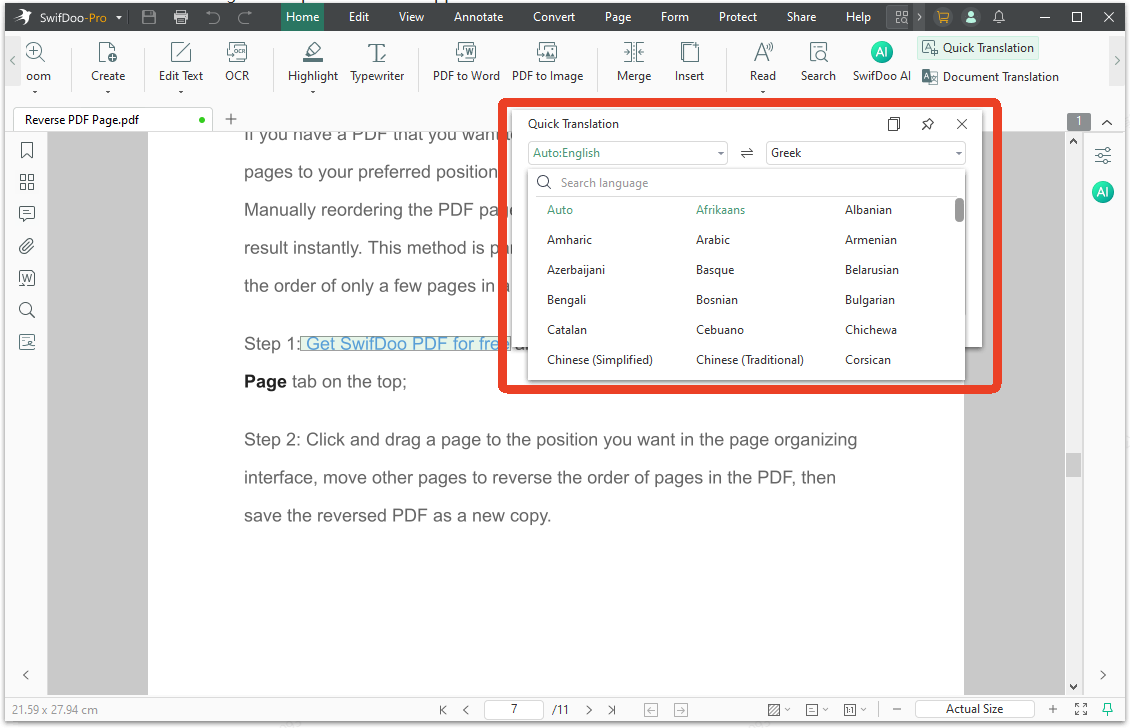
If you need to translate PDF to English, select English as the destination. For other language pairs, choose accordingly from the 100+ available options.
How to translate a whole PDF document?
Step 1: Open PDF from SwifDoo PDF and click Document Translation in the Home tab.
Step 2: In the new window, choose your target language, translation scope, and output path. You can choose to translate a document at once or select several pages.
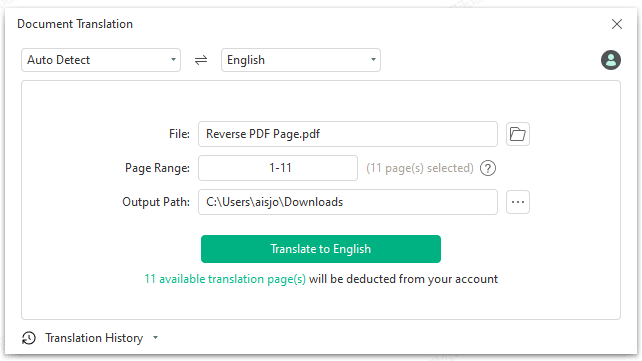
Step 3: Click the Translate to [Target Language] button to start.
How to AI translate PDF with SwifDoo PDF?
Step 1: On the Home page, click SwifDoo AI to chat with AI.
Step 2: Select # Translate and the output language for your command.
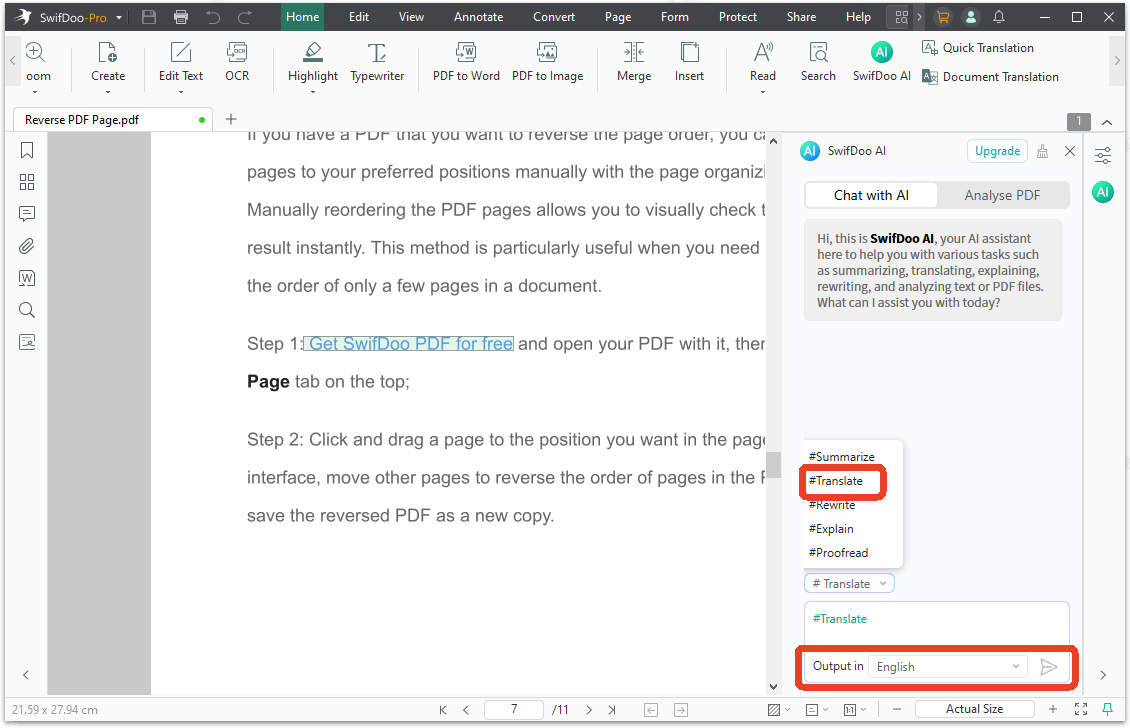
Step 3: Type your command and send it to the chat. SwifDoo's AI engine will process the document, applying neural machine translation while preserving the original layout. Processing time depends on document length and complexity, but most files complete within seconds to a few minutes.
Step 4: Once translation is complete, review the output. Make any necessary adjustments — you can edit text directly if you spot any translation nuances that need refinement — then save the file to your desired location.
Best Practices for Optimal Results:
-
Check document quality first: If your PDF contains scanned images, run OCR before translation to ensure accurate text recognition.
-
Review technical terms: For highly specialized content (legal, medical, technical), review key terminology after translation to confirm accuracy.
-
Keep the original: Always save a copy of the original document alongside the translated version for reference.
-
Use batch mode for efficiency: When translating multiple related documents, use batch processing to maintain consistency across files.
Conclusion
iLovePDF Translate PDF tool is convenient for quick online translations but has clear limits: one free task per day, a 15 MB cap, and privacy trade-offs from cloud processing.
SwifDoo PDF represents the next generation of PDF translate technology. With AI-powered neural machine translation and built-in OCR for scanned documents, it addresses every shortcoming of online tools while delivering superior results.
Now, download SwifDoo PDF and transform the way you translate PDFs.


