


It can be straightforward to cancel an Adobe subscription if you purchased it directly from Adobe. Simply sign in to your Adobe account, go to Plans and payment, select Manage plan, choose Cancel your plan, review the cancellation details, and confirm. In this article, I will also show you how to cancel the subscription if you purchased it through Apple, Google, or Microsoft.
If you need a cost-effective Adobe Acrobat alternative, SwifDoo PDF is worth a try. Serving as a lightweight, full-featured PDF editor, SwifDoo PDF enables you to edit, annotate, organize, protect, and print PDFs. For instance, you can use it to OCR PDFs to make a PDF searchable, compress PDFs to reduce file size, remove a PDF password, and make other edits as needed.
How to Cancel an Adobe Subscription
The easiest way to cancel an Adobe subscription purchased directly from Adobe is through your Adobe account. Generally, you don't need to uninstall Creative Cloud apps first. Below are the step-by-step instructions for your reference. Whether you need to cancel Adobe Creative Cloud, Acrobat Pro, Photoshop, or other plans, the instructions below can serve as a reference, provided you subscribed through the Adobe website.
Step 1. Sign in to your Adobe account
Visit Adobe’s website in your browser and sign in with the Adobe account associated with your subscription.
Step 2. Open your plan details
Once you sign in to Adobe’s website, open “Plans and payment”, find the Adobe subscription you want to cancel, and select “Manage plan”. Then Adobe will display your active plan and the applications and services included with it.
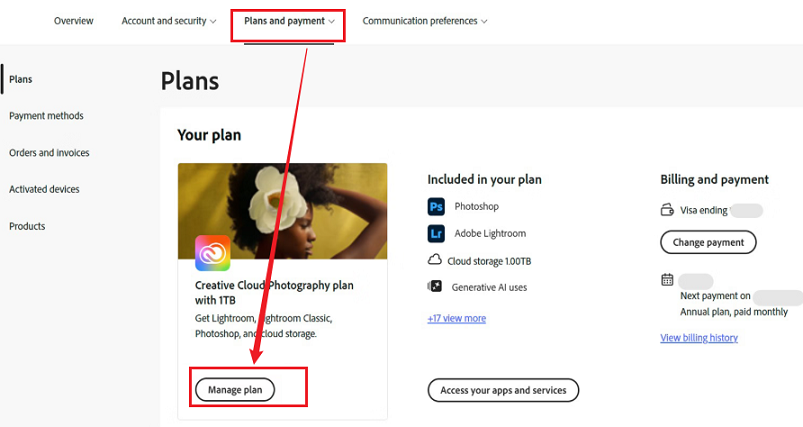
Step 3. Select “Cancel your plan”
Next, under the available actions, click “Cancel your plan”. If you don’t find the cancellation option, check whether Adobe is currently processing a payment. If so, wait 24 hours and try again in those situations.
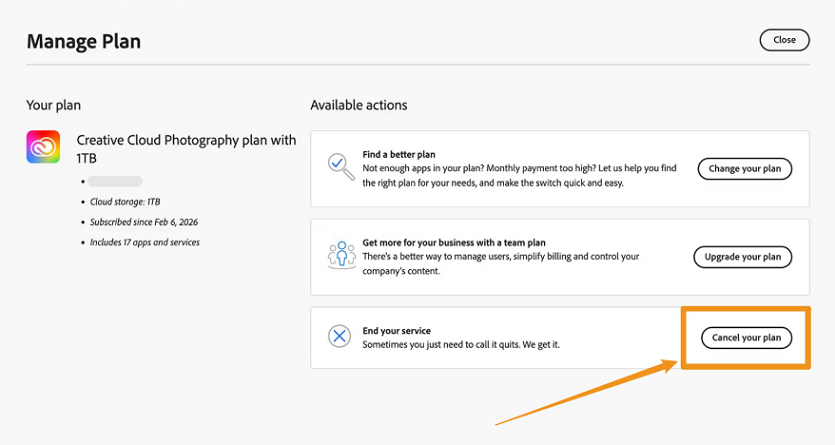
Step 4. Review your plan details and confirm the cancellation
Then Adobe will show information about your cancellation. Here, you need to check your current plan, billing information, and potential cancellation charges or refund details. Next, choose the reason why you are canceling and click Continue. Finally, click “Confirm cancellation”.
Once you complete the process above, check your Adobe account for the cancellation status and look for a cancellation confirmation email from Adobe. If you have multiple Adobe plans, you need to cancel them separately.
Full Guide to OCR Bank Statements in 3 Proven Methods
What is OCR for bank statements? Read this article to learn how to OCR a bank statement to extract text and transaction data from scanned PDFs or images.
READ MORE >How to Cancel Adobe Subscription Through Apple, Google, or Microsoft
If you purchased Adobe through a third-party provider, such as Apple or Google, you can’t manage the cancellation in the same way as a subscription purchased directly from Adobe. Instead, you need to follow the cancellation processes of each third-party provider.
How to Cancel an Adobe Subscription Through Apple
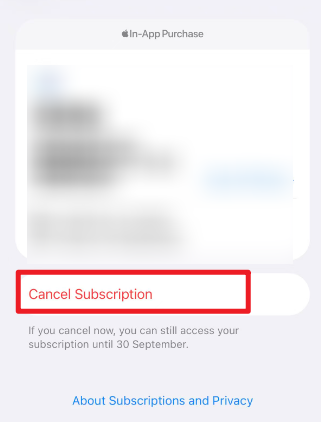
If you subscribed to Adobe through the Apple App Store, you can cancel it from an iPhone or iPad. Here are the exact steps for your reference:
- Go to Settings on your iPhone or iPad.
- Tap your name at the top of the screen and select Subscriptions.
- Here, find and select your Adobe subscription and tap Cancel Subscription.
- Finally, follow the onscreen instructions to confirm the cancellation.
How to Cancel an Adobe Subscription Through Google Play
If you purchased Adobe through Google Play, you can cancel the subscription from Google Play. Below is how:
- Open the Google Play Store and make sure you’re signed in to the Google Account used to purchase Adobe.
- Tap your profile picture and select Payments & subscriptions.
- Hit Subscriptions and select the Adobe subscription you want to cancel. Then tap Cancel subscription.
- At last, follow the onscreen prompts to complete the cancellation.
How to Cancel an Adobe Subscription via Microsoft
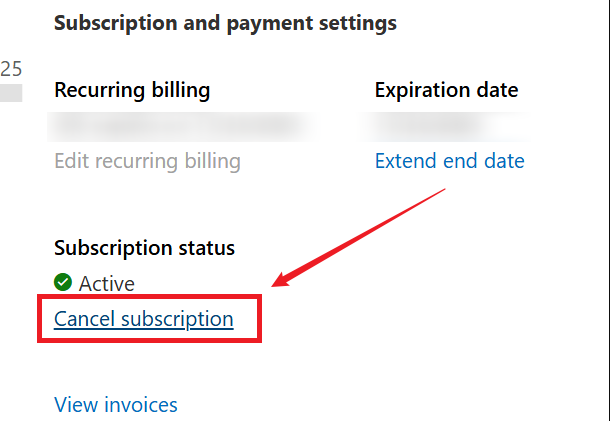
If Microsoft is responsible for billing your Adobe subscription, manage it through your Microsoft account. Here’s how:
- Go to Microsoft’s Services & subscriptions page and sign in with the Microsoft account used to purchase the subscription.
- Find your Adobe subscription, select Manage, and click Cancel.
- Finally, follow the instructions displayed on the page to complete the cancellation.
Can You Cancel Adobe Subscription Without a Fee
Can you cancel Adobe without a cancellation fee? The answer depends on several factors such as your plan type, when you cancel, where you purchased the subscription, and the applicable regional terms. In certain regions, for direct purchases, most plans are eligible for a full refund if you cancel within 14 days of the initial purchase. After that period, different plan types have different cancellation consequences.
All in all, the exact rules depend on the Adobe terms applicable to your region and subscription. Hence, you need to review the cancellation information Adobe displays before confirming. Here, you also need to check the consequences for your particular subscription.
Top 7 Google Books Downloaders to Save Google Books Offline
Are you looking for ways to download ebooks from Google Books? What is the best Google Books downloader? Find answers in this comprehensive article.
READ MORE >Can You Get a Refund After Canceling Adobe
Before discussing this question, you should know that canceling your Adobe subscription and receiving a refund are two separate things. For most Adobe plans, Adobe will fully refund you if you cancel your order within 14 days after your first purchase. After that period, refund eligibility depends on the plan and application terms.
Conclusion
How to cancel an Adobe subscription? If you purchased directly from Adobe, you can manage the plan from your Adobe account. If you purchased from third-party providers, follow their cancellation processes. In this comprehensive guide, I have provided you with step-by-step instructions. Moreover, we discuss some questions about canceling Adobe subscriptions. Hopefully, this article is helpful to you.