


Overall, ABBYY FineReader is worth considering if you regularly process scanned documents or need to convert complex PDFs into editable files. Its combination of OCR and PDF editing tools is appealing, though the subscription cost and differences between the Windows and Mac editions warrant attention before you buy. Now, let’s dive into this full review for ABBYY FineReader.
What Is ABBYY FineReader PDF
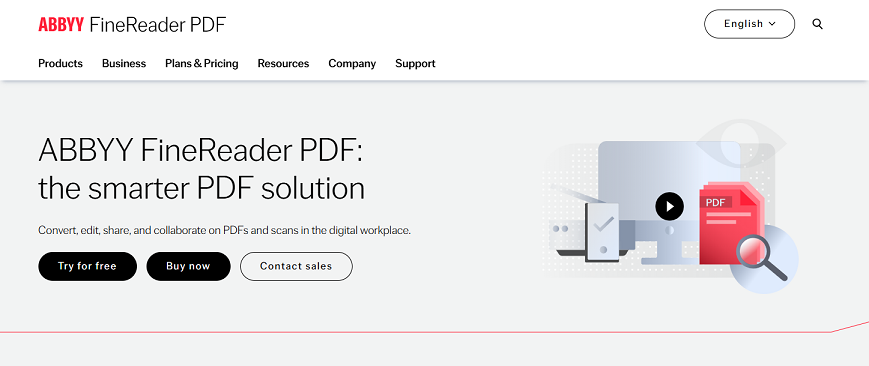
ABBYY FineReader PDF is a desktop PDF tool available for Windows and macOS, combining OCR (Optical Character Recognition), PDF editing, document conversion, and document management.
Its main purpose is to help users work with scanned documents and digital PDFs without relying on separate applications for each task. For instance, you can use ABBYY FineReader OCR to recognize the text and create a searchable PDF or convert the content into an editable Word document. Additionally, it is often positioned as a practical alternative to Adobe Acrobat owing to its industry-leading OCR accuracy and layout retention.
ABBYY FineReader Features Reviewed
ABBYY FineReader's main attraction is the combination of OCR and PDF tools. Rather than recognizing text in one application and editing the resulting PDF in another, you can handle several stages of the workflow within the same program. Now, let’s look at the features that matter most in our everyday use!
1. OCR Accuracy and Scanned PDF Recognition
OCR is one of ABBYY FineReader's most important features. It can recognize text in scanned documents and images, allowing you to create searchable PDFs or convert scanned pages into editable files. In addition, it is particularly relevant when working with reports, contracts, invoices, and other documents that contain multiple columns, tables, mixed formatting, or other layout elements.
With ABBYY FineReader OCR, you can:
- Make scanned PDFs searchable.
- Extract text from image-based documents.
- Convert scanned pages into editable Word documents.
- Recognize tables and structured information.
- Digitize printed reports, contracts, invoices, and research materials.
My take: If you frequently need to turn scanned paperwork into usable digital files, FineReader’s OCR capabilities are a major reason to consider it. However, if you only need to extract a few lines of text occasionally, a simpler tool, such as SwifDoo PDF and JOPDF, is sufficient.
2. PDF Editing and Page Management
ABBYY FineReader PDF is more than an OCR application. It is also a PDF editor that includes PDF editing and document-management capabilities. You can use it to edit PDF content, add comments and annotations, reorganize pages, create fillable PDF forms, and perform other PDF tasks.
One advantage I see in this approach is that it reduces the need to switch between multiple programs. However, not everyone needs a comprehensive desktop application. If you only want to rotate pages, add comments, or make occasional edits, a free PDF editor may be enough.
3. Convert PDF to Word, Excel, and Searchable PDF
Another key feature of ABBYY FineReader PDF is document conversion. It can convert PDFs into formats that are easier to edit or analyze. Meanwhile, for scanned PDFs, its OCR can recognize the text before it is exported.
- PDF to Word: Convert reports, contracts, and other PDFs into editable text.
- PDF to Excel: Extract tables and numerical information for further analysis.
- Scanned PDF to searchable PDF: Add a recognized text layer so you can search and select text.
- Image to text: Recognize text contained in scanned pages or images.
With ABBYY FineReader PDF, you can convert PDF to Word or Excel without losing formatting. This is quite important when the original document contains tables, columns, headings, or complex formatting. In all, ABBYY FineReader is a good PDF converter worth trying.
4. Document Comparison and Batch Processing
What’s more, if you regularly review contracts, reports, or policy documents, FineReader’s document-comparison functionality can be useful. It can help you identify differences between document versions, making it easier to spot changes that could otherwise go unnoticed. This can be valuable when reviewing long documents.
Additionally, ABBYY FineReader’s Windows Corporate edition also offers Hot Folder functionality for automating certain document-processing workflows. This can be useful when an organization repeatedly receives scanned documents that need to be processed in batch.
5. PDF Security and Collaboration
Moreover, ABBYY FineReader also provides PDF security and collaboration tools. Depending on the edition, supported workflows may include password protection, redaction, digital signatures, and related PDF operations.
However, these functions serve different purposes. You can choose to password protect PDFs from being accessed, redact PDFs to remove confidential content, or add digital signatures to establish document authenticity or integrity.
ABBYY FineReader Pricing and Plans
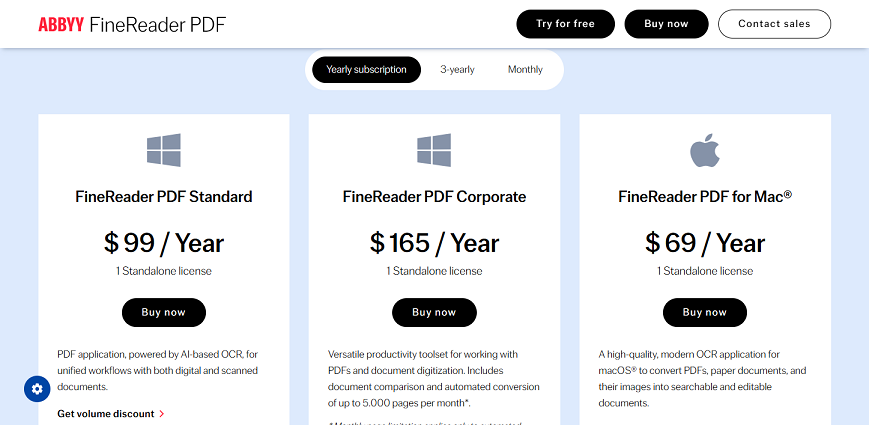
Pricing is another important factor to consider when reviewing ABBYY FineReader. Meanwhile, the total cost depends on your operating system and subscription terms.
|
Edition |
Listed price |
Best suited for |
|
FineReader PDF Standard for Windows |
$16/month or $99/year |
Individuals who need core PDF editing and OCR |
|
FineReader PDF Corporate for Windows |
$24/month or $165/year |
Professionals who need additional document-comparison and automation features |
|
FineReader PDF for Mac |
$69/year |
Mac users who need the supported OCR and PDF workflows |
Pay Attention: I only show you the pricing and plans for individuals. ABBYY FineReader also provides plans for businesses. In addition, you’d better verify the pricing on ABBYY’s official website (https://pdf.abbyy.com/pricing/) since prices, promotions, and regional availability can change.
Is ABBYY FineReader worth the price?
The answer depends largely on how often you work with scanned PDFs. If you regularly digitize contracts, convert reports, or extract information from scanned PDFs, FineReader's combination of OCR and PDF tools may save enough time to justify the cost. However, if you only need to make a few PDFs searchable each month, paying for a full-featured application may be unnecessary.
ABBYY FineReader Pros and Cons
In this section, I’d like to show you the pros and cons of ABBYY FineReader PDF.
- OCR-focused workflow: Recognize text in scanned documents and create searchable PDFs.
- Document conversion: Convert PDFs into editable formats, including Word and Excel.
- Layout preservation: Help retain the structure of documents containing paragraphs, columns, and tables.
- Integrated PDF tools: Combine OCR with supported editing, annotation, and page-management tasks.
- Advanced productivity features: The Corporate edition includes document comparison and Hot Folder automation.
- Subscription costs: Paying regularly may be difficult to justify for occasional PDF users.
- Platform differences: Windows and Mac editions do not necessarily offer identical capabilities.
- OCR limitations: Poor-quality scans and complex layouts may still require manual corrections.
What stands out to me is the combination of OCR and document conversion. These are useful capabilities for people who regularly work with scanned paperwork. On the other hand, I wouldn't recommend paying for advanced features simply because they are available. Their value depends on whether they solve problems you actually encounter.
Best ABBYY FineReader Alternatives
If ABBYY FineReader seems too expensive or includes more functionality than you need, several alternatives are worth considering. Here, I have rounded up several good alternatives to ABBYY FineReader.
|
PDF tool |
Key features |
Best for |
|
SwifDoo PDF |
OCR, PDF editing, conversion, annotations, page management, batch processing, and PDF protection |
Users seeking an all-in-one PDF editor with OCR |
|
JOPDF |
PDF editing, OCR, conversion, annotations, page management, and protection |
Users who want free PDF editing and OCR |
|
Adobe Acrobat |
OCR, PDF editing, conversion, document sharing, and broader document workflows |
Professionals who need a comprehensive PDF solution |
|
Foxit PDF Editor |
PDF editing, OCR in supported editions, conversion, and document-management tools |
Users seeking a commercial PDF editor for everyday and business tasks |
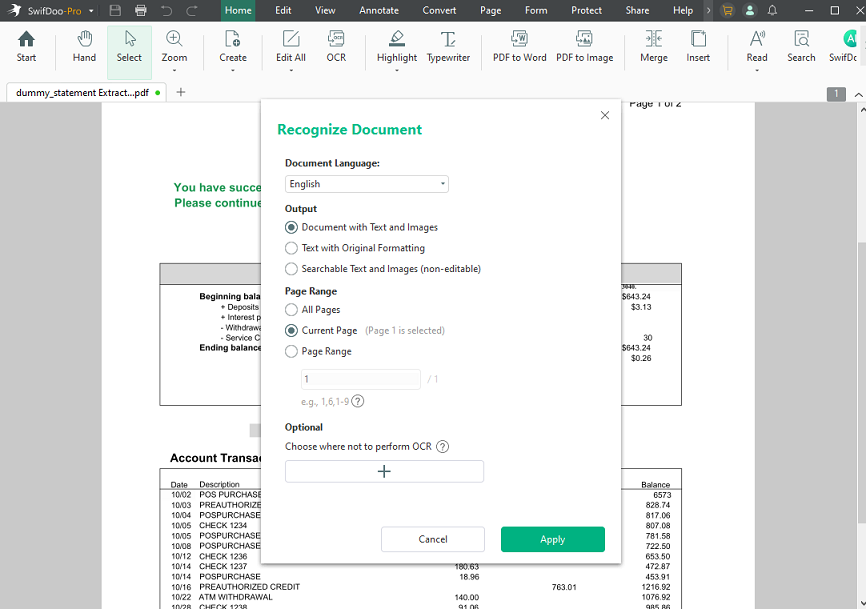
If you're looking for an ABBYY FineReader alternative that handles more than text recognition, SwifDoo PDF is worth a closer look. It combines OCR with PDF editing, conversion, annotation, page management, and document-protection tools, making it suitable for users who work with PDFs regularly.
Key Features of SwifDoo PDF:
- OCR for scanned PDFs
- Edit PDF text and images
- Convert PDFs to and from a wide range of formats
- Organize PDFs with merging, splitting, extracting, and reordering features
- Annotate, sign, and protect PDFs
- Fill out PDF forms efficiently
- Convert scanned PDF to Word, Excel, or PowerPoint
- …
Is ABBYY FineReader Worth It
ABBYY FineReader PDF is worth considering if OCR accuracy, document conversion, and scanned-document workflows are important to your work. It combines text recognition with PDF editing and conversion, while the Windows Corporate edition adds features that can benefit users who regularly compare documents or automate repetitive tasks.
Conclusion
Is ABBYY FineReader worth it? It's worth a try if you frequently digitize documents, recognize scanned text, and convert PDFs into editable formats. Its combination of OCR and PDF tools can streamline document-heavy workflows, while its advanced Windows edition offers additional capabilities for professional use. Hopefully, this review of ABBYY FineReader is helpful to you.


