Why Convert BTW to PDF?
By converting BTW files to PDF, you create a stable format ideal for printing, sharing, and long-term label storage. The PDF format keeps your layout intact, can be opened on nearly any device, and doesn’t require special software. This ensures smoother collaboration, consistent output, and long-term accessibility when you convert BTW file to PDF. Check the details.
✅ Keeps the layout and formatting unchanged.
Fonts, colors, and design details are fully preserved through conversion, keeping the label exactly as created.
✅ Protects files from any unwanted edits.
PDFs safeguard content from accidental alterations, preserving the integrity and precision of the file.
✅ Makes printing easier and more accurate.
PDF’s standardized output ensures consistent label printing, minimizing alignment issues and formatting errors.
✅ Enhances long-term storage and ensures broad compatibility.
PDF ensures that stored label files remain accessible and compatible across devices over time.
✅ View PDF in full screen.
PDF viewers offer full-screen mode for clearer inspection. It enables users to view PDF in full screen, making label details easier to check.
How to Convert BTW to PDF
Users can choose from several ways, depending on their technical expertise and requirements. While some methods are fast and internet-based, others offer greater control and precise results.
Here, we’ll walk you through the two best and most dependable ways to convert BTW files to PDF effortlessly. Once the file is converted, it’s simple to send PDF to email for records or distribution.
Use BarTender
As the original tool for BTW label files, BarTender provides a simple method to convert BTW to PDF. By using its built-in print or export functions, you can preserve the exact layout, fonts, and graphics of your labels. This method ensures high-quality output and complete control over design and printing settings.
Learn the easy steps for how to convert BTW file to PDF with BarTender quickly.
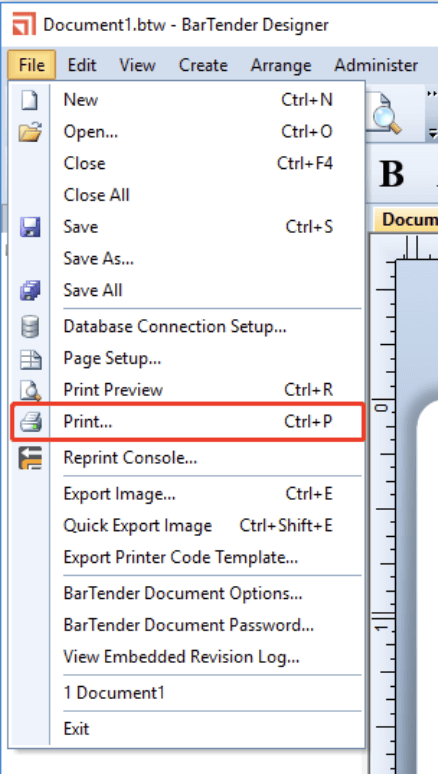
Step 1. Launch BarTender on your computer. And navigate to the File tab from the top toolbar.
Step 2. Next, press the Print… button from the dropdown menu to open the Print window.
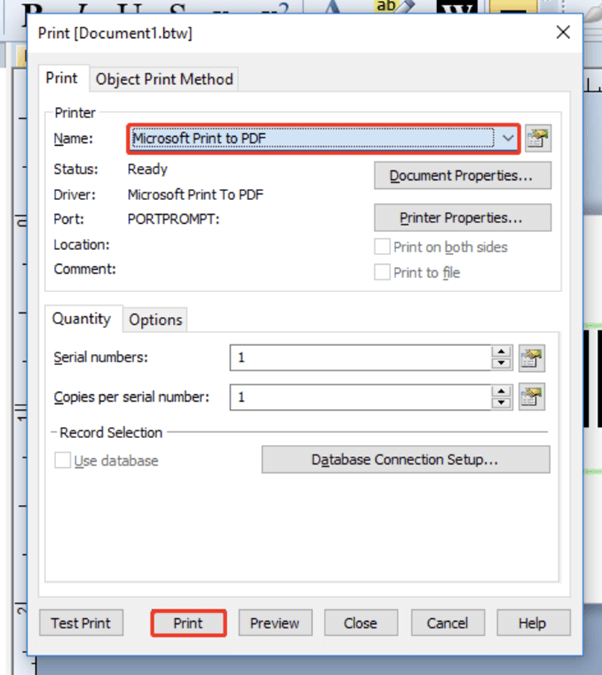
Step 3. Expand the Name menu and select a PDF printer, such as Microsoft Print to PDF. Alternatively, select a third-party solution from the list.
Step 4. Finally, modify the page size or orientation. And move to the "Print" button at the bottom to save the file as a PDF.
Use an Online Converter
You can also use online services, providing a fast, simple, and software-free solution. These online converters usually support several file types, preserve formatting, and allow immediate downloads. These solutions work best for speedy, occasional conversion tasks. PDFfiller stands out as a dependable tool for effortlessly converting BTW files to PDF.
Learn how to convert BTW to PDF online easily with PDFfiller.
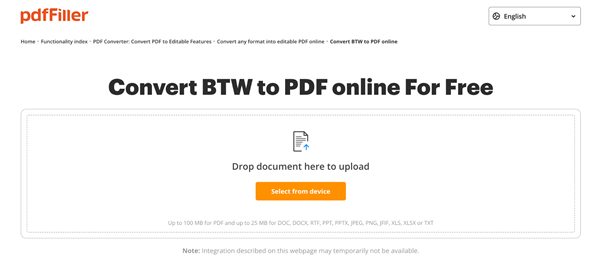
Step 1. Search for pdfFiller in your web browser.
Step 2. Select the Select from Device button to upload your BTW file.
Step 3. After uploading your file, navigate to the Three Dots.
Step 4. Finally, press the PDF option under the Save As menu.
How to View and Edit a Converted PDF File
You’ve learned two ways to convert your BTW files to PDF. Once your BTW files are converted, you can use SwifDoo PDF to manage your PDF-related tasks, where you can also edit a PDF on Windows and Mac computers.
SwifDoo PDF offers an all-in-one platform for seamless PDF management. It allows users to view, create a PDF, edit, annotate, merge, split, and secure files. With its clear interface, users can handle PDFs efficiently and with professionalism. Overall, this program is crucial for managing PDFs efficiently and effortlessly.

Get started with SwifDoo PDF today to manage your PDFs efficiently and effortlessly. Try it to simplify creating and editing PDFs on your computer.
Quick Wrap Up
Converting BTW files to PDF is simple and essential for sharing, printing, and securely storing label files. Whether using an online converter or BarTender software, both methods reliably convert BTW to PDF while preserving layout and formatting. Decide on the approach that works for you and keep your PDF files accessible anytime.
Once your files are converted, you can view and edit PDFs effortlessly in SwifDoo PDF. Hope this guide is helpful!