Can You Connect Outlook to ChatGPT?
The short answer is yes, absolutely! You can link these two tools together.
In the past, ChatGPT was just a website where you typed questions into a blank box. It could not see anything else on your computer. However, technology changes very fast. Thanks to recent updates, it is now entirely possible to connect Microsoft Outlook to ChatGPT.
There are two main ways this works. You can either bring your email data to the ChatGPT website or bring the ChatGPT brain directly into your email app. Both methods are very helpful, and you do not need to be a computer expert to set them up.
How to Connect Outlook to ChatGPT
Let us look at the two best methods to make this connection. We will go through the steps for each one and explain what you can do after they are linked.
Method 1. Using the ChatGPT Website
The first method is built directly by ChatGPT's creators. They created a way for the AI to access your Microsoft account and read your emails safely.
Steps:
1. Open your web browser and log in to your account at chatgpt.com.
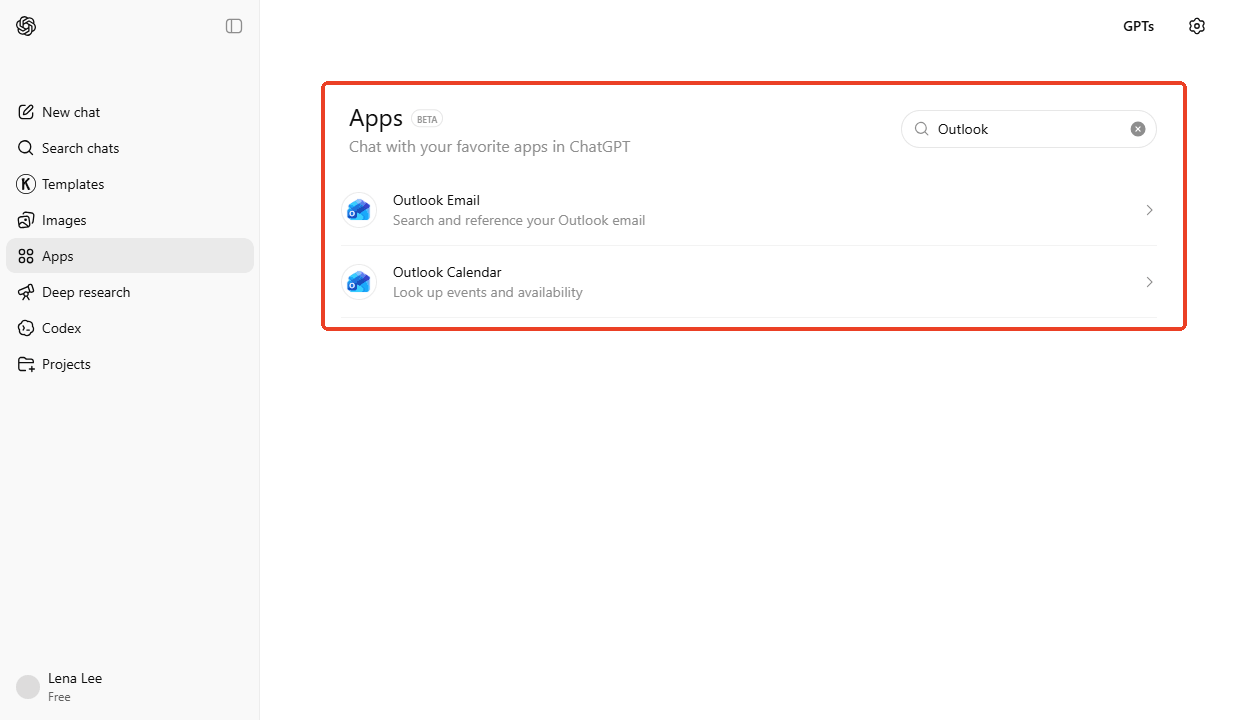
2. Go to the left side, find the Apps button, and click it.
3. Next, search for “Outlook" and select the Outlook Email or Outlook Calendar as needed.
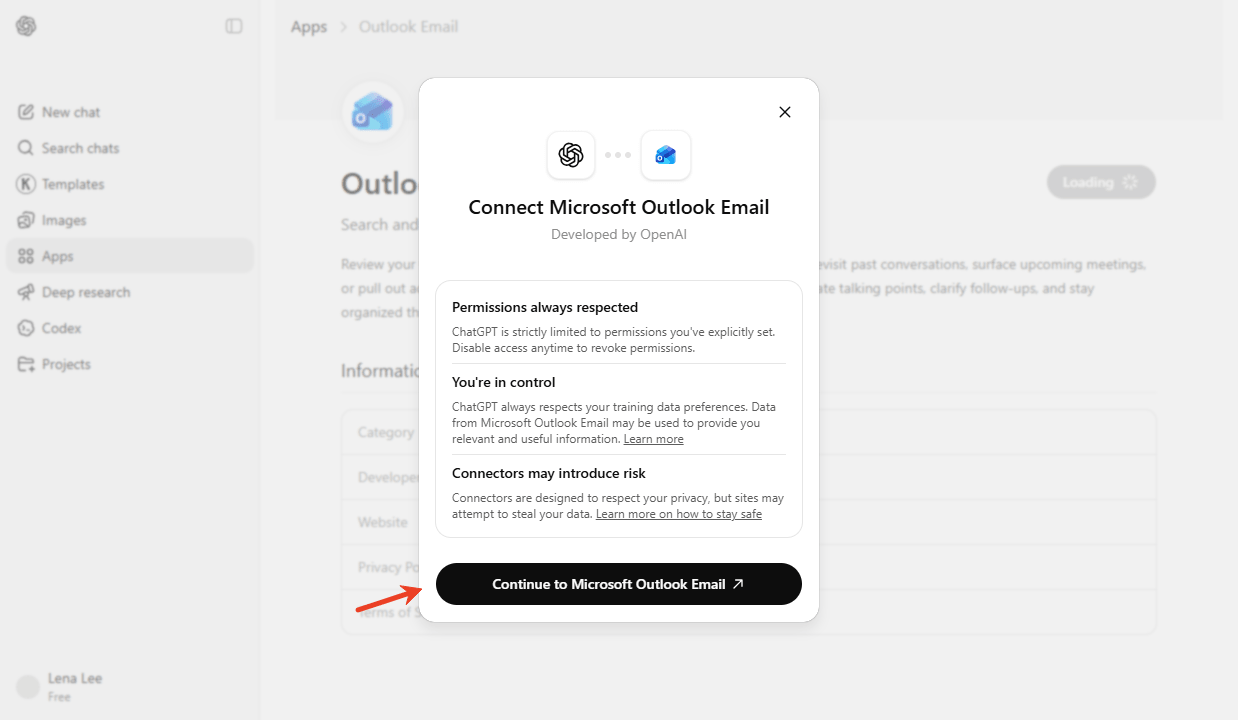
4. Click Connect, and a secure window will pop up. Log in with your Microsoft email address and password, then follow the prompts to create it.
The Benefits of Making the Connection
When you connect ChatGPT to Outlook using this official method, you can do amazing things directly on the ChatGPT website.
- Fast Searching and Summarizing: You can simply type, "Summarize all the emails my boss sent me this week." The AI will instantly read them and give you a short, easy list of the main points.
- Contextual Drafting: You can ask the AI to "Write a reply to the email about the Friday meeting." Because it is connected, the AI already knows what the Friday meeting is about. It will write a perfect reply for you to copy and paste.
Method 2. Using the Outlook App or Website
The second method is for people who do not want to leave their email inbox. You can install a small helper program called an Add-in directly in Microsoft Outlook. One great example of an Add-in is called "AI Mail Maestro - ChatGPT".
Steps:
1. Open your Microsoft Outlook app on your computer or in your web browser.
2. Go to the Home tab at the top of the screen. Look for a button that says Browse Add-ins or search to find it.
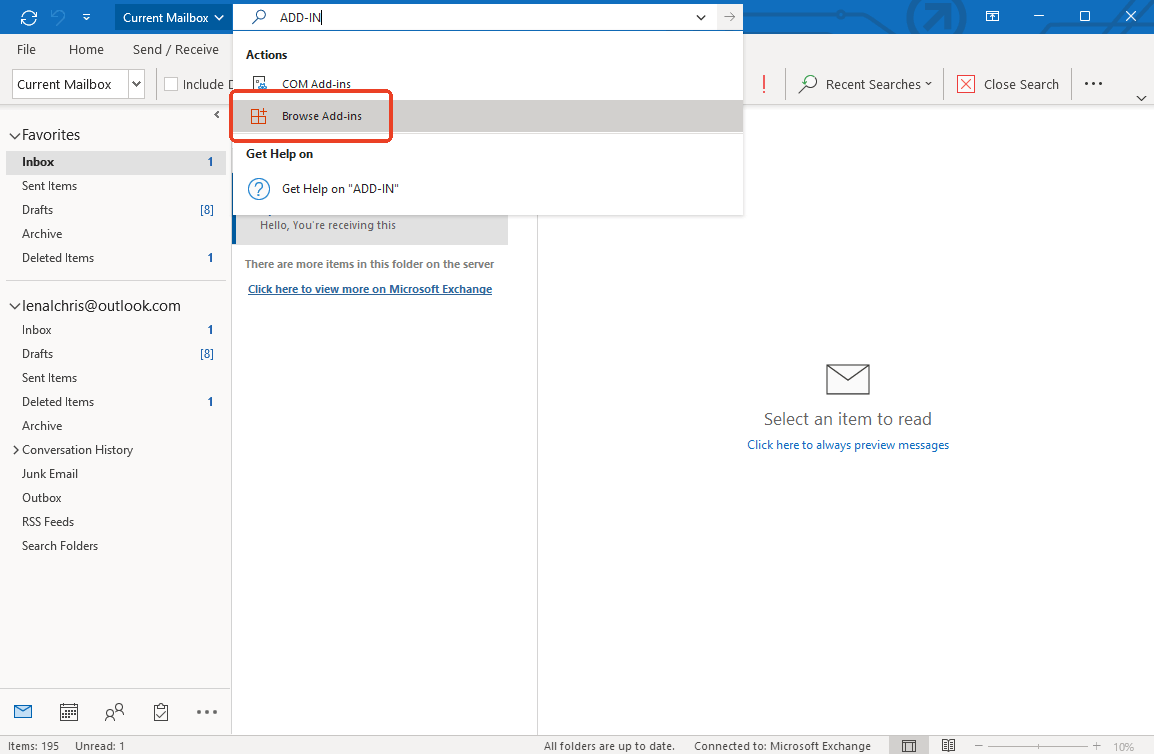
3. Click the search box and type the name of a trusted tool, like "AI MailMaestro".
4. Click the Add button to install the tool into your email menu.
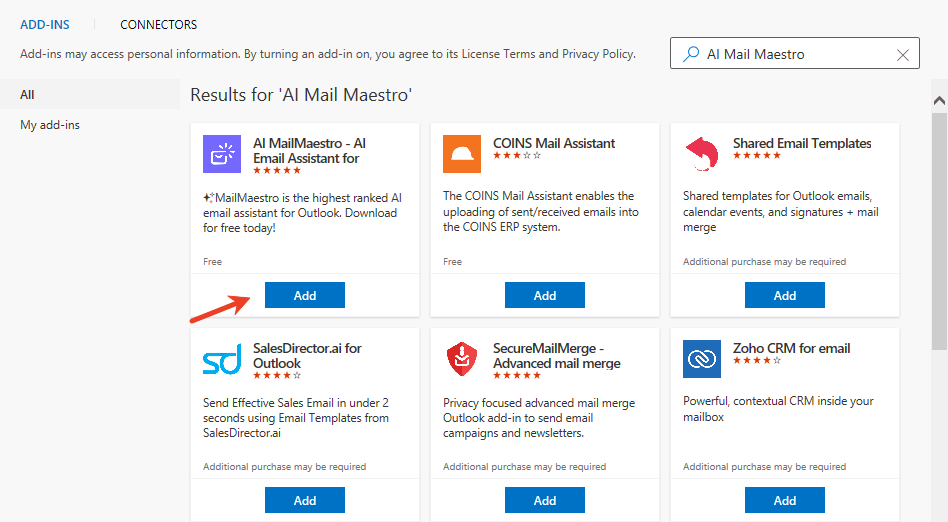
5. Click on the new Add-in icon. It may ask you to log in or create a quick account to turn on the AI features.
What Can You Do After Making the Connection:
If you choose to connect Microsoft Outlook to ChatGPT this way, your email app becomes incredibly smart.
- One-Click Replies: When you are reading an email, you can click a button to instantly generate a polite, professional, or friendly reply. You do not have to type a single word.
- Tone Adjustment: If you write an email but it sounds too angry, you can highlight the words and ask the AI to "Make this sound more professional." It will fix your writing instantly.
- Instant Translation: If someone sends you an email in Spanish or French, the Add-in can translate it to English for you right there on the screen.
Is It Safe to Connect Outlook to ChatGPT?
Because your emails are very private, you might be asking yourself, "Should I connect ChatGPT to Outlook?" This is a very smart question to ask.
Giving AI access to your personal or company emails comes with some safety rules you need to understand. When you use the official connections for paid business accounts, the company behind ChatGPT promises that they do not use your private business data to train its public AI models. Your secrets stay safe. However, if you are using a free account, the rules might be different, and the AI might use your conversations to learn.
If you use third-party Add-ins, you must be extra careful. Only download Add-ins from the official Microsoft Store. Always read the tool's privacy policy to ensure it does not store or sell your private email data to strangers.
You May Also Like:
How to Get ChatGPT Plus for Free in 2026 (All Legit Ways)
How to get ChatGPT Plus for free in 2026? This guide will introduce you to 3 legal methods that will enable you to obtain free use in a safe manner.
READ MORE >Bonus Tip: How to Back Up Important Emails
AI is wonderful for managing a busy inbox, but technology is not perfect. Sometimes computers crash, accounts get locked, or AI makes a mistake and deletes something. You should never rely completely on your email inbox to keep your most critical legal forms, tax papers, or financial receipts safe.
The smartest way to protect your most important messages is to save Outlook email as PDF . You can do this easily in Outlook by clicking "Print" on an email and choosing "Save as PDF" instead of sending it to a paper printer.
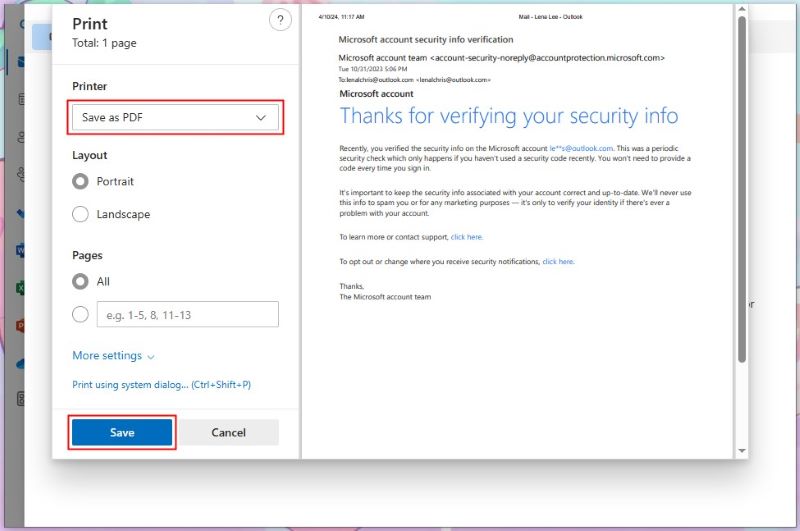
Once your emails are saved safely as PDF files on your computer, you can use SwifDoo PDF to open and manage them. It is a fantastic desktop software designed to make document work very easy.
With SwifDoo PDF, you can view your saved emails, edit mistakes, and merge ten different email PDFs into one organized client file. If the email contains highly sensitive information, you can use SwifDoo to encrypt a PDF with a password so no one else can open it.
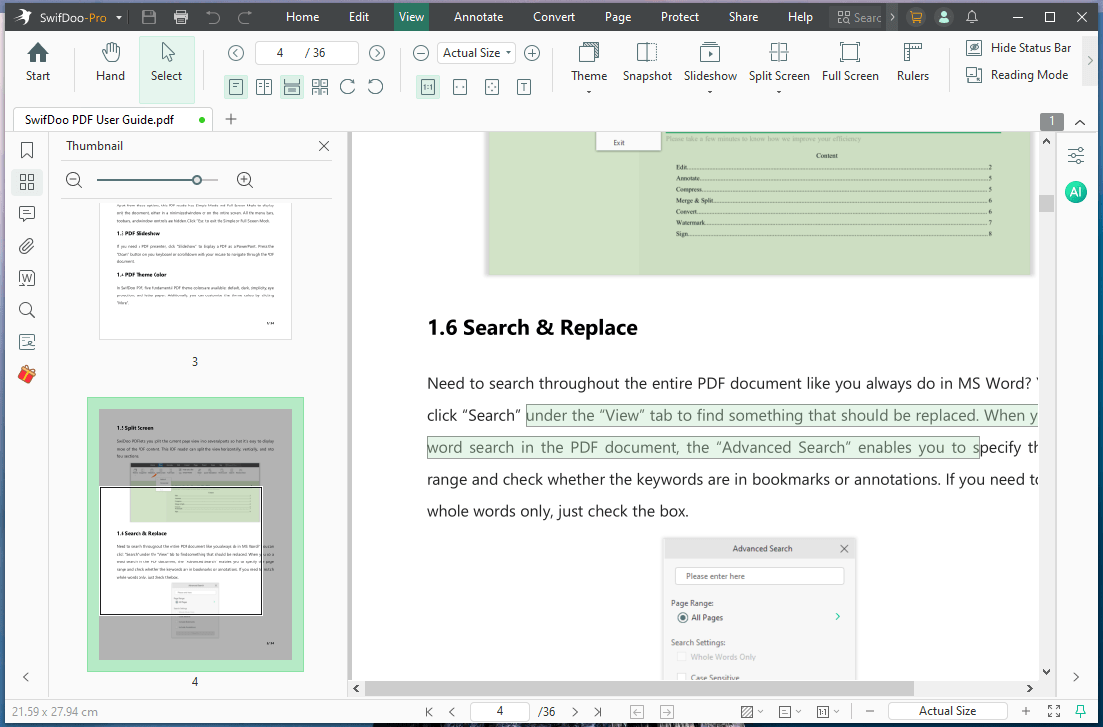
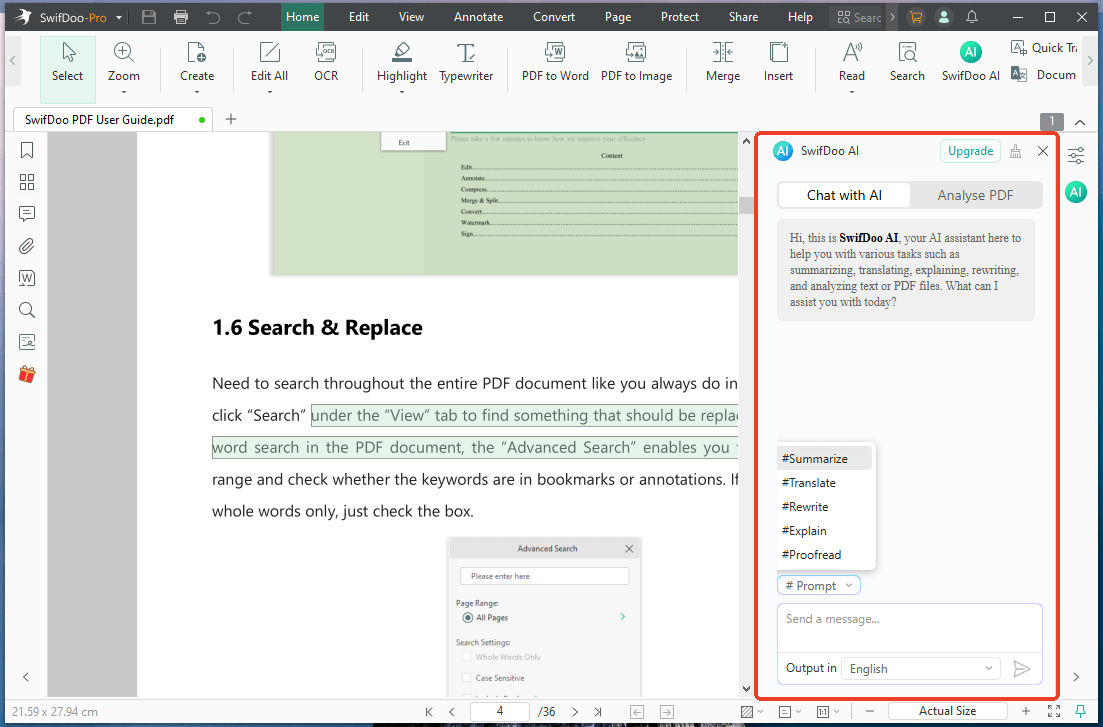
Even better, SwifDoo PDF has its very own SwifDoo AI feature built right in! This acts like a personal assistant for your downloaded documents. It allows you to chat with PDF files to find the information you need, summarize a long document, translate, or rewrite anything.
Do not let your important files get lost in a messy inbox. Download and try SwifDoo PDF today to take total control of your digital backups!
Conclusion
That’s all about how to link ChatGPT to Outlook. Integrating AI into your daily email routine saves you significant time and boosts your productivity. Whether you use the official web connector or a handy inbox Add-in, setting up the tools is simple.
However, you should also always prioritize your data privacy, follow company rules, and keep hard digital copies of your most vital emails using PDF tools like SwifDoo.