


If you need to analyze a PDF file using AI features, a dedicated PDF editor like SwifDoo PDF can help you. As an AI-powered PDF editor, SwifDoo PDF offers SwifDoo AI to analyze, summarize, explain, rewrite, proofread, and translate PDFs as well as chat with PDFs. Additionally, it can read PDFs aloud.
What Is ChatGPT
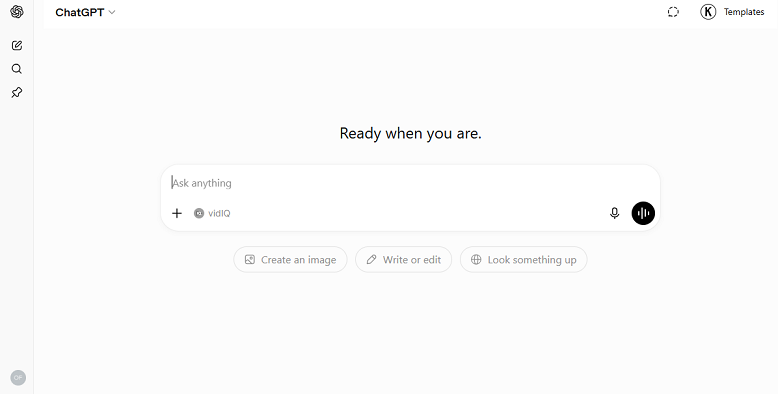
ChatGPT is an AI-powered conversational assistant developed by OpenAI. With ChatGPT, you can complete a wide range of tasks, such as writing articles, emails, and reports, answering questions, creating images from text prompts, analyzing uploaded files, coding, and researching and gathering information.
Key Features of ChatGPT:
- Advanced reasoning and problem-solving
- Natural conversational interface
- File upload support
- Image generation and editing
- Custom GPTs and AI agents
- Web browsing for current information
- Voice interaction
What Is Microsoft Copilot
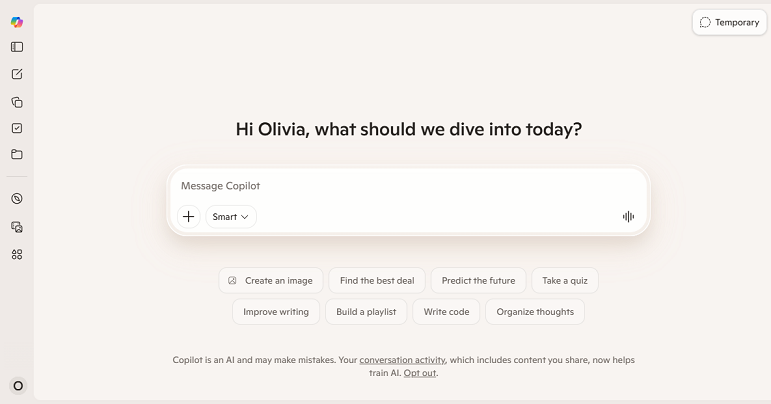
Microsoft Copilot is Microsoft's AI assistant integrated across its ecosystem and embedded in Microsoft Word, Microsoft Excel, Microsoft PowerPoint, Microsoft Outlook, Microsoft Teams, and Windows. While it uses advanced AI models similar to those powering ChatGPT, Copilot focuses heavily on productivity and workplace applications.
Key Features of Copilot:
- Deep Microsoft 365 integration
- AI-powered document drafting
- Spreadsheet analysis and formula generation
- Presentation creation
- Email summarization and drafting
- Meeting transcription and summaries
- Enterprise-grade security and compliance
ChatGPT vs Copilot: Quick Comparison
Before checking for the feature-by-feature comparison of Copilot vs ChatGPT, here’s a simple, quick comparison table for your reference.
|
Feature |
ChatGPT |
Copilot |
|
AI Model |
GPT models |
Microsoft/OpenAI models |
|
Writing & Content Creation |
Excellent |
Very Good |
|
Research & Analysis |
Excellent |
Good |
|
Image Generation |
Excellent |
Excellent |
|
Coding Assistant |
Excellent |
Excellent |
|
Custom AI Agents |
Available |
Limited |
|
Microsoft 365 Integration |
Limited |
Excellent |
|
Voice Conversations |
Yes |
Yes |
|
Enterprise Deployment |
Strong |
Strong |
|
Best For |
General AI tasks, writing, research, coding |
Microsoft productivity workflows |
ChatGPT vs Copilot: Feature-by-Feature Comparison
In this section, I will compare ChatGPT and Microsoft Copilot from 6 main aspects. Now, let’s check them one by one.
#Writing and Content Creation
Both Copilot and ChatGPT can help you write and generate content. Which one should be your choice? The right choice based on your practical needs. If your primary goal is creating content, ChatGPT generally has the edge. It excels at:
- Blog writing
- SEO content creation
- Social media posts
- Marketing copy
- Email drafting
- Creating writing
Copilot can also generate content, especially within Word and Outlook, but its strength lies in productivity rather than in advanced creative writing.
#Research and Information Gathering
What are your thoughts on research and information collection? Is ChatGPT better than Copilot for research? Yes, ChatGPT usually provides more comprehensive responses when detailed explanations, comparisons, brainstorming, or analytical reasoning are required.
ChatGPT is particularly strong for:
- Learning new topics
- Summarizing complex information
- Comparing products and services
- Brainstorming ideas
- Creating outlines and reports
- Deep analysis and reasoning
Conversely, Copilot is advantageous for rapid answers and web-based information.
#Coding and Software Development
Both of them are excellent AI coding assistants, but they serve slightly different audiences. Let’s learn what each of them is strong at.
ChatGPT is strong for:
- Explaining code
- Generating scripts
- Debugging errors
- Learning programming concepts
- Building prototypes
- Working across multiple languages
Copilot is strong for:
- Code completion
- Developer productivity
- Integrating with enterprise workflows
- Working inside Microsoft development environments
If you're learning to code or need detailed explanations, ChatGPT is often more helpful. If you're a developer working heavily in the Microsoft ecosystem, Copilot can be extremely efficient.
#Microsoft 365 Productivity
When it comes to which is better for Microsoft 365 productivity, Copilot stands out, which can:
- Draft documents in Word
- Analyze spreadsheets in Excel
- Create PowerPoint presentations
- Summarize Outlook email threads
- Generate Teams meeting notes
- Answer questions using your Microsoft 365 data
ChatGPT can help with similar tasks, but it does not have the same native integration with Microsoft 365 applications. If you rely on Microsoft 365 every day, Copilot is often the practical choice.
#Image Generation
Both ChatGPT and Copilot can generate images from text prompts. You can use them to create:
- Social media graphics
- Blog illustrations
- Concept art
- Marketing visuals
- Presentation images
- Product mockups
ChatGPT often provides more flexibility for creative projects, while Copilot integrates image generation into Microsoft's productivity tools.
#Voice Conversations
Both of them support voice interactions on supported devices. Copilot's voice features are improving and work well within the Microsoft ecosystem, but ChatGPT currently offers a more polished conversational experience for many users.
ChatGPT’s voice mode is particularly natural for:
- Brainstorming ideas
- Practicing languages
- Learning concepts
- Hands-free assistance
- Conversational problem-solving
ChatGPT vs Copilot Pricing
|
Plan |
ChatGPT |
Copilot |
|
Free Plan |
Yes |
Yes |
|
Premium Plan |
ChatGPT Plus |
Copilot Pro |
|
Business Plan |
Available |
Available |
|
Enterprise Plan |
Available |
Available |
#ChatGPT Plus
The paid ChatGPT plan includes:
- Access to more advanced GPT models
- Faster responses
- Higher usage limits
- Image generation
- File uploads
- Advanced research features
- Custom GPTs
#Copilot Pro
The paid Copilot plan includes:
- Priority access to AI features
- Enhanced image generation
- Additional productivity capabilities
- Better integration with Microsoft services
- Expanded usage limits
For individual users, ChatGPT Plus often provides more AI capabilities for the money. For organizations already paying for Microsoft 365, Copilot can deliver significant productivity value through its integrations.
Copilot vs ChatGPT: Pros and Cons
If you still don’t know which one to choose, you can read this section to learn the pros and cons of ChatGPT and Copilot.
Pros and Cons of ChatGPT
Pros:
- Excellent writing and creativity
- Strong reasoning and analysis
- Powerful research capabilities
- Image generation and editing
- Custom GPTs and AI agents
- Natural voice conversations
- Flexible across many use cases
Cons:
- Premium features require a subscription
- Less native integration with Microsoft 365
- Some enterprise workflows require additional setup
Pros and Cons of Copilot
Pros:
- Deep Microsoft 365 integration
- Excellent Excel and PowerPoint assistance
- Strong enterprise security features
- Useful for email and meeting management
- Works seamlessly within Windows and Microsoft apps
- Strong productivity-focused workflows
Cons:
- Best experience depends on the Microsoft ecosystem
- Less flexible for some advanced AI tasks
- Creative writing capabilities are generally not as strong as ChatGPT
- Some features require Microsoft 365 subscriptions
Copilot vs ChatGPT: Which One Should You Choose
After learning the differences between Copilot and ChatGPT, you can make the right choice.
Choose ChatGPT if you:
- Write articles, blogs, or marketing content
- Need detailed research and analysis
- Want a flexible AI assistant for many tasks
- Generate and edit images
- Learn coding or debug programs
- Want custom AI agents and advanced AI tools
- Prefer a conversational AI experience
Choose Copilot if you:
- Use Microsoft 365 every day
- Work heavily in Excel and PowerPoint
- Need help managing Outlook emails
- Attend many Teams meetings
- Work in a Microsoft-centric organization
- Prioritize productivity and workflow automation
Final Verdict
When comparing ChatGPT vs Copilot, there is no single winner for everyone. Each of them has its advantages and limitations. You need to make the right choice according to your practical needs.
Choose ChatGPT if you want the most versatile AI assistant for writing, research, coding, creativity, and general problem-solving.
Choose Microsoft Copilot if you spend most of your time in Microsoft 365 and want AI that works directly inside Word, Excel, PowerPoint, Outlook, Teams, and Windows.
All in all, the best AI assistant is ultimately the one that fits your workflow, tools, and goals.



