


Before You Convert: How to Prepare PNG Images for EPUB
It's important to prepare for the PNG/JPG to EPUB conversion if you want to keep every detail. EPUB is a compressed format. If your source images are low quality, no conversion tool can fix them. If they're too large, your ebook becomes bloated and slow to load. Follow the next tips to convert PNG to EPUB without losing image quality:
-
Use lossless PNG files. When preparing files for PNG to EPUB, keep your PNGs in their original lossless format.
-
Check your resolution. For readable text in scanned pages, aim for 200-300 DPI. Lower resolutions make small text blurry on high-definition screens.
-
Avoid unnecessary re-compression. Some conversion tools re-encode images during the PNG to EPUB process.
-
Name files in reading order. EPUB paginates content sequentially. This matters for any image to EPUB converter method.
-
Balance quality and file size. A 300-page manga at 300 DPI can produce a 500MB EPUB. Most e-readers handle this fine, but some phones struggle.
How to Download EPUB Books for Free: The Complete Guide 2026
Want to download EPUB books for free? Discover the best sites for free EPUB downloads. Learn how to open and convert EPUB files with perfect PDF tool.
READ MORE >Method 1: Use SwifDoo PDF for JPG/PNG to EPUB
SwifDoo PDF is a Windows desktop document converter that handles the PNG to EPUB workflow through a powerful two-step bridge. To be more specific, it can handle most image types, such as PNG, JPG, BMP, TIFF.
Actually, it's not easy to keep the original image quality for most direct PNG-to-EPUB converters; they just compress images aggressively to reduce file size. SwifDoo PDF takes a different path. Here are two important stages for full JPG to EPUB or PNG to EPUB conversion:
-
Merge PNG images into a PDF
-
Convert the PDF to EPUB
When converting PDF to EPUB, you control the output settings. This makes SwifDoo PDF the most reliable PNG to EPUB converter for users who care about visual quality.
Supported image formats for conversion: JPG, JPEG, PNG, BMP, TIFF
How to convert image to EPUB with SwifDoo PDF?
Step 1: Click the Download button to download and install SwifDoo PDF and launch it.
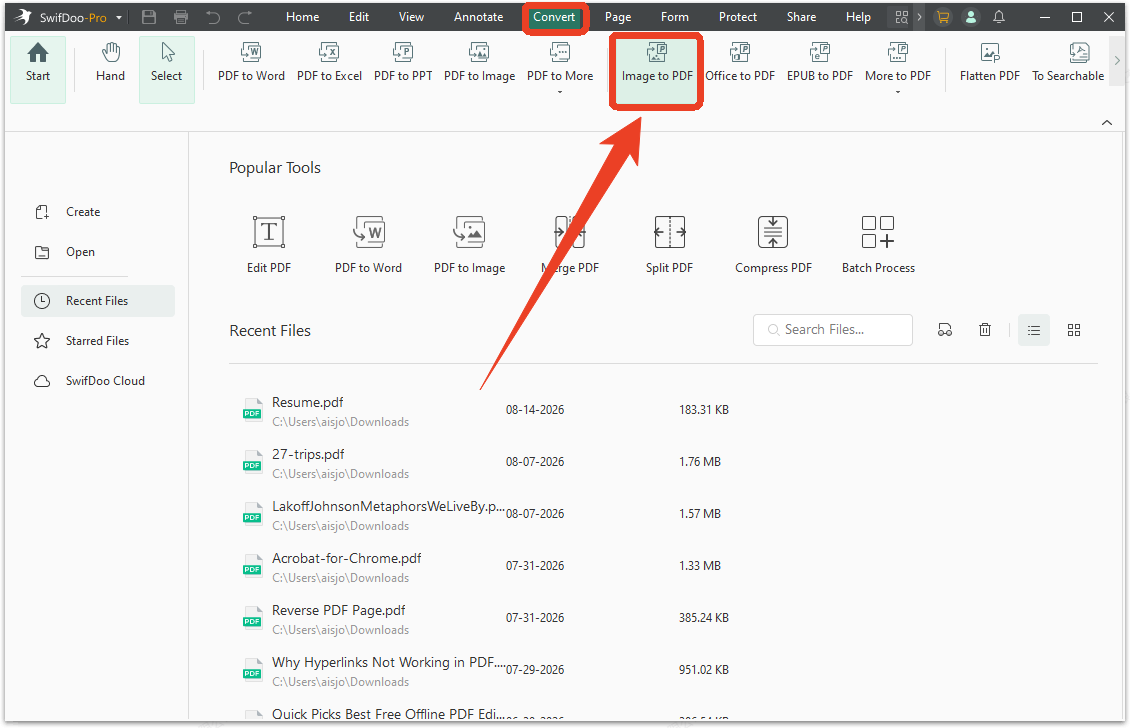
Step 2: Switch to the Convert tab and choose Image to PDF.
Step 3: In the image to PDF converter, upload your image file. SwifDoo PDF allows batch image conversion. You can upload different image types at once.
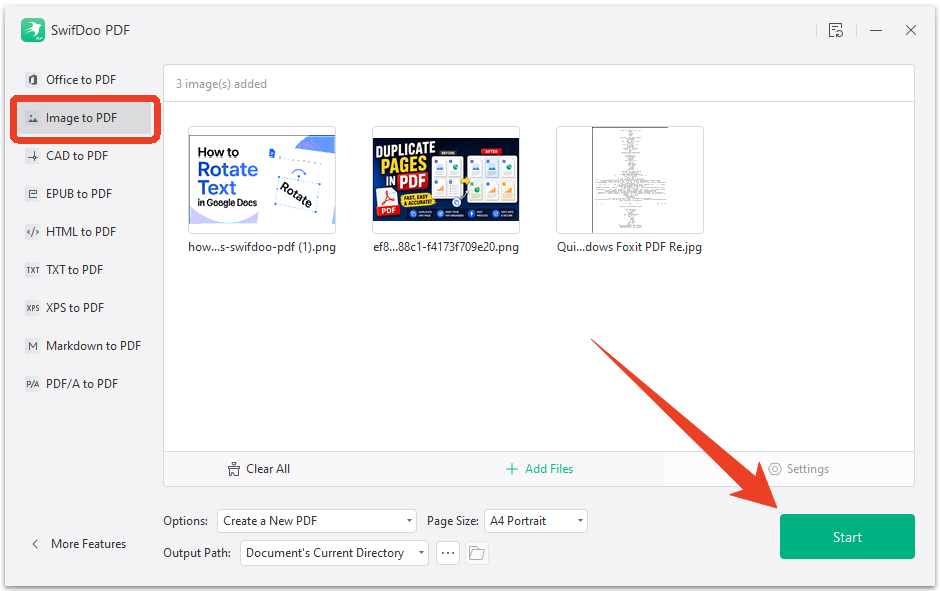
Step 4: Set the page size and other options and click Start to convert PNG to PDF.
Step 5: Then click More Features >Convert from PDF and choose PDF to EPUB tab from the left bar.
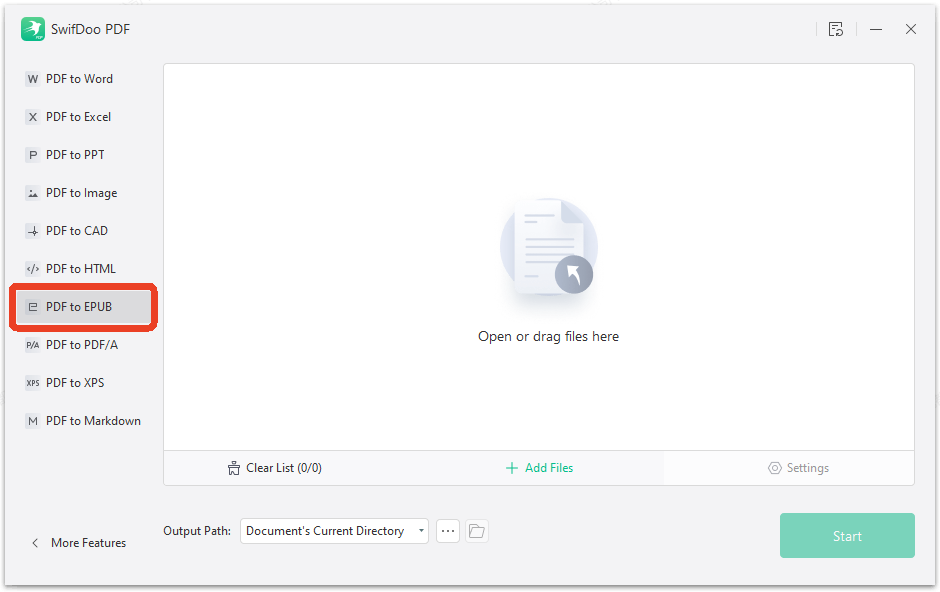
Step 6: To convert JPG to EPUB or PNG to EPUB, upload your PDF file and click Start to finish the process.
SwifDoo offers a free trial for initial conversions. For advanced needs like batch processing or convert PNG to EPUB with image as cover, the full version provides additional features.
Word to EPUB: How to Convert Your Documents for E-Readers
Looking for the best Word to EPUB converter? Learn how to convert Word to EPUB free with Calibre, online tools, and Word add-ins.
READ MORE >Method 2: Convert JPG/PNG to EPUB with Google Drive
Google Drive can help you convert PNG to EPUB free using its cloud conversion capabilities. This method works well for simple conversions and small files.
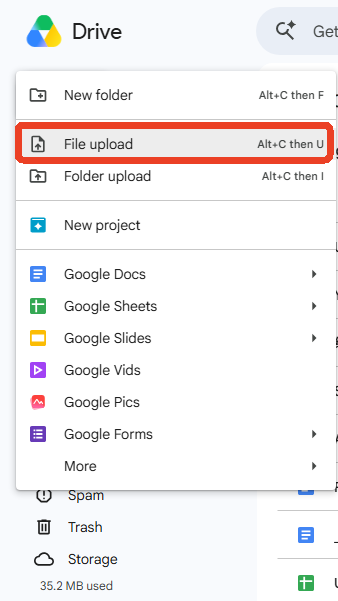
Step 1: Open your Google Drive and Click New > File upload to upload your JPG or PNG file.
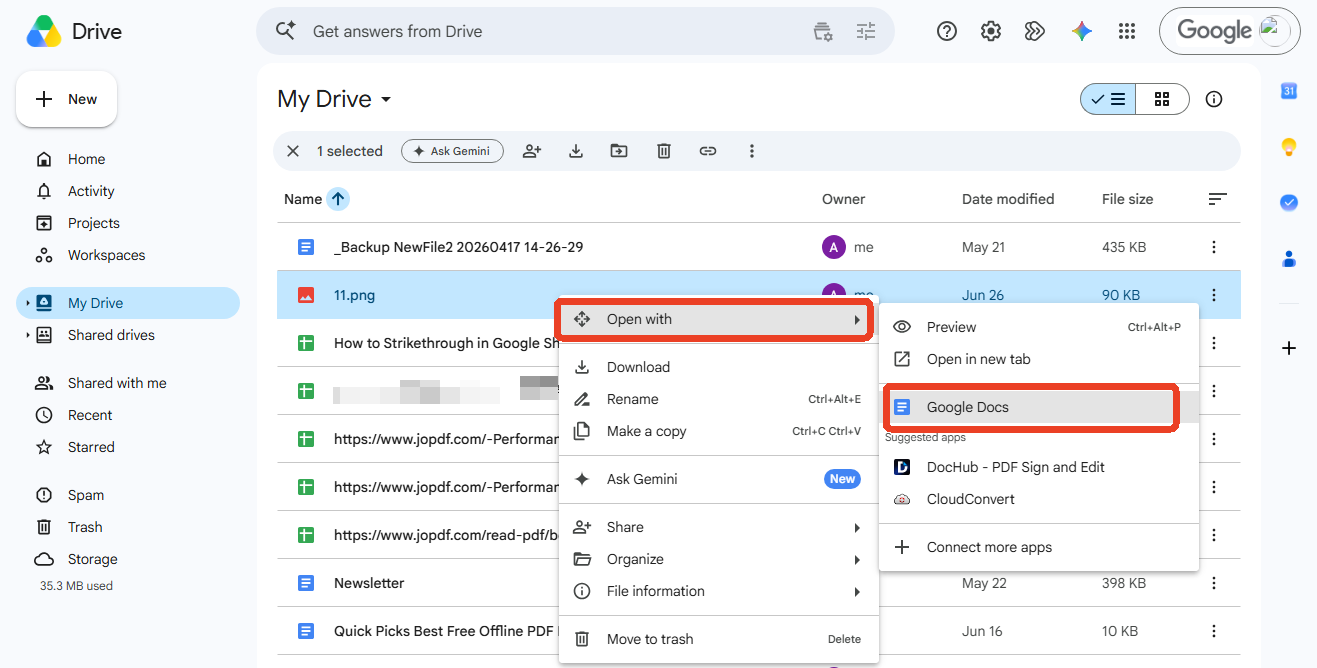
Step 2: Locate and right-click on the image file and choose Open with > Google Docs.
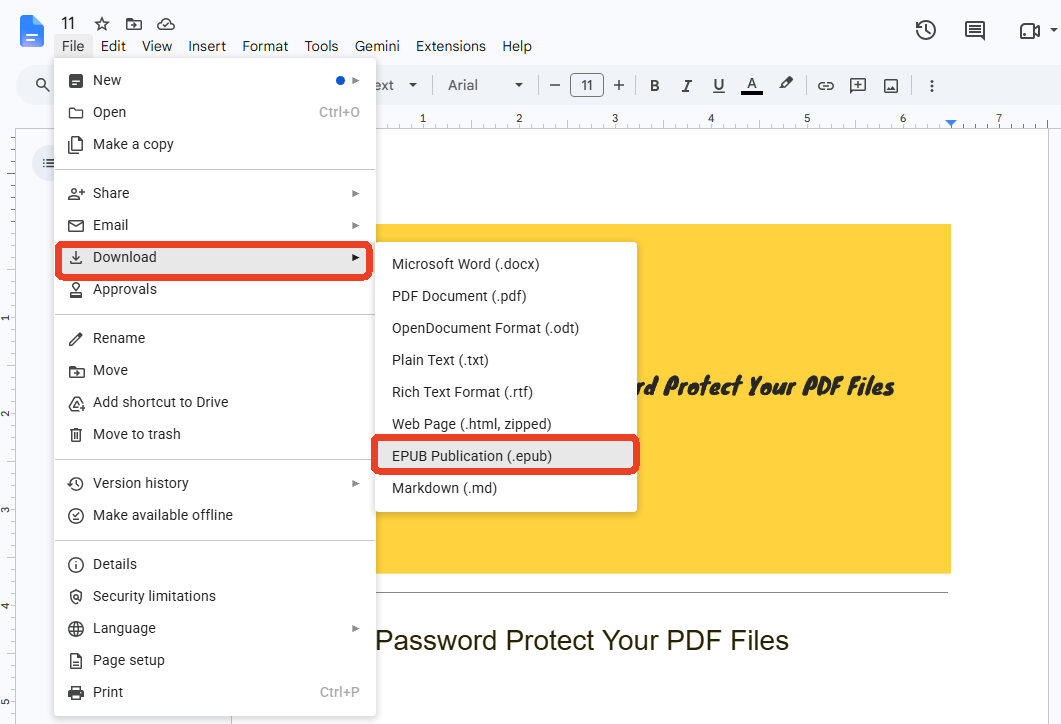
Step 3: Your PNG or JPG file will open in Google Docs. Click File > Download > EPUB Publication (.epub) to save the JPG to EPUB file.
Method 3: Use Calibre for Direct PNG to EPUB Conversion
Calibre is another good option to convert PNG to EPUB directly by packaging your images into an ebook container. It's an open-source, cross-platform tool that excels at converting PNG to EPUB and other ebook conversions. You just add your image files, choose EPUB output, and Calibre does the rest.
Supported image formats for conversion: PNG, JPG, JPEG, GIF, TIFF, WebP
How to convert PNG to EPUB with Calibre?
Step 1: Install Calibre from calibre-ebook.com and launch it.
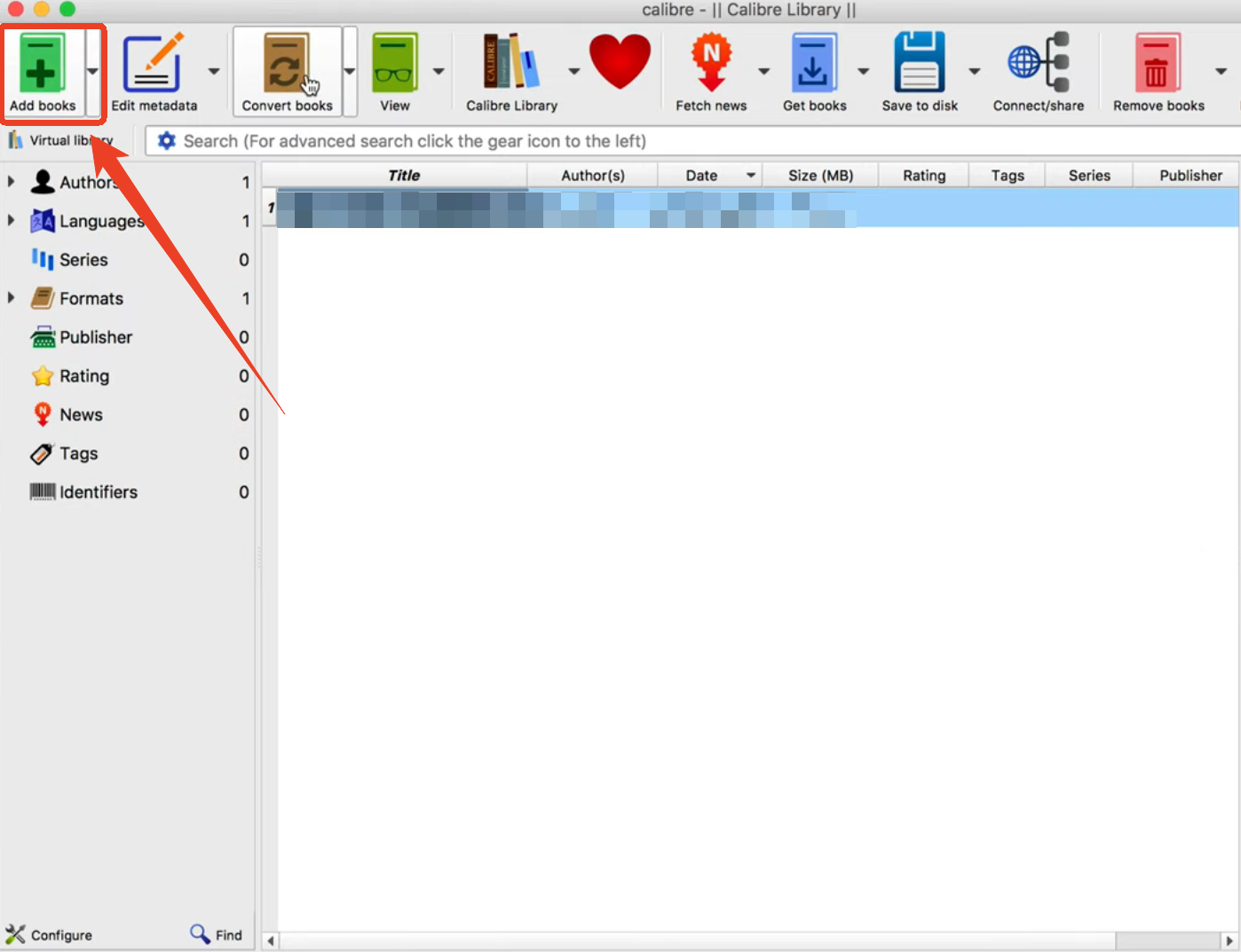
Step 2: Click Add Books and select your PNG or JPG files.
Step 3: Click the Convert Books button and set the output format to EPUB.
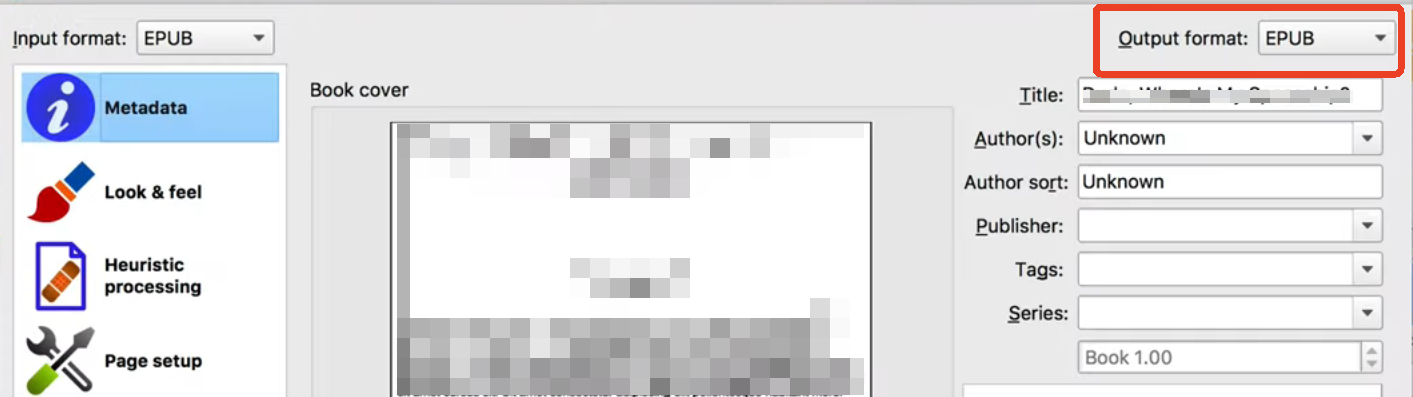
Step 4: Click OK to start the image to EPUB conversion and save the EPUB from your Calibre library.
Besides, if you want to convert PNG to EPUB for Kindle, Calibre is the best choice because it has built-in Kindle profiles that optimize output for Amazon devices.
Method 4: Convert JPG/PNG/TIF to EPUB Online
For quick conversions without installing anything, an online PNG to EPUB converter free tool is absolutely a good option. They work in any browser, on any device, and handle basic conversions well.
The supported image formats vary by platform. Most support PNG and JPG; some add GIF, BMP, and WebP. We'll provide some popular online converters for PNG or JPG to EPUB.
-
Convertio is a polished online converter supporting over 300 formats, including PNG to EPUB. Upload your images, select EPUB, and download the result in minutes. The free tier allows 10 conversions per day with a 100MB file size limit. Best for users who want a clean interface, clear progress indicators, and reliable output quality without creating an account.
-
Online2PDF takes a different approach. It's built specifically for document conversion rather than general file conversion. You can upload multiple PNG files, arrange them in order, and export directly to EPUB. The free version supports files up to 150MB and allows batch processing of up to 20 images per conversion. Best for users who need to convert image collections into a single ebook with page order control, without installing any software.
-
Online-Convert.com specializes in bulk image processing. You can upload multiple PNGs and package them into a single EPUB with adjustable image quality and metadata fields. Best for users converting entire image collections without installing software.
You can try one of them to convert PNG to EPUB free online. The steps are quite the same:
Step 1: Visit the converter website, such as Convertio.
Step 2: Upload your PNG files. Some tools require you to zip multiple images first.
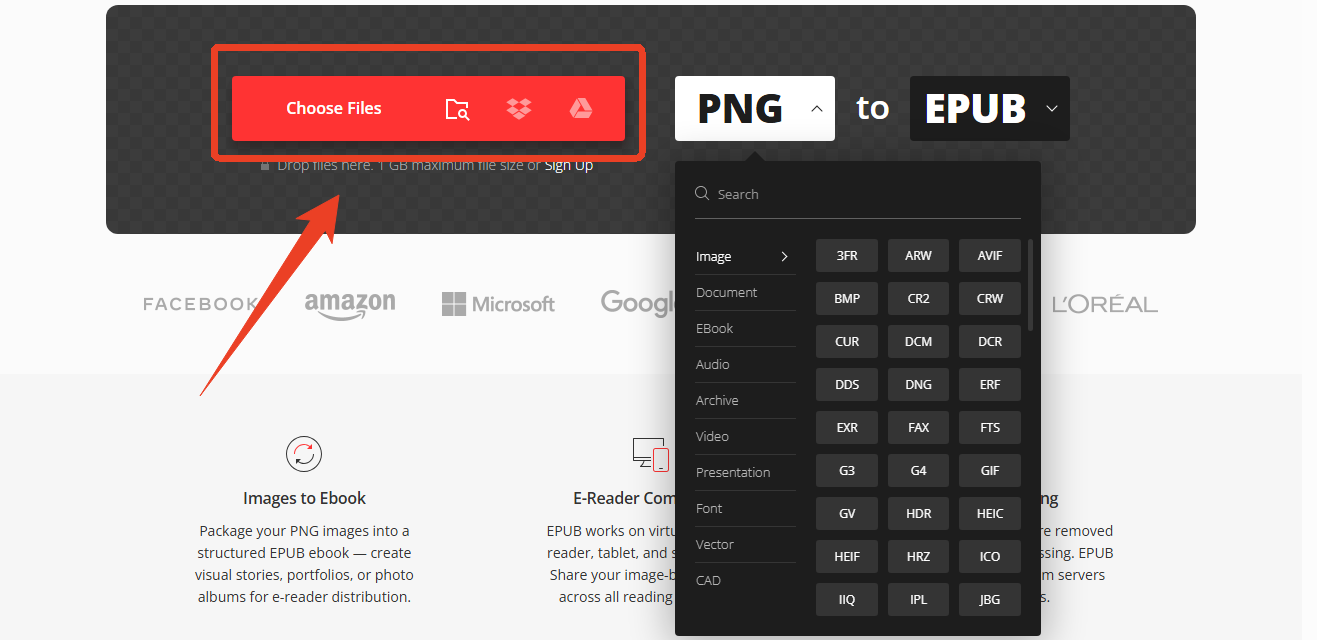
Step 3: Select EPUB as the output format.

Step 4: Set any available options, like book title, author, page orientation.
Step 5: Click Convert and download the EPUB file.
Conclusion
Converting PNG to EPUB is straightforward with the right tool. For quick, one-off conversions, online PNG to EPUB tools work well. For batch processing and e-reader optimization, SwifDoo PDF is the best free PNG to EPUB converter available. Advanced users with scanned books can use scan-to-ebook for OCR capabilities.
Choose the method that fits your workflow and e-reader requirements.


