Can You Encrypt Email in Yahoo?
Yes. Email in Yahoo can be encrypted, but it has some limitations. Yahoo Mail doesn’t feature built-in end-to-end encryption like some other email services, such as ProtonMail. That said, you can safeguard your Yahoo email accounts by following these steps.
✅ Use Third-Party Encryption Tools – To secure your Yahoo emails, try using services such as ProtonMail Bridge, Virtru, or Mailvelope. Using end-to-end encryption, these tools make sure only the sender and recipient can access and read the email content.
✅ Encrypt Attachments – To secure sensitive files, use 7-Zip or WinRAR to encrypt them with a password, then send the encrypted attachments via Yahoo Mail.
Even though Yahoo encrypts emails in transit, third-party tools or secured attachments are recommended for full protection.
How to Encrypt Email in Yahoo
Although Yahoo Mail lacks built-in end-to-end encryption, you can protect your emails with reliable third-party tools. One of the easy solutions is using a browser extension like Mailvelope. You can use it to encrypt Yahoo Mail content, making sure only the intended recipient can read the messages.
Learn how to secure email in Yahoo using the Mailvelope browser extension.
Step 1. Download the Mailvelope browser extension for Google Chrome, Mozilla Firefox, or Microsoft Edge.
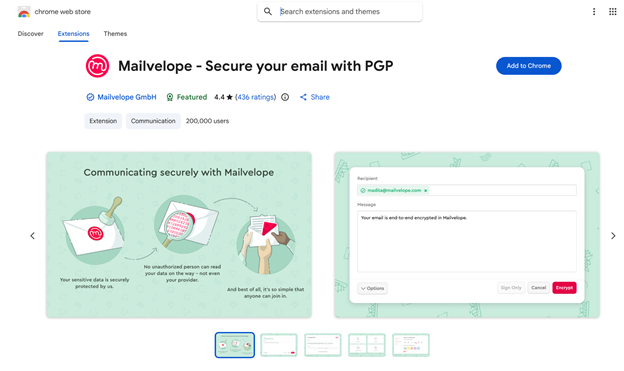
Step 2. Next, open the extension and create your PGP key pair (public and private keys).
Step 3. Encrypt in Yahoo.
- Open Yahoo Mail and click Compose.
- Click the Mailvelope icon that appears in the editor window in the top right corner.
- Compose your message, and click Encrypt. It will be encrypted before it leaves your browser.
Bonus Tip: How to Password Protect a PDF Attachment for Yahoo
Now that you’ve seen the practical steps on how to send a secure email in Yahoo, it’s also important to secure attachments. Sensitive documents remain at risk if unprotected, so you should always encrypt a PDF with a password before sending it to anyone. You can easily do this with SwifDoo PDF by adding strong password protection to your files.
SwifDoo PDF is a versatile, all-in-one tool that simplifies PDF management for everyday users. Its simple and intuitive interface makes managing, securing, and optimizing PDFs fast and easy.
- It enables the addition of strong encryption while restricting unauthorized access to important documents in a simple way.
- As an efficient PDF compressor, SwifDoo PDF reduces file size without affecting document quality or clarity, making it easier to attach and send documents through Yahoo Mail.
Check out how to send a secure email attachment in Yahoo using SwifDoo PDF effectively.
Step 1. First, download SwifDoo PDF, then complete the installation on your computer. Next, open the PDF file that requires a password.
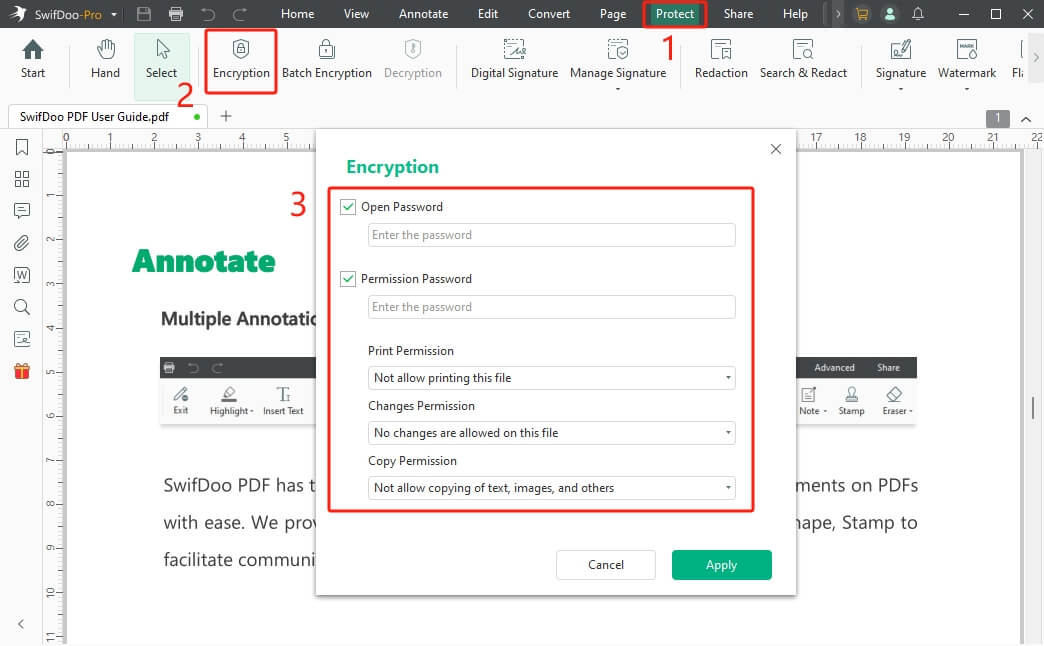
Step 2. Go to the top menu bar and select Protect. And then, select Encryption from the secondary menu bar.
Step 3. When the Encryption window opens, select the password type you wish to apply. Then enter the password.
Step 4. When you finish configuring permissions, click Apply to confirm and save them.
If you want to save an email as a PDF as backup, SwifDoo PDF can also help. It can help you merge all saved emails into one single document.
To simplify things, try SwifDoo PDF for all your PDF compression and encryption requirements. Download it today to start securing, optimizing, and managing your PDFs effortlessly for safer, smoother email sharing.
Conclusion
Grasping how to encrypt email in Yahoo is vital for securing your personal and confidential information. While Yahoo Mail offers basic security, using tools like encryption extensions and password-protected attachments adds stronger protection.
Using these methods together, you can achieve safer communication and enhanced privacy protections. Start applying these techniques today to keep your emails and attachments secure from unauthorized access!