Way 1. Fill Out PDF with Adobe Alternative
The first and easiest method is to use a professional computer program other than Adobe. If you want to know how to fill out a PDF without Adobe quickly and safely, SwifDoo PDF is a top choice.
It is widely considered the best PDF editor for Windows and Mac because it is lightweight, easy to use, and powerful. Even if you have no technical skills, SwifDoo PDF is much easier to use than other complex programs. The menu is clear and easy to read.
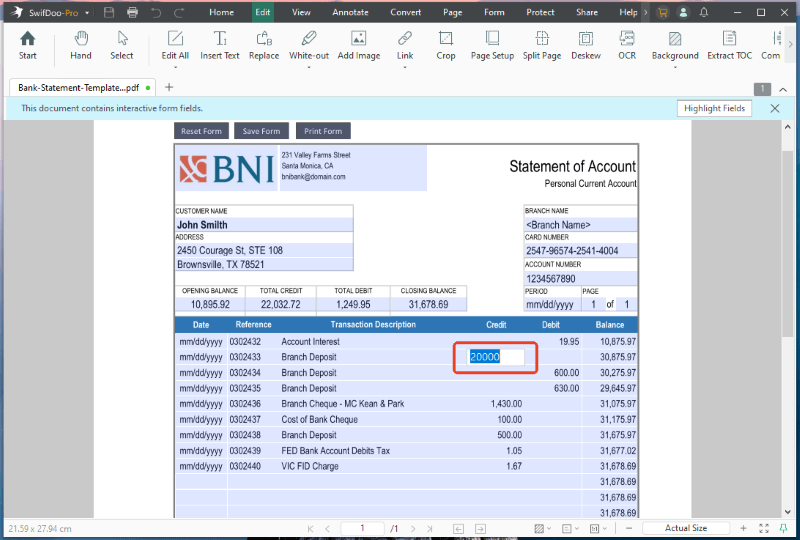
One of the best things about SwifDoo PDF is that it can automatically highlight form fields. When you open a form, the software colors all the empty boxes. This takes away the guesswork. You know exactly where to click and what to type. You do not have to struggle to find the right blank line.
Here are the steps to fill out a PDF without Adobe using this software:
Step 1. Download, install, and launch SwifDoo PDF.
Step 2. Click on the Open button to find and load your document into the workspace.
Step 3. Look at the highlighted boxes on your screen. Click inside any highlighted interactive field.
Step 4. Type your information into the boxes.
Step 5. When OK, click the Save button to keep your changes.
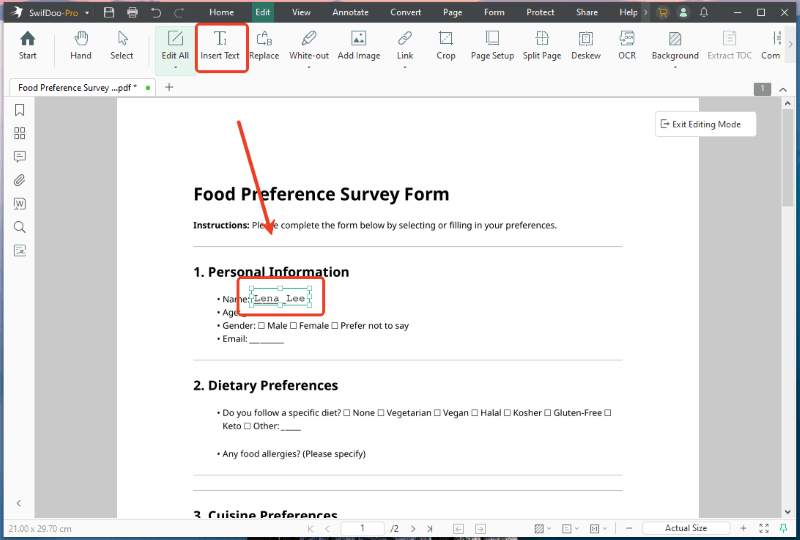
Receive a document that is just a flat picture of a form? How to fill out a PDF form that is not fillable? Don’t worry. The Insert Text feature can help you.
- Open your document in SwifDoo PDF.
- Go to Edit and click the Insert Text button.
- Click anywhere on the blank lines of your form. A small text box will appear. Type your information.
- You can use your mouse to move the box around so your words sit perfectly on the line.
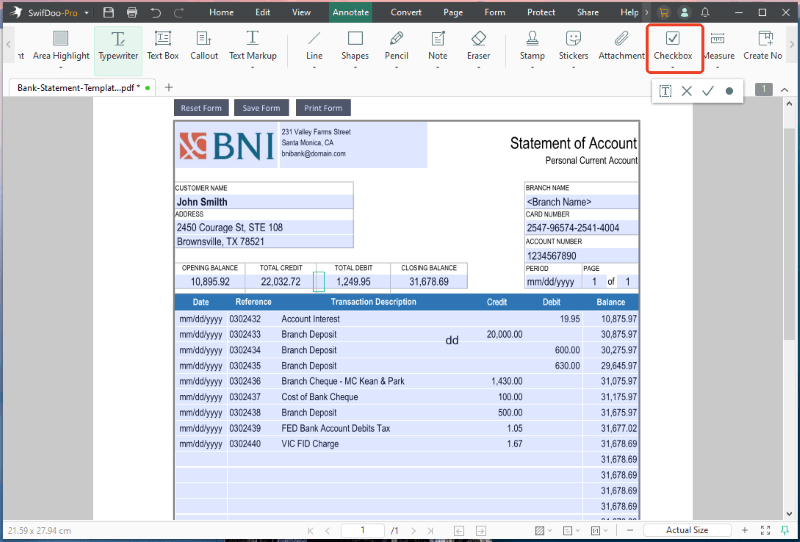
Plus, you can also go to Annotate > Checkbox to add a text box, a cross mark, a check mark, and a dot.
SwifDoo PDF is not just for forms. It is a feature-rich PDF editor that provides a range of tools to help you manage PDFs in daily life.
- You can edit the text, just like typing in a Word document.
- You can add notes, highlight important words, or draw anything.
- You add electronic or digital signatures to your contracts.
- You can add password protection to lock your private files safely.
New users can get a 7-day free trial to enjoy all features. Just click the button below to get SwifDoo and give it a try!
Way 2. Fill Out PDF in a Browser
What if you are in a rush and do not want to download any new software right now? You might be asking how to fill out a PDF form without Adobe, using just the tools you already have on your screen. The good news is that you can use your everyday web browser.
Programs like Google Chrome and Microsoft Edge have built-in PDF readers. They can also handle basic digital forms. This is the fastest method if the form has blue clickable boxes already set up inside of it.
How to fill out PDF without Adobe but with a browser:
Step 1. Right-click the file > Go to "Open with" and select Google Chrome or Microsoft Edge.
Step 2. The form will open in a new web page tab. Click directly into the empty boxes and start typing your details.
Step 3. When you are finished typing, look for the download or save icon in the top right corner of the screen. Click it to save the filled document to your computer.
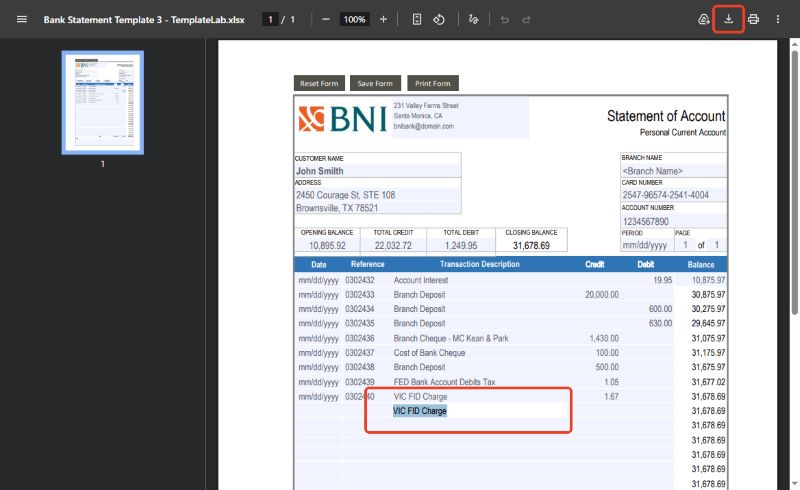
This method is great for simple jobs. However, it has a limit. It only works if the document is a true interactive form. If someone just took a picture or scanned a piece of paper, you will not be able to click and type using your browser.
Way 3. Use an Online PDF Filler
Another way to fill out a PDF without Adobe is to use an online PDF form filler. You do not need to install anything on your hard drive. It is perfect if you are using a work computer where you are not allowed to download new apps. A great option is Smallpdf. Check to learn the details.
Follow these simple steps to use this online tool:
Step 1. Open your web browser and go to the Smallpdf website (https://smallpdf.com/pdf-form-filler).
Step 2. Click the CHOOSE FILES button to upload your document from your computer.
Step 3. Now, you can enter your text as needed.
Step 4. Finally, click the download button to save the file to your computer.
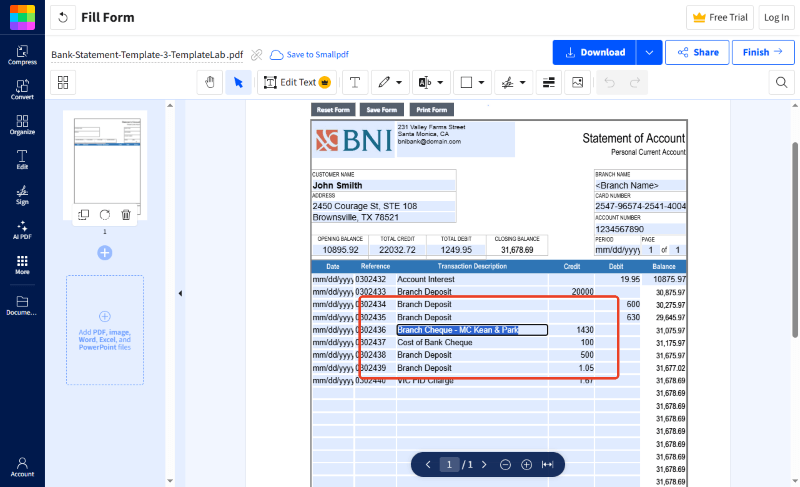
This is very convenient because it works on any computer, whether it is an Apple Mac or a Windows PC. Just keep in mind that free online tools sometimes limit how many files you can edit in one single day.
Conclusion
That’s all about how to fill out a PDF without Adobe. You can choose the tool that best suits your situation.
For one-time tasks, you can complete them using a browser or an online form-filling tool. There's no need to download any software, and it's very convenient.
However, if you care about quality and need a reliable tool for daily use, then SwifDoo PDF is the best choice. It not only helps you fill out forms, but also enables you to edit text and ensures the security of your files!