


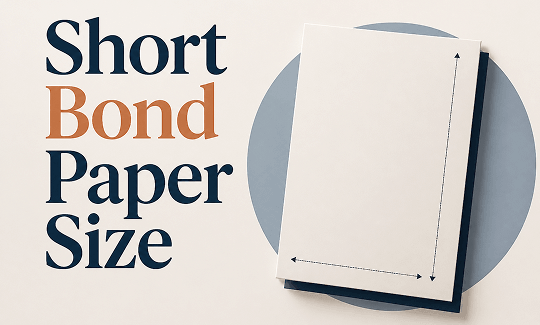
What Is Short Bond Paper Size?
Short bond paper is the term used primarily in the Philippines and some other Asian countries for what is internationally known as US Letter size paper. The short bond paper size may come from its distinction from "long bond paper" - it measures 8.5 x 13 inches (Legal size).
So, what is short bond paper size? It's exactly the same as US Letter size - 8.5 x 11 inches. This paper size is the standard for academic papers, office documents, resumes, formal letters, and school assignments throughout the Philippines. Students know it as the default paper for submitting homework, thesis papers, and projects.
-
Short bond paper size in cm: 21.59 cm x 27.94 cm.
-
Short bond paper size in mm: 215.9 mm x 279.4 mm.
-
Short bond paper size in inches: 8.5 x 11 inches.
-
Short bond paper size in pixels: The pixel dimensions depend entirely on your resolution. At 72 dpi for screen viewing, the size is 612 x 792 px. At 300 dpi for high-quality printing, the size is 2550 x 3300 px.
Is short bond paper size A4? A4 paper measures 210 x 297 mm, while short bond paper (Letter) measures 215.9 x 279.4 mm. Short bond paper is slightly wider and noticeably shorter than A4.
Short Bond Paper Size in Different Units
Here are the exact short bond paper size dimensions in every unit you'll need, whether you're setting up a document, configuring a printer, designing in Canva, or preparing a file for professional printing.
|
Unit |
Width |
Height |
|---|---|---|
|
Inches |
8.5" |
11" |
|
Centimeters (cm) |
21.59 cm |
27.94 cm |
|
Millimeters (mm) |
215.9 mm |
279.4 mm |
|
Pixels (72 dpi - screen) |
612 px |
792 px |
|
Pixels (150 dpi - standard) |
1275 px |
1650 px |
|
Pixels (300 dpi - print) |
2550 px |
3300 px |
Short Bond Paper Size vs A4 vs Letter – What's the Difference?
One of the most frequent questions about paper sizes is whether short bond paper and A4 are the same. They are not. Here is a clear comparison.
|
Paper Type |
Width |
Height |
Primary Regions |
|---|---|---|---|
|
Short Bond Paper (Letter) |
8.5" (21.59 cm) |
11" (27.94 cm) |
Philippines, North America |
|
A4 |
8.27" (21.0 cm) |
11.69" (29.7 cm) |
Europe, Asia, Australia, ISO Standard |
|
Long Bond Paper (Legal) |
8.5" (21.59 cm) |
13" (33.02 cm) |
Philippines, North America (legal docs) |
-
The key takeaway from this short bond paper vs a4 comparison is that A4 is narrower and taller than short bond paper. If you load short bond paper into a printer set to A4, your content will be stretched or cropped.
-
The short bond paper vs letter has a simpler answer: they are exactly the same. Letter size and short bond paper are two names for identical dimensions.
How to Set Short Bond Paper Size with SwifDoo PDF
SwifDoo PDF is a Windows desktop PDF editor that makes setting and managing short bond paper size straightforward. Whether you need to create a new PDF with precise dimensions, adjust an existing document's page size, or prepare a file for short bond paper printing, SwifDoo PDF handles the entire workflow.
Click the button to download and install SwifDoo PDF.
If you want to modify an existing file for the right short bond paper size, follow the next moves:
Step 1: Launch SwifDoo PDF on your Windows PC.
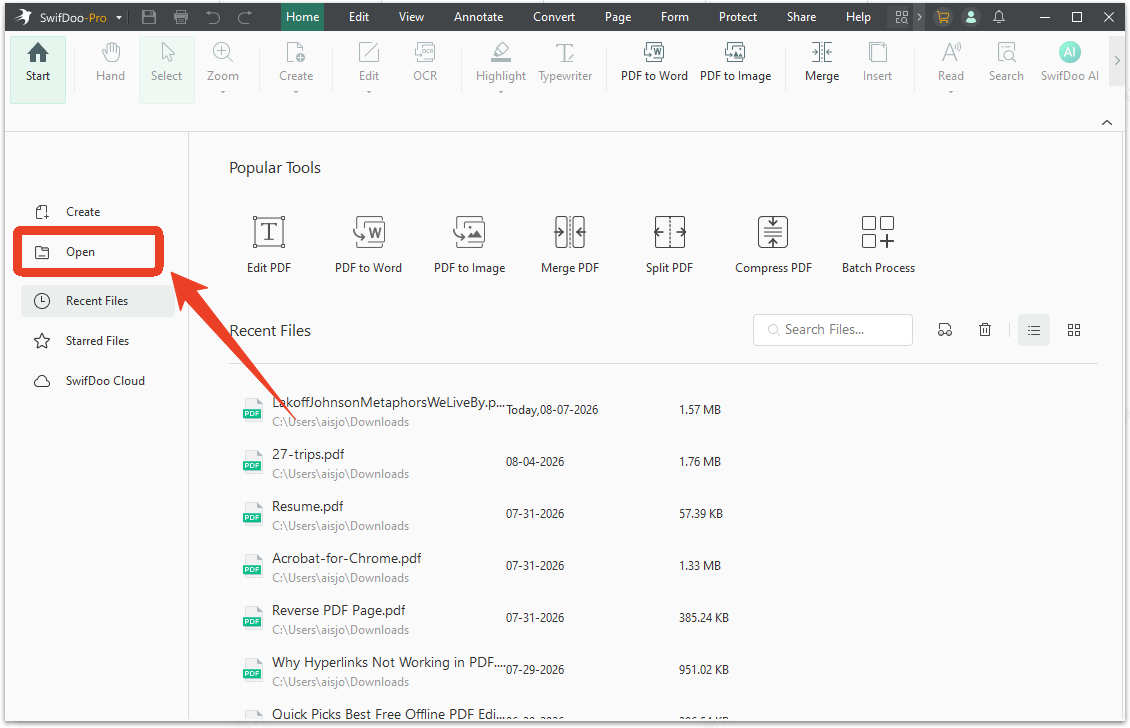
Step 2: Click Open to select your PDF.
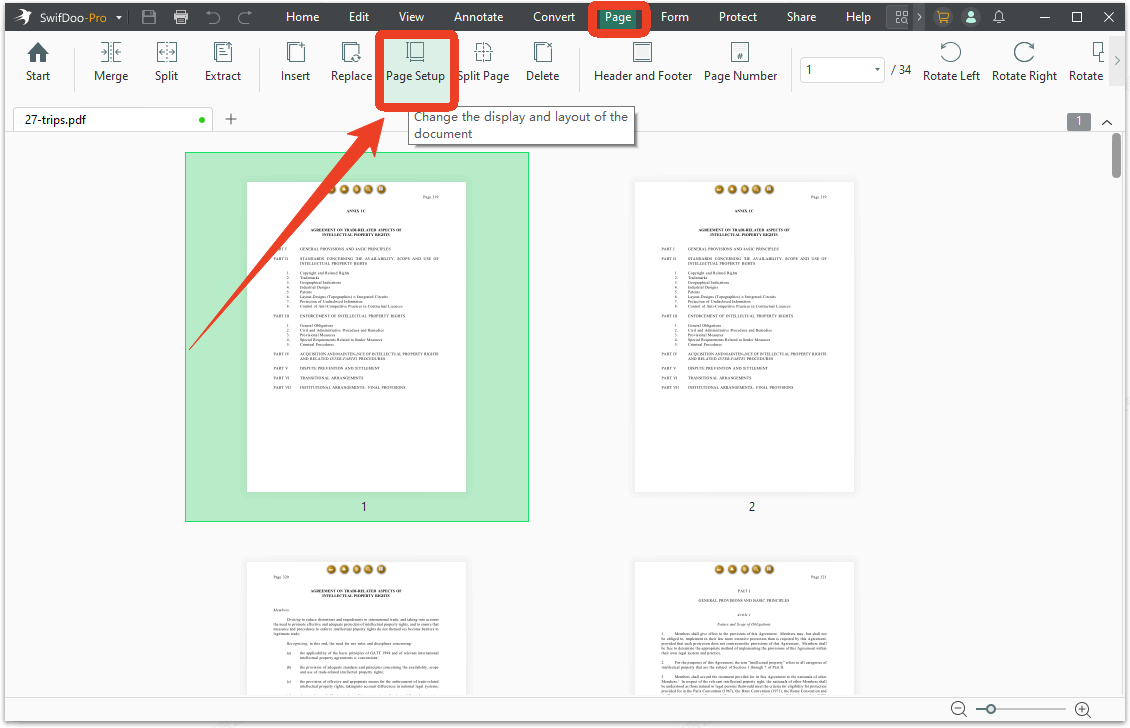
Step 3: Go to the Page tab and then select Page Setup.
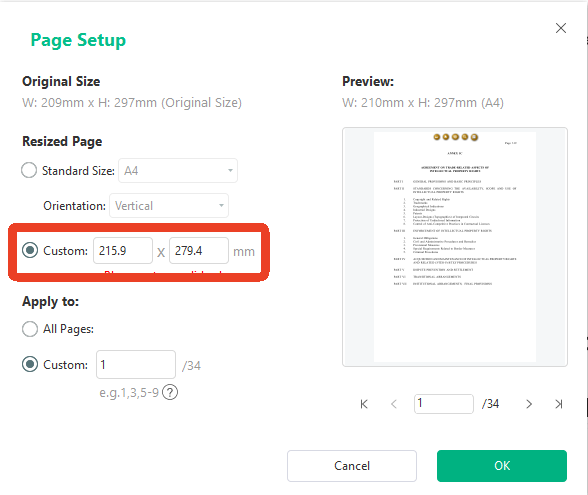
Step 4: Choose Custom from the preset options and enter the short bond paper dimensions - 215.9 x 279.4 mm. This correctly configures your short bond paper size height and width for any document.
Step 5: Set the page you want to apply and click OK to save the settings.
If you want to create a new short bond paper, SwifDoo PDF can help you easily handle that.
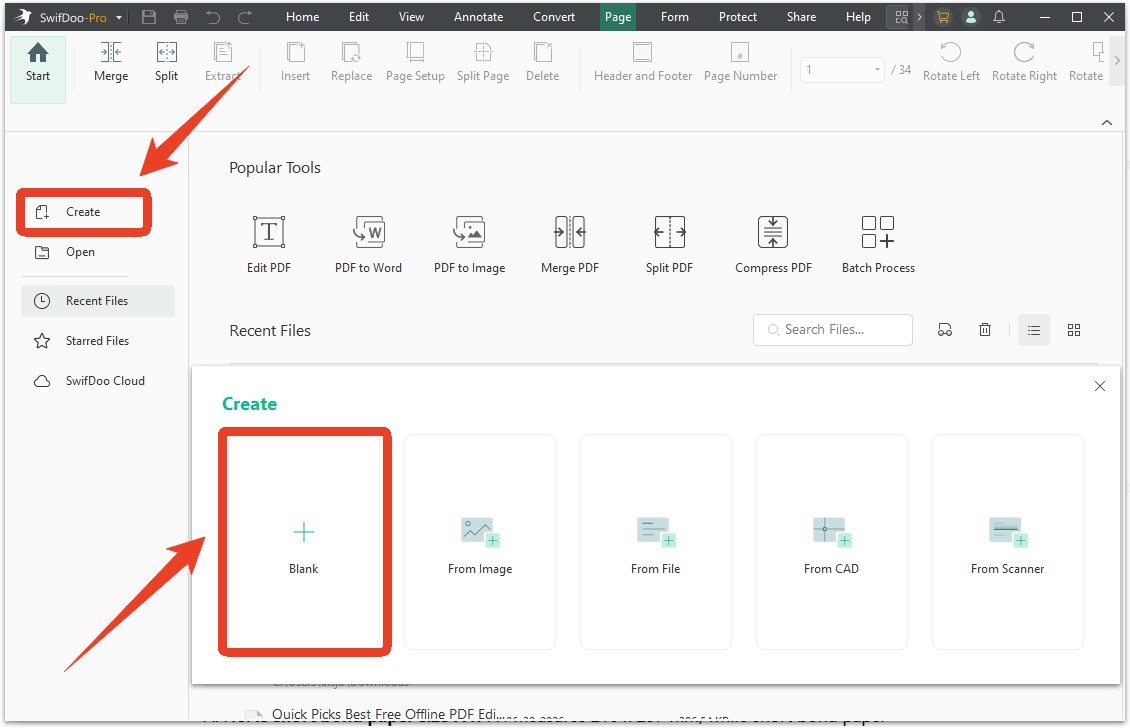
Step 1: Open SwifDoo PDF and click Create > Blank.
Step 2: After that, SwifDoo PDF prompts you to set the page dimensions. Enter 215.9 mm for width and 279.4 mm for height in the Customize section.
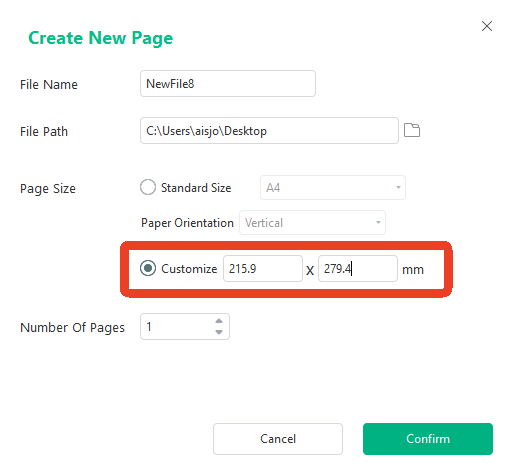
Step 3: Configure other settings and click Confirm to create this new short bond paper.
With the page correctly sized for short bond paper, use SwifDoo PDF's editing tools to add text, images, and annotations. The fixed page dimensions ensure that everything you design stays within the printable area for short bond paper. You can type directly onto the page, insert images, add shapes, and format text within the correct short bond paper dimensions.
How to Print Short Bond Paper with SwifDoo PDF?
After you set the short bond paper size, you can follow the next steps to print the paper. Alternatively, you can directly set the bond paper size in the printer.
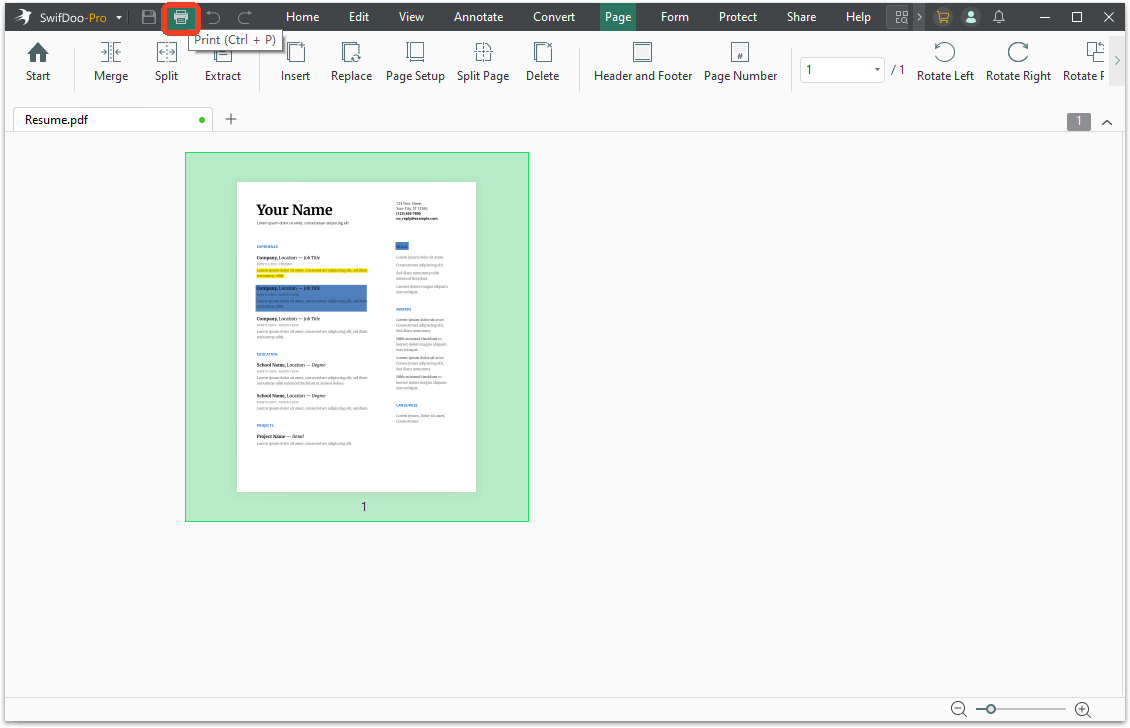
Step 1: Open your file in SwifDoo PDF and click the Print icon from the top-left corner.
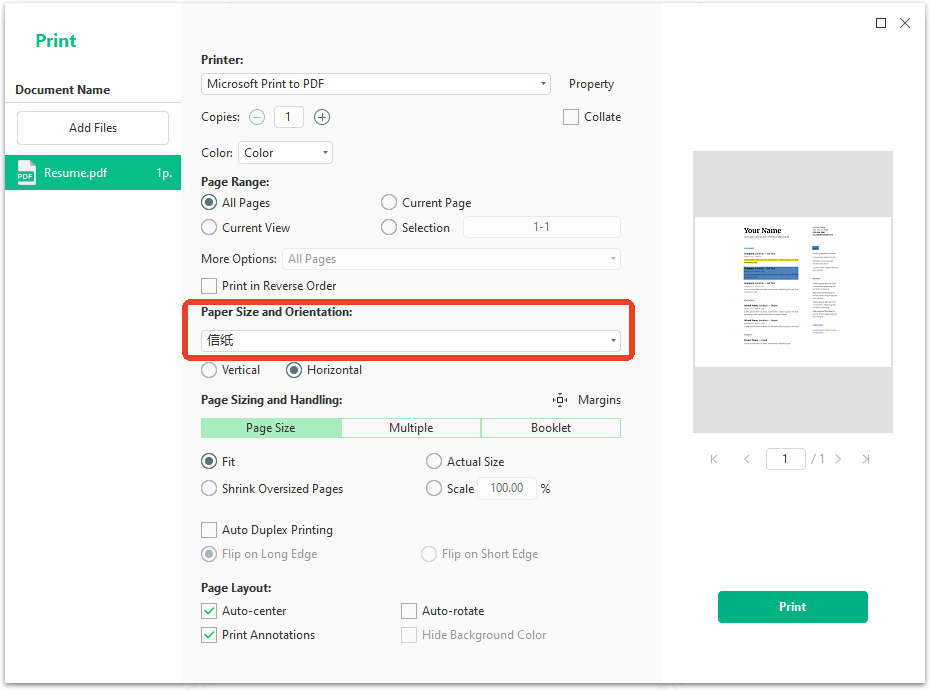
Step 2: Under Paper Size and Orientation, choose Letter from the drop-down menu. SwifDoo PDF's print preview shows exactly how your document will appear on short bond paper before you commit to printing.
Additional SwifDoo PDF features for document management:
-
Merge multiple documents: Combine several short bond paper PDFs into a single file, ideal for compiling thesis chapters, reports, or assignment submissions.
-
Compress PDF files: Reduce file size for email submission without losing print quality. This is especially useful when submitting school requirements online.
-
OCR scanned documents: Convert scanned short bond paper pages into searchable, editable text. Perfect for digitizing printed references or old assignments.
-
Add electronic signatures: Sign your short bond paper documents directly in the PDF before printing or submitting digitally.
How to Resize a PDF for Printing | Top 3 Ways
This guide will show you how to resize a PDF for printing. Whether you want to make it online or offline, you will find a way here.
READ MORE >How to Set Short Bond Paper Size in Microsoft Word
Microsoft Word is where most students and professionals prepare their documents. Setting the correct short bond paper size Word configuration ensures your document prints exactly as it appears on screen.
Step 1: Open your Microsoft Word document.
Step 2: Click the Layout tab in the top ribbon menu and click the Size button in the Page Setup group.
Step 3: Select Letter (8.5" x 11") from the dropdown menu. This is the exact short bond paper size in microsoft word configuration, since short bond paper equals Letter size. Your document immediately updates to match.
If the Letter option doesn't appear in your dropdown menu, click More Paper Sizes at the bottom of the list. In the dialog box that opens, enter 8.5" for width and 11" for height. You can also enter 21.59 cm and 27.94 cm if working in metric units. Click OK to apply.
How to Set Short Bond Paper Size in Canva
Canva is a popular design platform for creating everything from school projects to professional presentations. Setting short bond paper size Canva dimensions correctly is essential when your design will be printed.
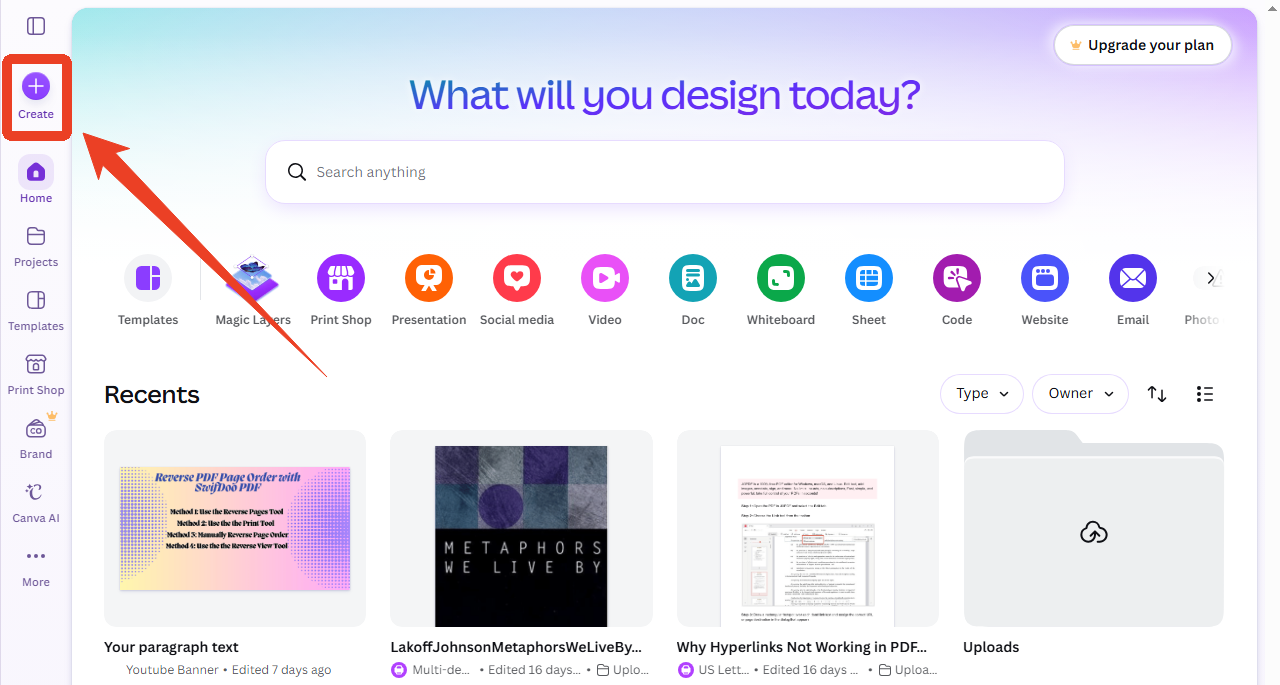
Step 1: Open Canva in your browser and click the Create a design button on your homepage.
Step 2: Click Create from the side bar on your homepage.
Step 3: Choose Custom size in the list options. Then, select the Units option as cm and choose 21.59 cm for width and 27.94 cm for height.
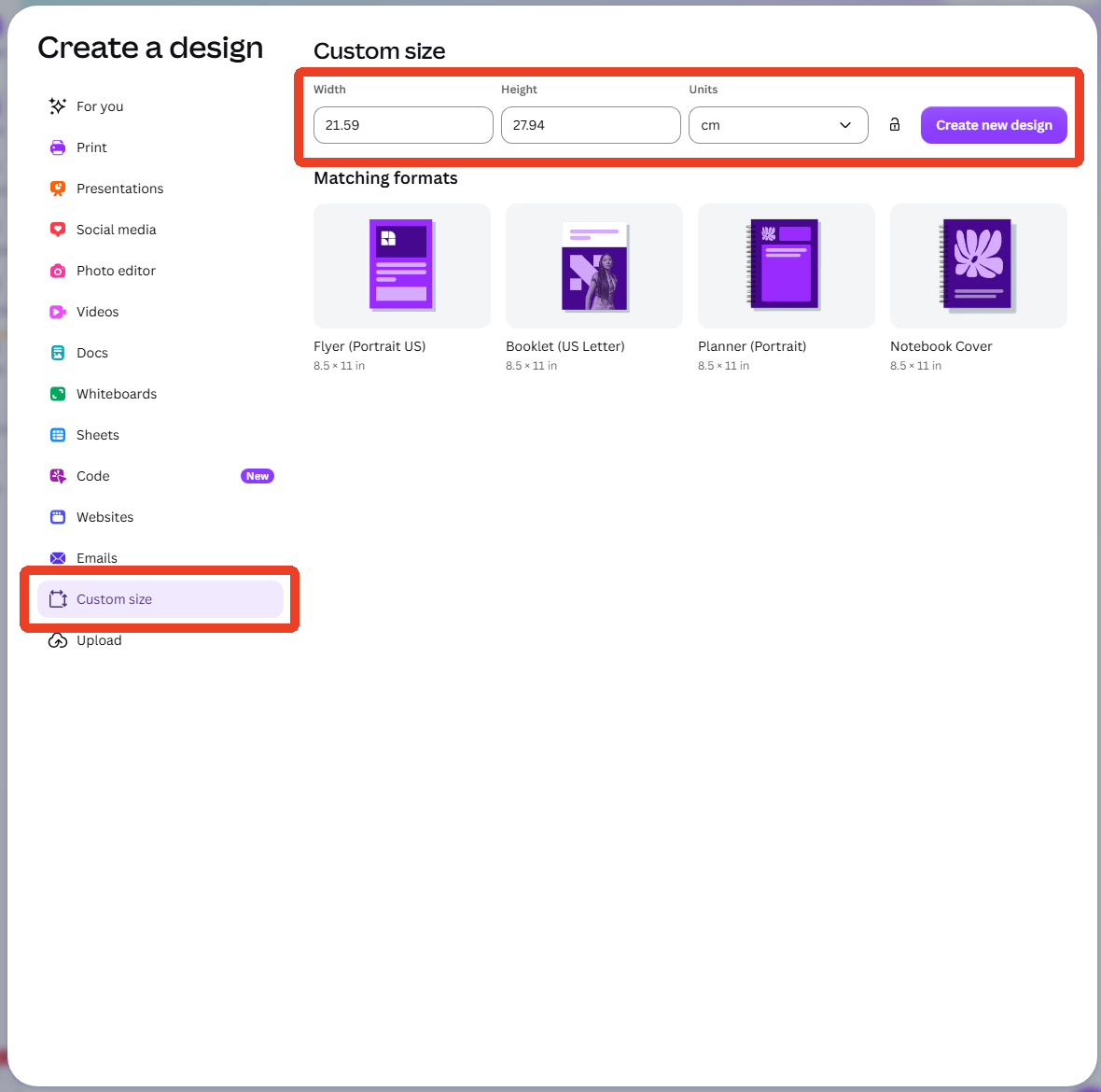
Step 4: Click Create new design. Canva opens a blank canvas set to the exact short bond paper size canva dimensions.
How to Set Short Bond Paper Size in Google Docs
Google Docs is the go-to online word processor for students, teachers, and professionals who need cloud-based document editing. You can set the correct short bond paper size in Google Docs to ensure your document prints properly on 8.5 x 11 inch paper.
Step 1: Open your document in Google Docs or create a new blank document from your Google Drive.
Step 2: Click File in the top menu bar. From the dropdown menu, select Page setup.
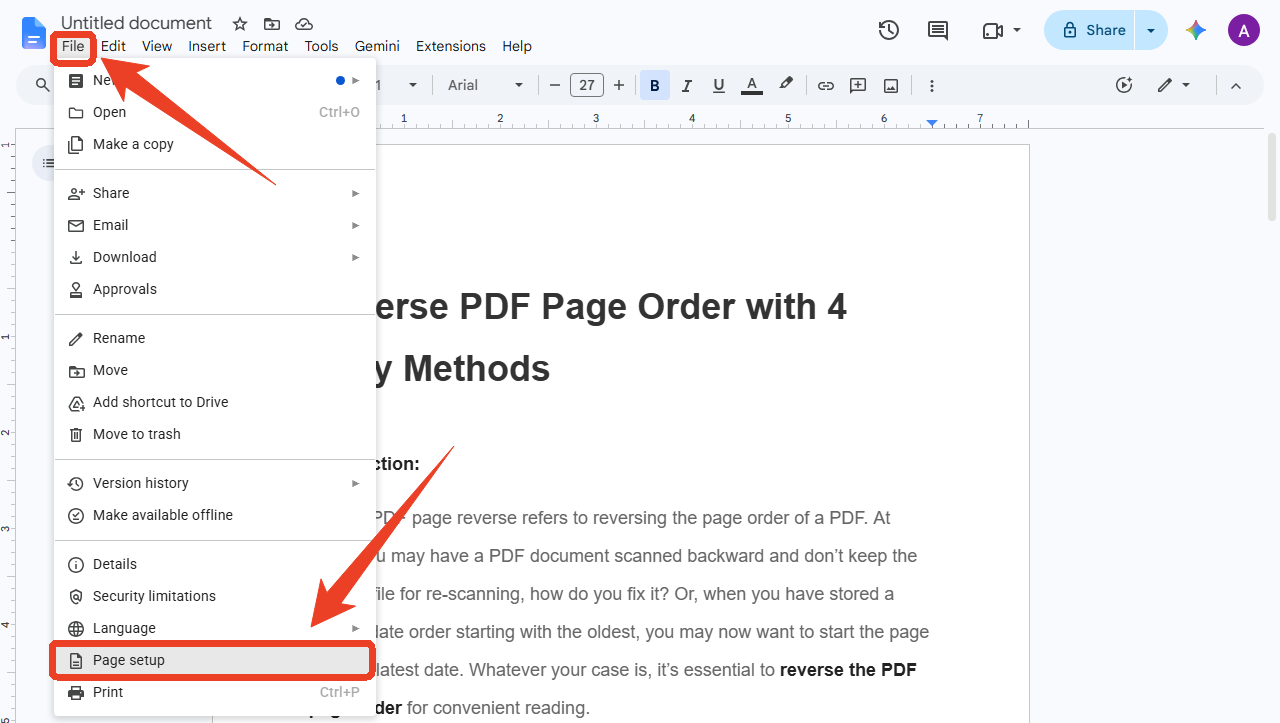
Step 3: In the Page setup dialog, locate the Paper size dropdown menu and select Letter (8.5" x 11") from the list.
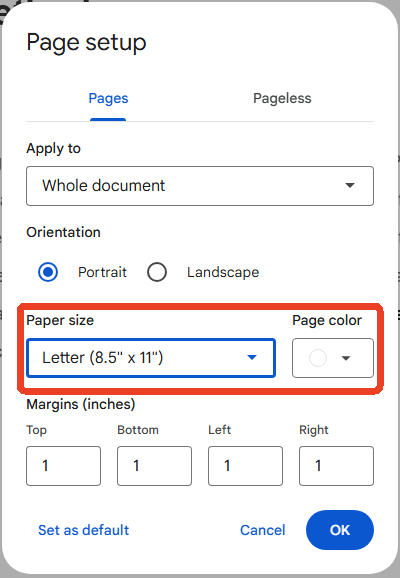
Step 4: Finish other settings and click OK to save your changes.
Tip: If you frequently create documents for short bond paper, click "Set as default" in the Page setup dialog before clicking OK. This saves the Letter size and your preferred margins as the default for all new Google Docs documents, eliminating the need to reconfigure settings every time.
How to Set Short Bond Paper Size in Printer
Even when your document is correctly sized, the printer settings must match. Proper short bond paper size in printer configuration prevents cropping, scaling errors, and misaligned output.
Step 1: Load short bond paper (8.5 x 11 inches) into your printer's paper tray. Adjust the paper guides so they fit snugly against the edges of the paper stack.
Step 2: Open the document you want to print and press Ctrl + P to open the print dialog.
Step 3: In the print dialog, locate the Page Setup option. Select Letter (8.5 x 11 inches). Some printer drivers display this in metric as Letter (21.59 x 27.94 cm).
Step 4: Check the scaling option. Select Actual Size or 100% if you want the document to print at its intended dimensions.
Step 5: Click Print. Check the first printed page to confirm the output matches your expectations.
Conclusion
The short bond paper size (8.5″ x 11″) is the same as the Letter standard, making it the default choice for everyday documents in the Philippines and North America.
Setting up your document correctly is just as important as knowing the numbers. SwifDoo PDF gives you complete control over page dimensions, letting you create, resize, and print short bond paper documents. Word, Canva, and Google Docs each offer their own paths to the same result. The key is matching your software settings to the actual paper in your printer tray.
Hope this article has resolved your problem!
Related Articles:


