What Is an ODS File?
An ODS file, short for OpenDocument Spreadsheet, is an open spreadsheet file format and is commonly associated with LibreOffice Calc and Apache OpenOffice Calc. Like other spreadsheet formats, it organizes information into rows and columns and allows you to work with data rather than simply viewing it as a fixed document. What are the differences between ODS and PDF? How to turn a PDF into ODS? Here’s a comparison table.
|
Feature |
|
ODS |
|
Primary purpose |
Fixed-layout document |
Editable spreadsheet |
|
Cell editing |
Limited |
Yes |
|
Data analysis |
Difficult |
Easy |
|
Formulas |
Limited |
Supported |
|
Tables |
Primarily for display |
Designed for data manipulation |
|
Typical software |
PDF readers/editors |
LibreOffice Calc and compatible apps |
If you need to edit PDF tables in a spreadsheet or analyze financial data, it’s necessary to convert a PDF into an ODS file. In the following content, I’ll introduce you to effective ways to transform a PDF into an ODS file.
How to Convert PDF to ODS Online
Using an online PDF to ODS converter is usually the fastest option. You don’t need to download and install desktop software. PDF24 is a good option to convert PDF to ODS online. Its official PDF-to-ODS tool lets you select or drag PDFs into the upload area and turn them into an ODS file. Here, you can refer to the exact steps below to convert PDF to ODS online with PDF24.
Step 1. Open your browser and visit the official PDF24 PDF to ODS converter.
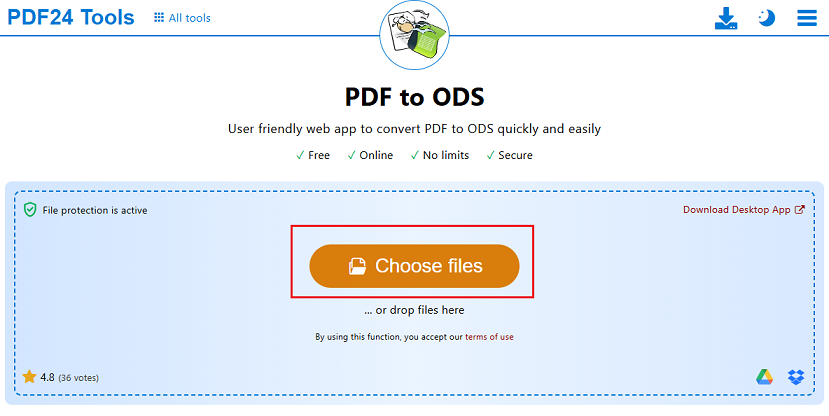
Step 2. Click the Choose file button to locate and select the PDF file you want to convert. Or, directly drag and drop the PDF into the file-selection area.
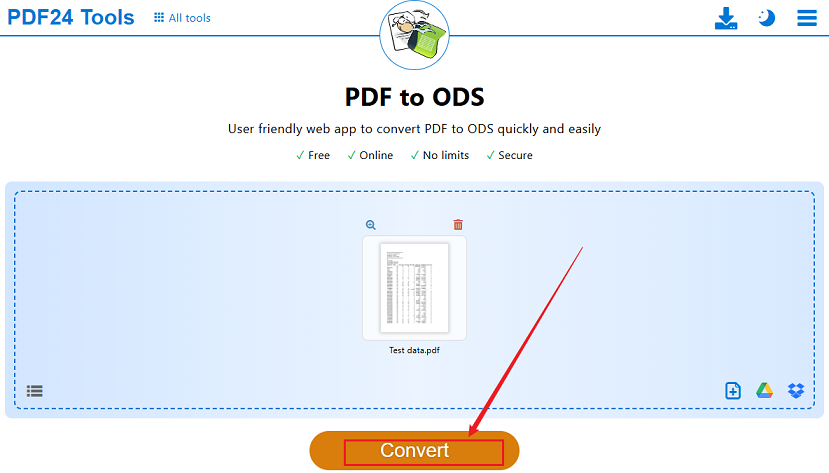
Step 3. When the file is uploaded into PDF24 Tools, click the Convert button to start the PDF-to-ODS conversion.
Step 4. Once the conversion is over, click Download to save the ODS file to your computer. Then, you can open the .ods file with LibreOffice Calc.
How to Convert PDF to ODS with Desktop Software
Option 1. Using PDF24 Creator
If you prefer to convert PDFs locally instead of uploading them to an online service, you can use PDF24 Creator on Windows. It is the offline version of PDF24’s tools. In addition to converting PDFs to ODS, PDF24 Creator also supports converting PDF to Excel, Word, and other formats. Meanwhile, it enables you to create, edit, annotate, manage, and OCR PDFs.
Here, let’s learn how to convert PDF to OpenDocument Spreadsheet with PDF24 Creator.
Step 1. Go to the official PDF24 website and then download and install PDF24 Creator on your Windows PC.
Step 2. Launch PDF24 Creator and open the PDF Converter. Then, import the target PDF file by dragging and dropping it into the window.
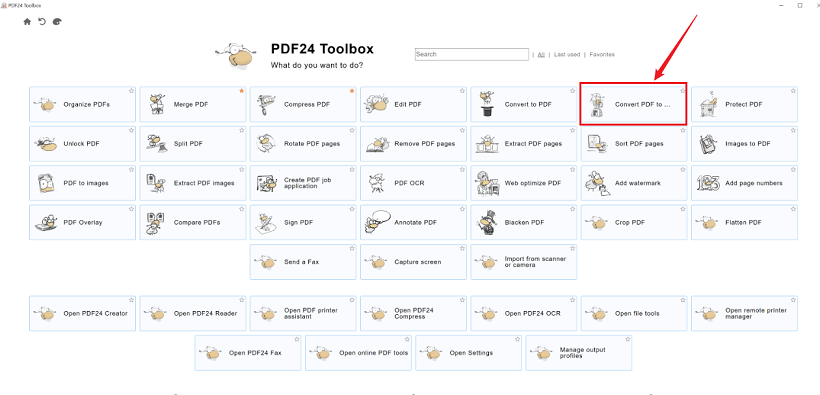
Step 3. Next, select ODS as the output format and click Convert to start the conversion.
Option 2. Using LibreOffice
LibreOffice Calc is an excellent application for opening and editing ODS files. Can it convert PDF to ODS? No, it is a dedicated PDF-to-ODS converter. Fortunately, there is a workaround to transform a PDF into an ODS file. Here, let’s see how to convert PDF to ODS with LibreOffice.
Step 1. Open your PDF in SwifDoo PDF or another PDF reader that allows you to select its text. Then, select the table or relevant information you want to transfer and press Ctrl + C on Windows or Command + C on Mac to copy the selected content.
Step 2. Launch LibreOffice and open Calc to create a new spreadsheet. Then, paste the copied PDF data into the spreadsheet.
Step 3. Once the spreadsheet is ready, click File, select Save As, and choose ODF Spreadsheet (.ods) as the file type. Finally, name the ODS file and click Save.
PDF to ODS vs PDF to XLSX: Which Should You Choose
Both ODS and XLSX are spreadsheet formats. Should you choose ODS or XLSX? Below is an overview table for your reference:
|
Feature |
ODS |
XLSX |
|
Full name |
OpenDocument Spreadsheet |
Excel Open XML Spreadsheet |
|
Common software |
LibreOffice Calc |
Microsoft Excel |
|
Best suited to |
OpenDocument workflows |
Microsoft Office workflows |
|
File extension |
.ods |
.xlsx |
|
Common use |
LibreOffice/OpenOffice |
Excel |
|
Open standard |
Yes |
No, proprietary Microsoft format |
If you need to convert PDF to XLSX, SwifDoo PDF is the best converter worth trying. It enables you to convert PDF to XLSX in a few clicks. Moreover, it supports batch converting PDF to XLSX efficiently. What’s more, SwifDoo PDF offers OCR to handle scanned PDFs. Even if you need to convert scanned PDFs to ODSs, you can use SwifDoo PDF to OCR PDFs before converting.
Conclusion
If you need to edit or analyze data in a PDF file using LibreOffice, you’d better convert it to ODS. How to convert PDF to ODS? In this article, I introduce you to 3 effective methods and step-by-step guidance. For a quick conversion, an online tool such as PDF24 is a good choice. If you need to handle confidential documents, a desktop tool should be your choice.