You can convert the DAT file to a ZIP archive to extract file contents. After that, you can convert files to PDF using reliable online tools. Once converted, you can open your PDF to view, annotate, and edit it in SwifDoo PDF.
Why do my Attachments Turn into a DAT File?
A DAT file is a generic data file used by various applications, often requiring a specific program to be readable. Do you ever wonder why your attachments (probably PDFs) turn into a DAT file? It's usually because the sender's Outlook is set to use a format called TNEF (Transport Neutral Encapsulation Format), which other email clients can't interpret correctly. The reason why your PDF is showing up as a winmail.dat might be that you set your Outlook to default configurations or incorrectly configured Microsoft Outlook email client that the old software used by others cannot recognize.
To fix this, if possible, request the email sender to reconfigure their Outlook settings and resend you the attachments according to the Microsoft Support page - “TNEF effects on email messages". However, a better way is to convert Winmail.dat to PDF yourself using online free DAT to PDF converters or other trusted tools.
Convert DAT to PDF Using winmaildat.com
Winmaildat.com is a convenient, free online tool that helps you convert DAT files with no hassle. It is a quick and simple solution with no hidden costs. However, it does not directly convert DAT to PDF. Instead, this DAT file converter can help convert files to JPG, HTML, or other formats, such as RTF. However, you can convert a winmail.dat file back to its original format without any fuss. The best part is that you don't need to register or provide your email details to proceed with the conversion process.
Let’s learn how to convert .dat to PDF in a few clicks.
Step 1: Launch the winmail.dat to PDF converter online on your web browser.
Step 2: Click Browse files on the main interface. And upload the DAT file you want to convert to PDF online.
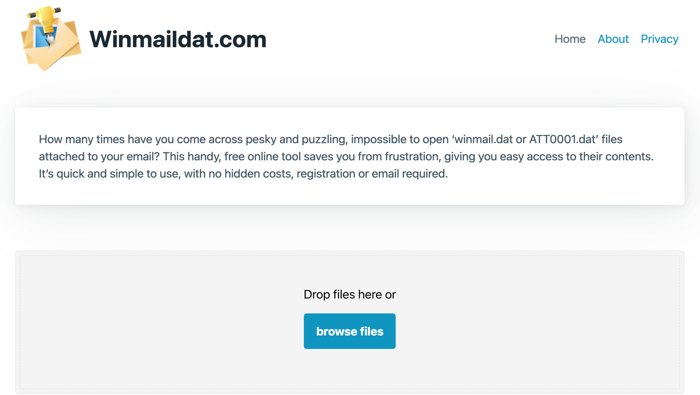
Step 3: Click on a file to download it in .htm, .rtf, or .jpg. Alternatively, you can click all_files.zaip to download all the contained files as a zip file.
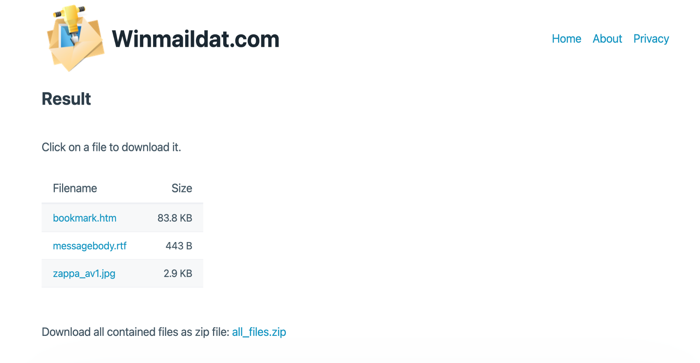
Extra Step 4: If the original format is not PDF, launch SwifDoo PDF, choose Convert, and then, once the online converter has converted the DAT to a ZIP file, extract all files from the ZIP file. Then, convert the extracted images, spreadsheets, Word documents, or other documents to PDFs.
Step 5: Select the correct conversion option, such as Image to PDF or Word to PDF, etc.
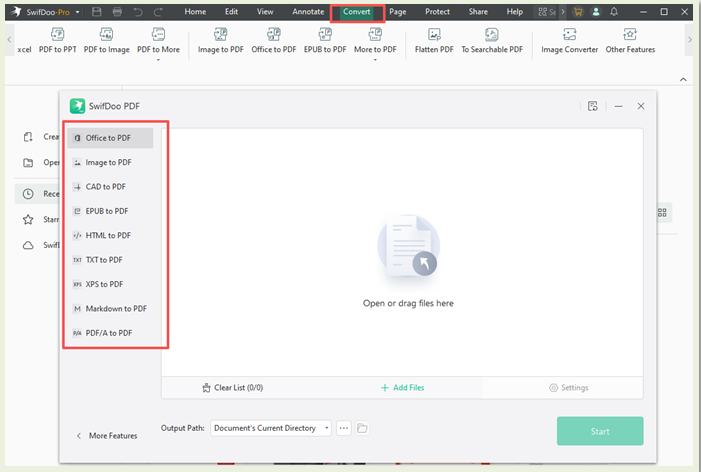
Step 6: Click Start, and you can even combine the images into a PDF and achieve the DAT to PDF conversion.
If the original file is a Word file, select Office to PDF in SwifDoo PDF, and convert Word to PDF without losing formatting.
Convert DAT File to PDF with winmail-dat.com
Winmail.dat file converter is another web-based, free option for converting DAT files into readable formats. While it cannot directly convert DAT to PDF, it simplifies the process of working with DAT files. For instance, you can convert DAT to JPG and HTM formats. Thereafter, you can convert a DAT file to PDF online for free using a powerful online PDF converter such as SwifDoo PDF.
This online version was developed for users of Mac, Linux, iPad, iPhone, Android, and BlackBerry devices that receive Winmail.dat attachment files sent by Microsoft Outlook and Microsoft Exchange.
Check out the steps to convert a DAT file to PDF with winmail-dat.com.
Step 1: Launch the online .dat file to PDF converter, winmail-dat.com.
Step 2: Click Choose File and import the DAT file you wish to convert to PDF.
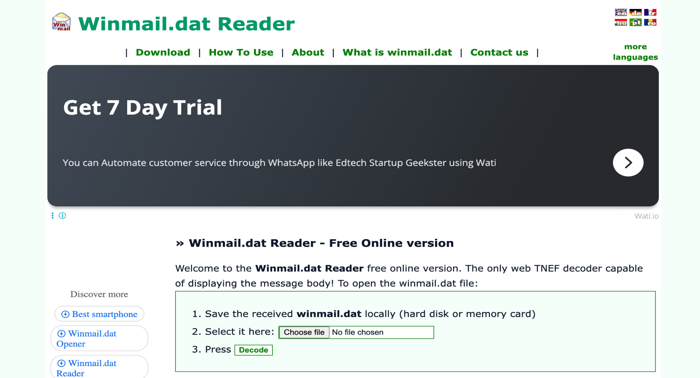
Step 3: Then, press Decode to convert the winmail.dat file to PDF, and your attachments will be available in .jpg, .htm, or other formats they should be.
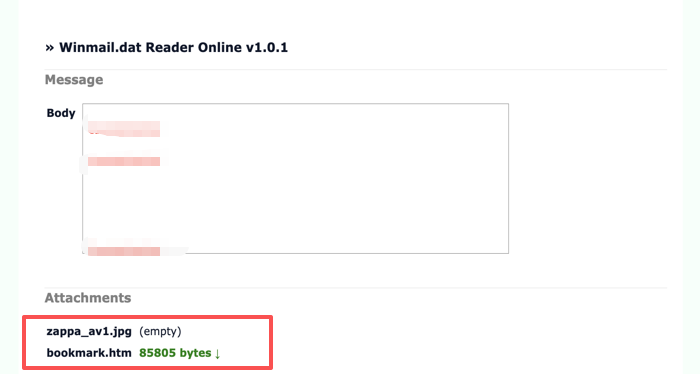
Step 4: You can read the DAT file content, and copy the message or screenshot the extracted files to convert to a PDF.
An All-around PDF Converter and Editor for Windows
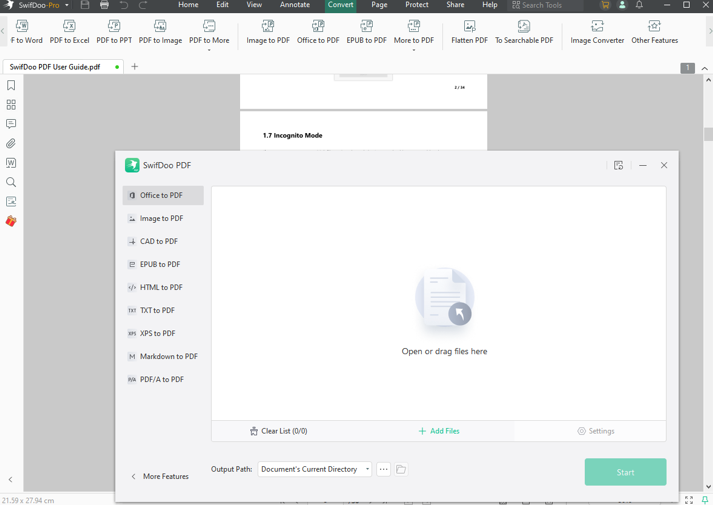
Now you know how to use an online converter to convert DAT to PDF, especially when dealing with DAT files that originally contain PDF data. After you convert DAT files to PDFs, you may need to edit, organize, or repurpose them for professional or personal use. That's where the powerful and versatile SwifDoo PDF comes in handy. It enables users to manage all PDF-related tasks effectively.
SwifDoo PDF emerges as one of the best PDF converters and editors. With just a few clicks, Users can easily transform PDFs into multiple file formats, making them readable on several devices. If the original format of the DAT file is PDF, you can convert it to Excel, Word, PowerPoint, and other files accurately using SwifDoo’s reliable conversion tools.
You’ll also enjoy these extra benefits with SwifDoo PDF:
- Read, view, and edit PDFs with ease
- Highlight, comment, and annotate PDFs to improve teamwork
- Seamlessly compress, join, and split PDF documents losslessly
- Encrypt, decrypt, and sign (digitally and electronically) the PDF documents
- Features AI to analyze, summarize, proofread, and translate your PDF documents
Wrapping Up
Converting DAT files to PDF ensures better accessibility and compatibility across devices. Whether you're extracting contents or using a direct converter, both methods help make your files readable and shareable. For a seamless experience, try the SwifDoo PDF online conversion service, which allows you to quickly and accurately convert various file types, including Word, JPG, and Excel to PDF—making document handling easier than ever.