
1. Does ChatGPT Save Your Chats When Logged In?
Most people create an account to use ChatGPT. If you sign up with your email address and log in, the answer is simple: Yes, ChatGPT saves your chats.
You have probably noticed the sidebar on the left side of your screen. This is your "History." It lists all the conversations you have had in the past weeks or months. This feature is helpful because it lets you go back and find that recipe or email draft you wrote last Tuesday.
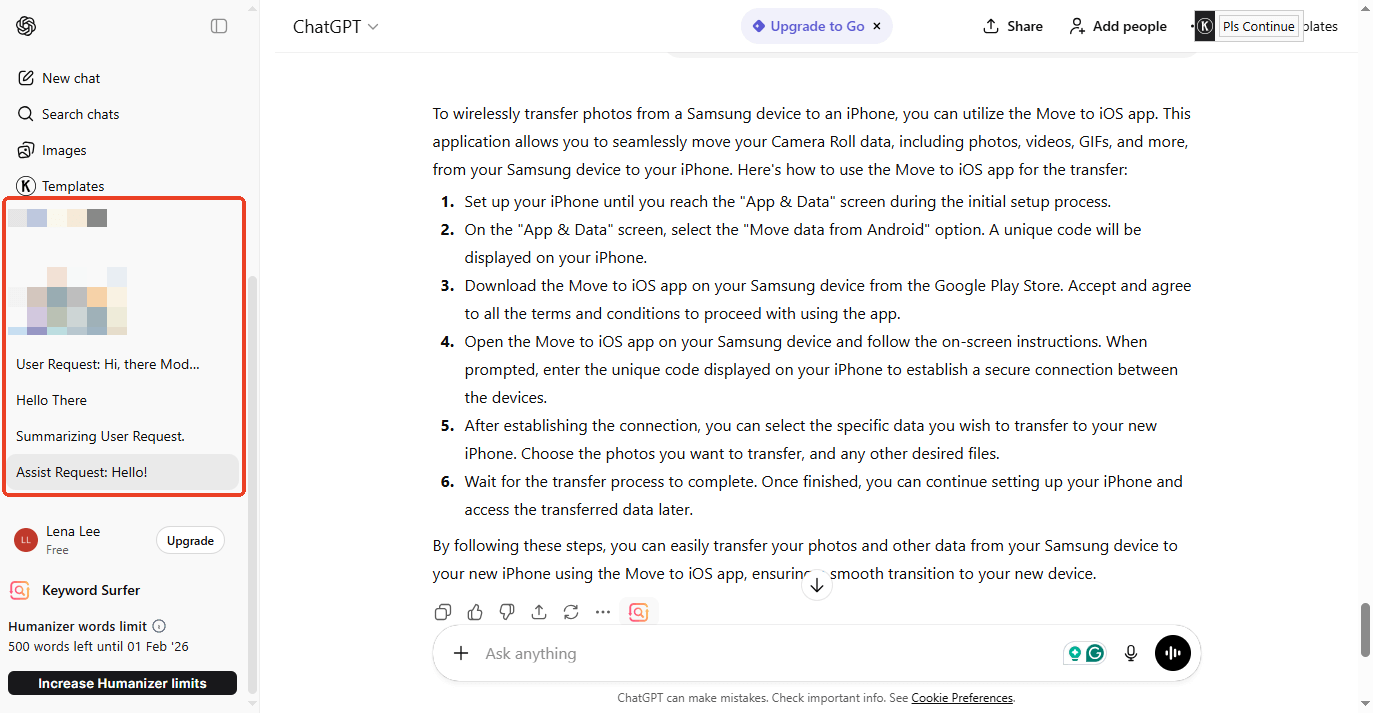
Where is this data stored?
They are saved on OpenAI’s big computers (called servers). This is why you can start a chat on your computer at work and finish it on your iPhone on the bus home. The conversation syncs across all your devices.
Can humans read your chats?
This is a scary thought for many people. The answer is yes, sometimes. OpenAI has a team of human reviewers. These employees read a small number of chats to assess whether the AI is helpful and safe. Because of this, you should never type your passwords, credit card numbers, or private health secrets into ChatGPT. Treat it like a public space.
2. Does ChatGPT Save Your Chats If Not Logged In?
You can use ChatGPT instantly without creating an account or logging in. This is great for quick questions. But does it mean your privacy is safe? Does ChatGPT save your chats if you’re not logged in? The answer is yes, but in a different way.
Usually, when you use ChatGPT as a guest, your browser will not save a long history sidebar. If you close that tab or clear your cookies, you will lose the chat forever. You cannot get it back. However, just because you can't see it doesn't mean it is gone.
OpenAI Still Keeps a copy, even if you are not logged in, your words are sent to OpenAI's servers to get an answer. OpenAI keeps a record of these "Guest" chats for a short time.
- Safety Monitoring: How long does ChatGPT save chats? They keep the chat open for about 30 days to ensure you follow their rules.
- Training: By default, OpenAI can use these anonymous guest chats to train its AI models. They want to learn from how people use the tool, even if those people don't have accounts.
How to Protect Yourself as a Guest?
If you use ChatGPT without logging in, you can still protect your privacy.
1. Click your Profile icon and select Settings.
2. Go to Data Control. Look for a setting that says "Improve the model for everyone."
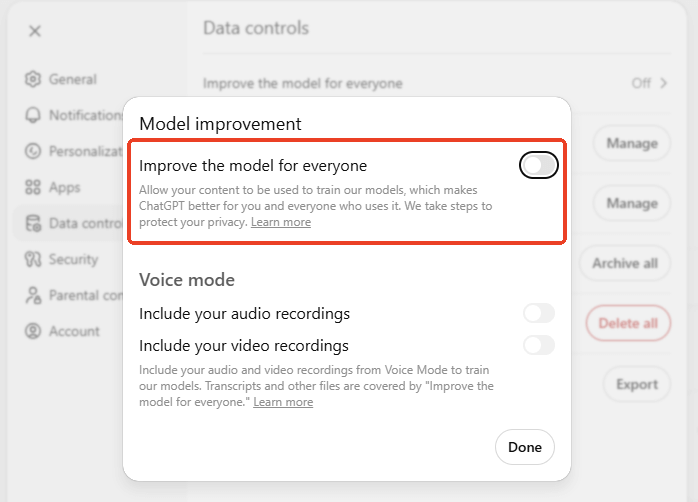
3. Turn this OFF. Click Done to confirm.
If you turn this off, OpenAI will still keep your chat for 30 days for safety reasons, but they will not use it to train their AI.
How to Stop ChatGPT from Saving Your Chats?
What if you have an account, but you want to ask a sensitive question? Maybe you are planning a surprise party or asking about a medical symptom. You don't want this chat saved in your history sidebar. You can use a feature called "Temporary Chat."
How to turn on Temporary Chat:
1. Open ChatGPT.
2. Click on the button that says "Turn on temporary chat."
3. Tap Continue to make it.
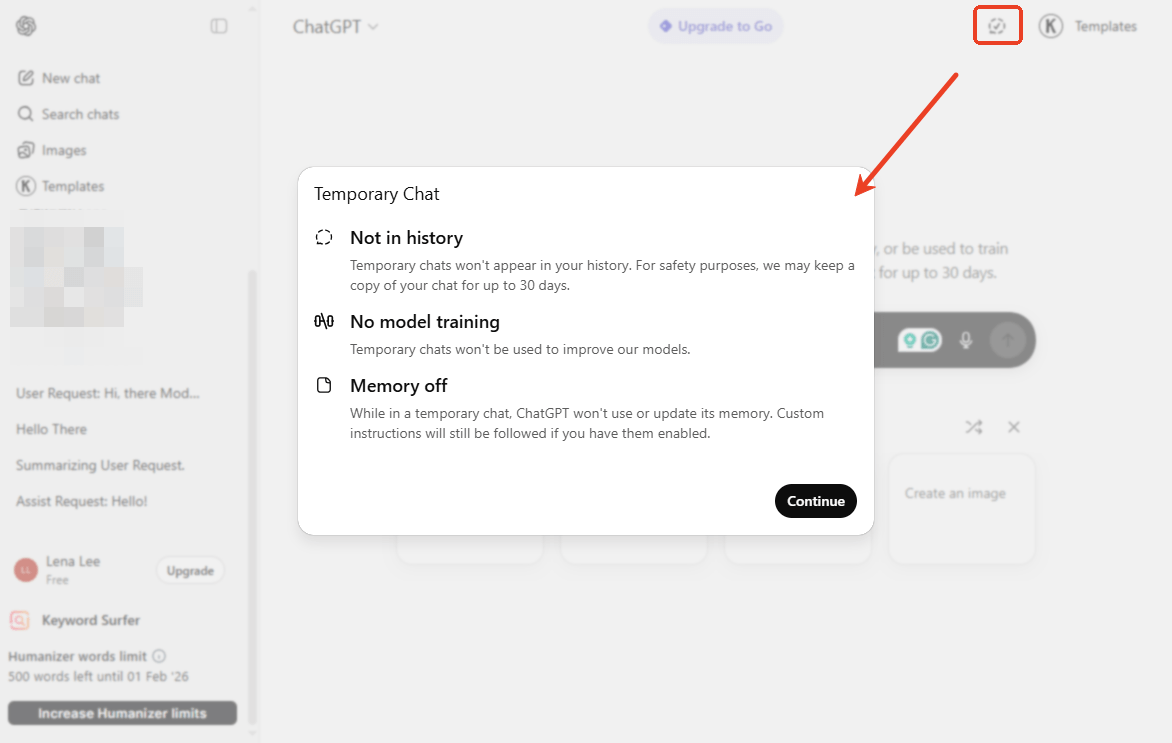
What happens when you do this?
- No History: The chat will not appear in your sidebar. Once you close the window, you won't see it again.
- No Training: OpenAI will not use this conversation to train their models. It is private from the "learning" system.
Note:
There is one important catch. Even in Temporary Chat, the conversation is not deleted instantly. OpenAI keeps a copy on its private servers for 30 days.
Why? They do this purely for safety. If someone uses the AI to plan a crime, OpenAI needs a record of it for the police or their safety team. If no bad behavior is found, the chat is permanently deleted after 30 days. So, while Temporary Chat hides the conversation from your history list, it is not immediately invisible.
How to Delete Your Saved Chats Permanently
If you have old chats you want to delete, you have a few options. Here are 2 ways that can help you delete ChatGPT conversation history.
Delete One Chat
If you just want to remove one embarrassing or private conversation:
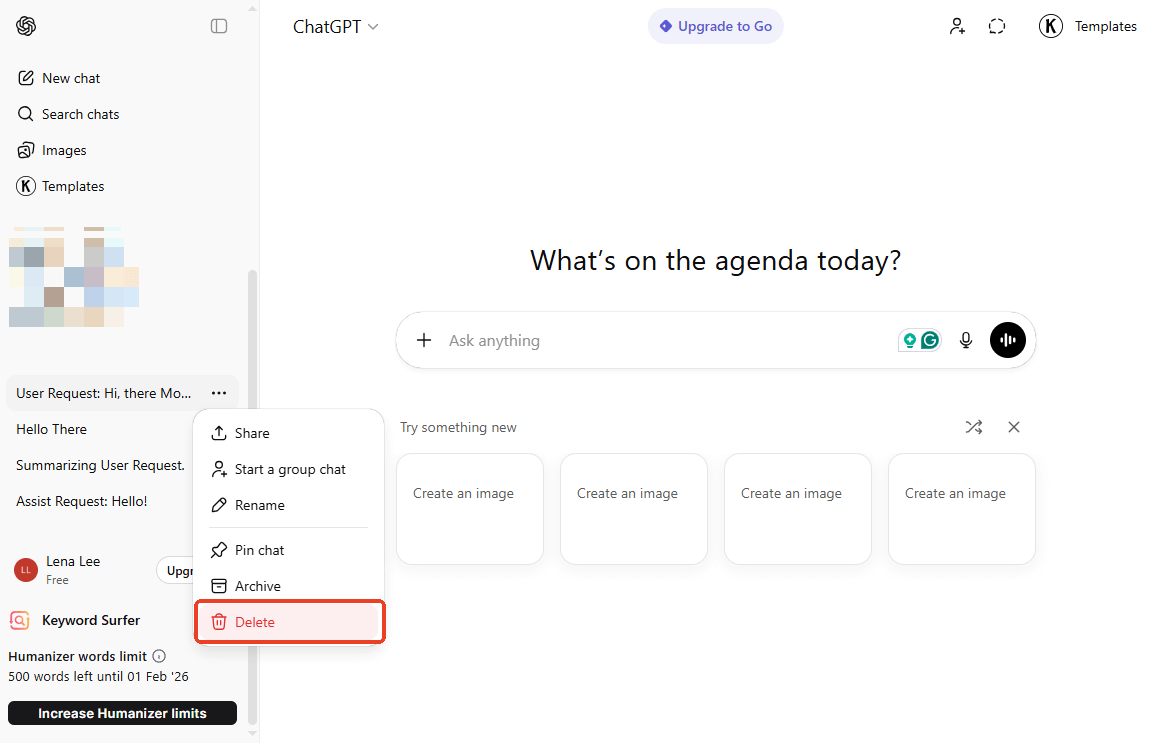
- Look at your sidebar history.
- Hover your mouse over the chat you want to delete.
- Click the three dots (...).
- Click Delete chat. It is now gone from your view.
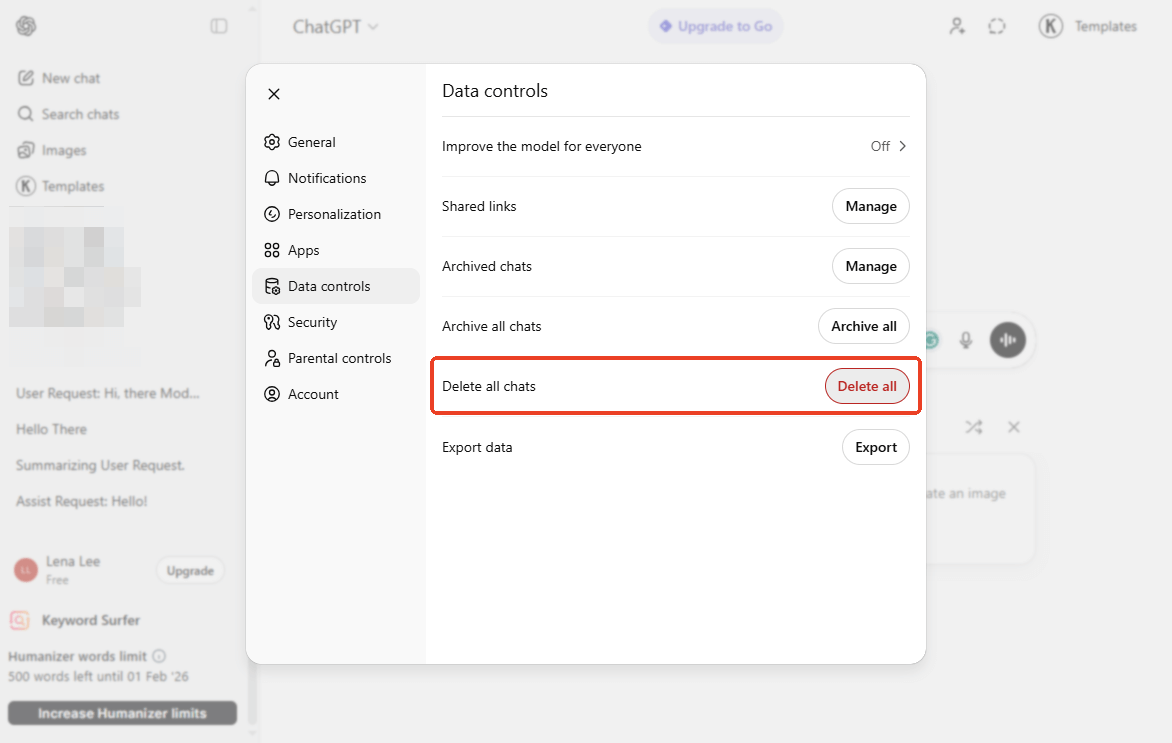
Delete All Chats
If you want a fresh start:
- Go to your Profile and click Settings.
- Click Delete Control.
- Find Delete all chats and click Delete all.
If you are worried that you might need certain conversations in the future, you can save them as a PDF document. The PDF format retains every detail of the conversation, and the file size is small. More info: Save ChatGPT Conversation as PDF.
Bonus Tip: How to Easily Handle PDFs with AI
Working with PDF documents often involves more than just reading; it requires understanding, analyzing, and extracting information from pages of dense text. This can be time-consuming and mentally draining.
To solve this problem, SwifDoo PDF has integrated powerful AI directly into its software, transforming your PDF editor into an intelligent assistant.
How SwifDoo AI Streamlines Your Workflow:
✅ Chat with Your PDF: Instead of searching for a specific fact using keywords, you can simply "talk" to your document. SwifDoo AI will retrieve the exact answer for you.
✅ Smart Translation: Working with international documents? The AI feature can instantly translate entire PDF or selected text into your native language, eliminating the need to copy-paste text into external translation tools.
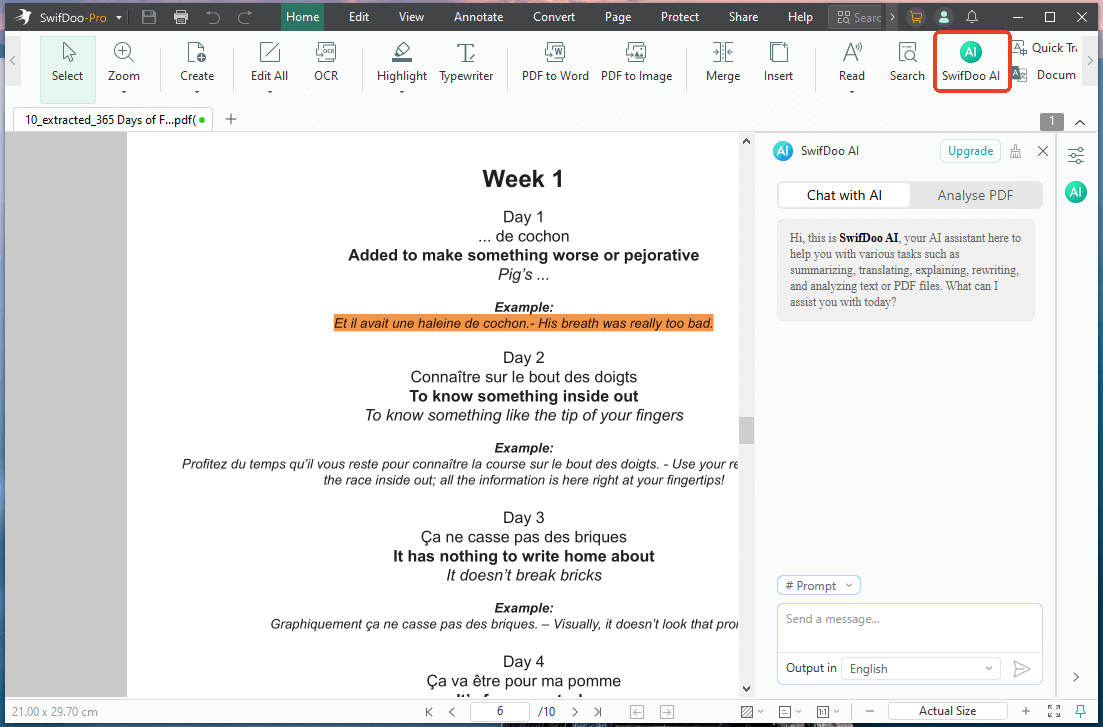
In short, SwifDoo AI allows you to focus on decision-making rather than data processing. Ready to work smarter, not harder? Stop drowning in information. Download SwifDoo PDF today to experience the power of AI-driven document management and transform the way you handle PDFs forever.
Conclusion
So, does ChatGPT save your chats? Yes, it does.
Whether you are logged in to your account or using it as a guest, your words travel to OpenAI's servers. By default, they are saved to help you track your history and for the AI to learn. If you care about privacy, you don't have to stop using ChatGPT. You just need to use the right settings.
- For casual questions: The default settings are fine.
- For private topics: Use Temporary Chat.
- To stop AI learning: Go to Settings and turn off "Improve the model for everyone."
Technology is useful, but your privacy is precious. Now that you understand how it works, you can chat safely!