


Understanding Magazine Print Formats and Requirements
A successful magazine printing starts with proper file preparation. Hence, it’s important to understand the standard printing specifications. Let’s check them one by one.
Common Magazine Size
Different magazine types use different dimensions. Here, I will show you the most common magazine sizes.
- US Letter: 8.5" × 11"
- A4: 210 × 297 mm
- Digest Size: 5.5" × 8.5"
- Square Magazine: 8" × 8" or 210 × 210 mm
If you designed your PDF using Canva, Adobe InDesign, or another layout tool, you need to confirm that the document size matches your target print size.
Resolution Requirements
To get clear printing results, refer to the following resolution requirements:
- 300 DPI minimum for crisp text and images
- Avoid low-resolution screenshots
- Use CMYK color mode when possible
Bleed and Margins
Meanwhile, professional magazine printing usually requires:
- 125-inch bleed on all edges for full-bleed designs
- Safe margins for text and graphics
- Proper crop marks
Prepare Your PDF for Printing
In addition to understanding magazine printing, you need to review your PDF carefully before you print the magazine. What do you need to prepare? Check the following points:
- Check font embedding: make sure all fonts are embedded in the PDF, or the layout may be altered during printing.
- Export the correct PDF format: print-ready PDF, and avoid overly compressed PDFs.
- Check and optimize: Use tools like Adobe Acrobat to preview CMYK or check resolution.
- Test print: You’d better print the test PDF before the official printing process.
Now, let’s dive into the exact methods for printing magazines from PDFs.
Method 1: Print Magazine from PDF Using Professional Online Printing Services
Professional online printing services are ideal when you need high-quality magazine printing without having to manage the printing process yourself. What you need to do is to upload your PDF, then those platforms can customize paper and binding options, preview the layout, and order printed copies online. Here, I have rounded up several reliable online printing services for your magazine printing.
- Mixam: It is one of the most popular online magazine printing services, which is excellent for custom magazines. It provides you with instant pricing, customizable paper stocks, perfect binding, and global shipping.
- PrintingCenterUSA: This online printing service specializes in booklet and magazine printing for businesses, schools, and creators. You can upload PDFs and preview the finished product online. Then, select the coating and binding options you need.
- Blurb: It supports premium magazine printing with glossy paper and bookstore-quality finishes. More importantly, it has integration with Adobe InDesign.
- Lulu Direct: Compared with the 3 online services above, this one is better suited for indie creators and low-volume magazine distribution.
How to print magazines from PDFs using a professional online printing service? You can check the steps below. Here, I only take Mixam as an example.
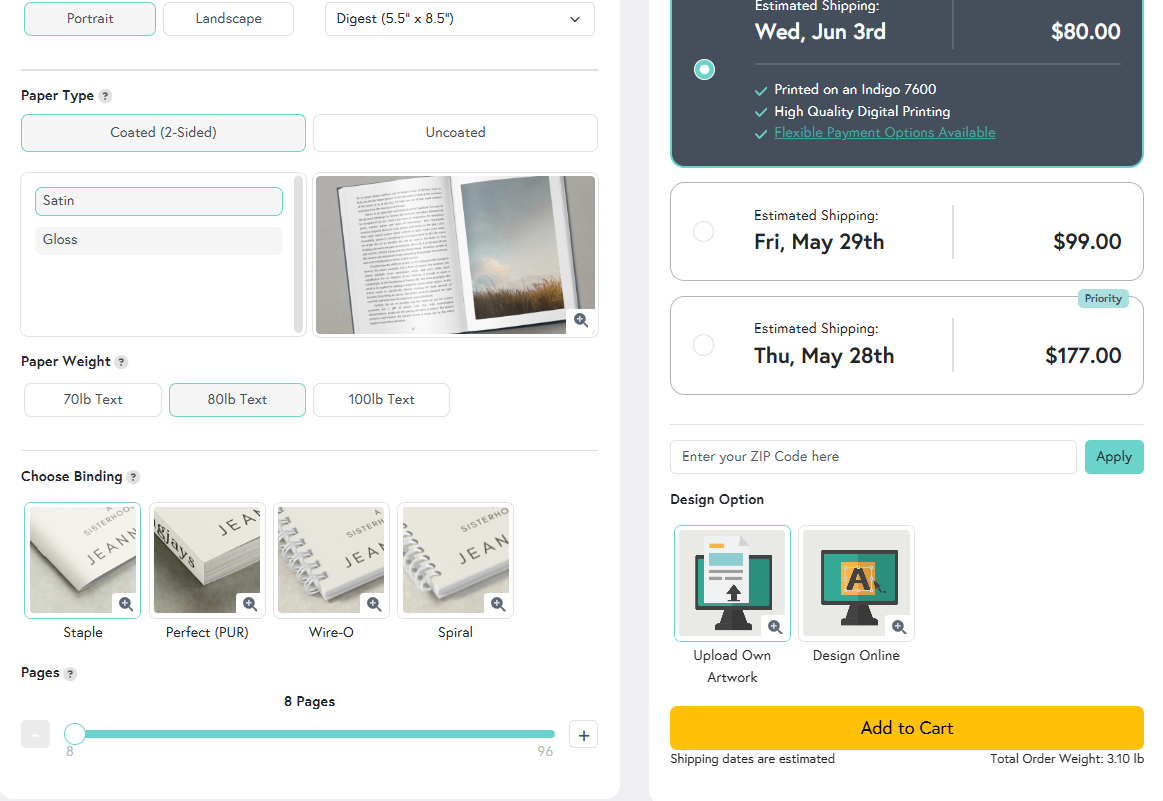
Step 1. Open your browser and visit Mixam’s Magazine Printing page. Then, use the Instant Quote Calculator to choose your specifications, such as Size, page count, Paper type, Color, and Binding. Next, add the quote to your card and click the Continue button to proceed to the artwork upload stage.
Step 2. In the Artwork tab, upload your PDFs by dragging and dropping. Meanwhile, you can upload your files from Dropbox or WeTransfer. Here, you need to upload your cover separately.
Step 3. Then, you can use Mixam’s online preview to check layout, bleeds, and page order. Meanwhile, if you are using Mixam for the first time, it offers a physical proof option.
Step 4. Once you are satisfied, complete payment and submit the order. Then the production typically starts after confirmation.
Method 2: Print a Magazine from PDF via Printing with Booklet Mode
If you want to print a magazine yourself at home or in the office, the booklet printing mode is one of the most practical methods. In this case, you need to select a reliable PDF editor, such as SwifDoo PDF or Adobe Acrobat.
SwifDoo PDF is a professional PDF editor that enables you to print a PDF as a booklet. Additionally, it allows you to customize print settings, such as paper size, orientation, margins, and more. What’s more, SwifDoo PDF offers useful features for magazine printing preparation, including PDF viewing and editing, print layout adjustments, annotation tools, and more.
How to print a PDF as a magazine using SwifDoo PDF? Check the exact steps below:
Step 1. Open your PDF for a magazine in SwifDoo PDF and click the Print icon or press Ctrl + P to enable the Print dialog.
Step 2. Under Page Sizing and Handling, click Booklet. Meanwhile, set the booklet subset to both sides or other options. Also, you can select left-edge binding.
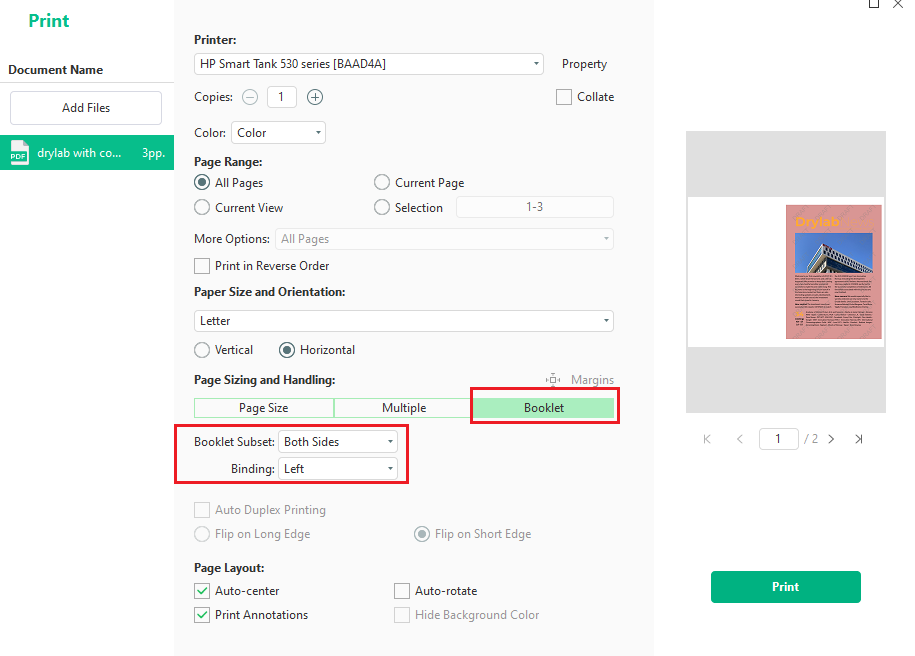
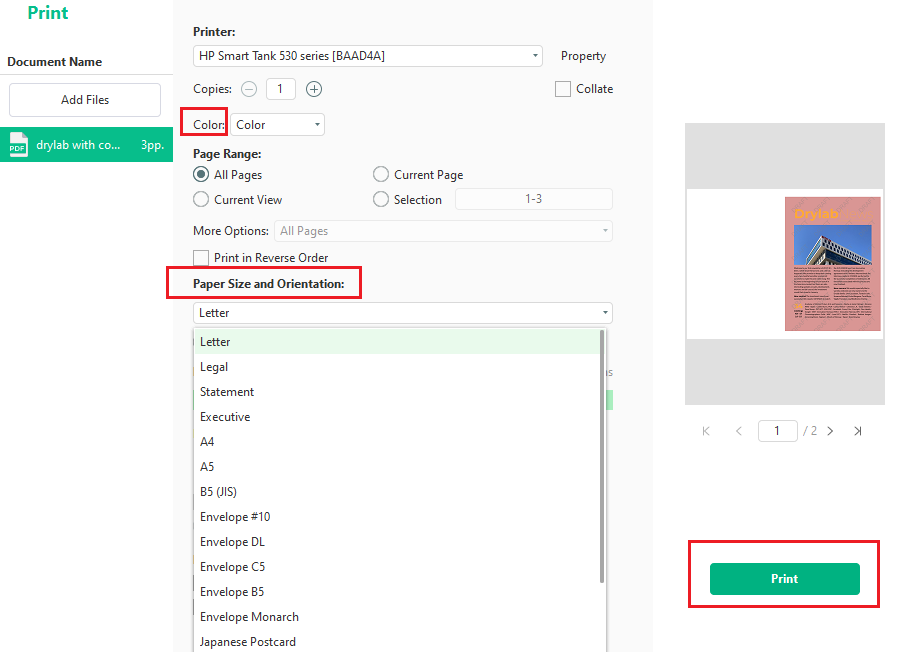
Step 3. Additionally, you can customize other print settings, like the paper color, size, and orientation. Finally, click the Print button.
Method 3: Print a Magazine from PDF via Local Print Shops
Local print shops are another reliable option, especially if you want professional results without ordering online. This method allows you to combine in-home design with local offset printing for bulk printing.
Comparison Table: Which Magazine Printing Method Is Best
Which magazine printing method should you choose? Here’s a quick comparison table for you.
|
Method |
Best For |
Cost |
Print Quality |
Convenience |
Quantity |
|
Online Printing Services |
Professional magazines, catalogs, and portfolios |
Medium to High |
Excellent |
High |
Small to Large |
|
Booklet Printing Mode |
DIY home or office printing |
Low |
Moderate |
Moderate |
Small |
|
Local Print Shops |
Urgent or local printing needs |
Medium |
Good to Excellent |
High |
Small to Medium |
Also, refer to the quick recommendations for you:
- Choose online printing services if you need professional-quality magazines with premium finishing.
- Choose the booklet printing mode for affordable DIY magazine printing at home.
- Choose local print shops if you need fast turnaround or in-person support.
Conclusion
When your document is properly prepared, it can be easy to print a magazine from PDF. In this article, I walk you through 3 effective methods, including professional online services, booklet printing services, and a local print shop. Which method should you choose from? The choice depends on your budget, timeline, and print quality expectations. Finally, I hope this article can be helpful to you.



