



Why You Need a Fanfiction Downloader
Though reading fanfictions online is convenient, unstable internet access can affect normal reading. In addition, fanfiction websites can change policies, experience downtime, or even remove content. In that case, downloading stories has some benefits:
- Offline access and reading: Read fanfiction stories anywhere, like Kindle or Kobo, even without an Internet connection.
- Backup stories: Preserve fanfiction stories against deletion, author account closures, or site changes.
- Customization: Customize your experience with preferred formats, such as PDF, EPUB, or MOBI.
If you are an avid reader or researcher, a reliable fanfiction downloader is essential.
4 Core Methods to Download Fanfictions
There is not just one single way to download fan fiction. Here, I will introduce four methods.
1. Official or Built-in Download Options
Generally, most major fanfiction sites and platforms offer native download features. Here are 2 examples:
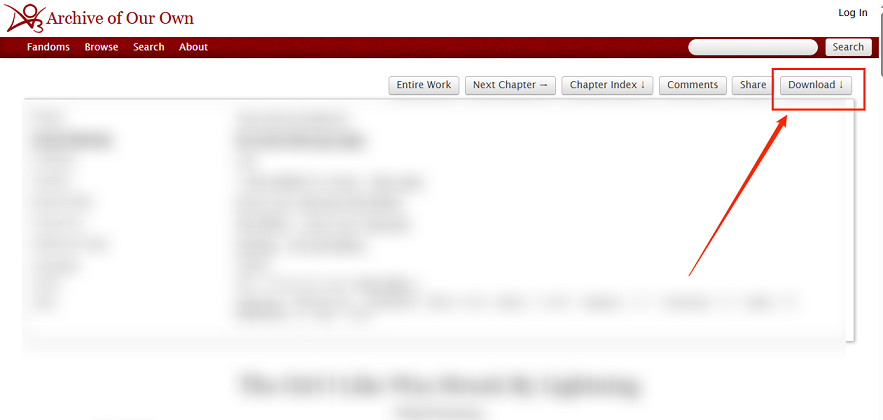
- AO3 (Archive of Our Own): It is a platform that contains many transformative fanworks, such as fanfictions and fan videos. It allows you to export stories as PDF, HTML, or EPUB directly from the story page.
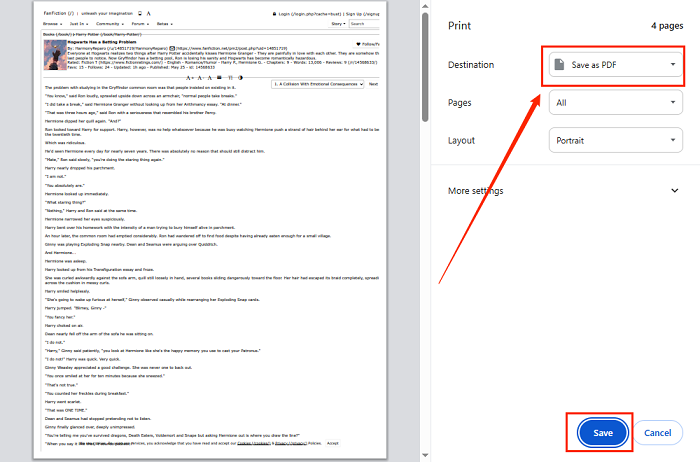
- net: As one of the most well-known fanfiction archives, FanFiction.net holds millions of stories. Though it doesn’t offer a direct download icon, you can save stories using the Print option.
Advantages: This approach is fully compliant with the site's terms, making it safe and legal. Meanwhile, it has no extra software required
Limitations: not all platforms offer download options, not suitable for batch downloads
2. Browser Extensions
You can also choose useful browser extensions to download fanfictions without leaving your reading page. It can also make the download simple as long as you select the right tool. I have picked several for you:
- Fanfiction Downloader (Chrome): Allows you to download stories as EPUB or PDF from AO3 and FanFiction.net.
- Sere’s Fanfic Downloader (Firefox): Supports EPUB, HTML, Markdown, PDF, DOCX, and Plain text output. In addition to AO3 downloads, it supports FFN, Wattpad, FictionPress, Tapas, and forum sites.
- FicLab (Firefox recommended, Chrome limited): Enables you to download as EPUB, MOBI, or PDF from many fanfic sites.
Advantages: Browser extensions are easy to install, and most of them are often free. Moreover, they are convenient for one-click downloads
Limitations: Some browser extensions support limited sites and have potential security or compatibility updates needed
3. Web-based Services
If you don’t want to install any browser extension, consider web-based services. Web-based downloaders allow you to paste a fanfiction story URL and download it instantly. Here are online fanfiction downloaders you can try:
- FicHub: It supports multiple platforms, such as AO3, FictionPress, FanFiction.net, and SpaceBattles. You can download stories in MOBI, PDF, or Zipped HTML format.
- FicDownloader: It allows you to download fanfictions to EPUB, MOBI, or PDF from RoyalRoad, AO3, FanFiction.net, and other platforms.
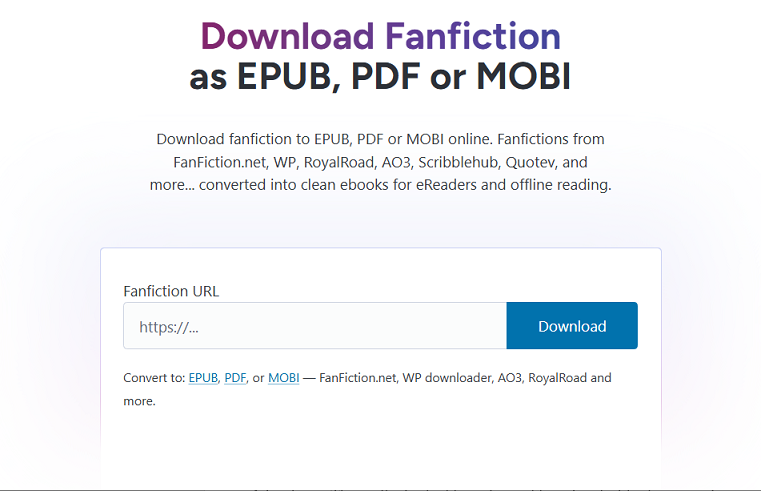
Advantages: It has no installation required and can work across devices
Limitations: Some of them may have daily download limits and occasionally include ads.
4. Command-Line Tools and Calibre Plugins
The last method is quite suitable for power users. Command-line tools and plugins offer advanced features. You can try the following 2 examples.
- FanFicFare: It is a Calibre plugin that automatically downloads and formats fanfiction into your ebook library. Meanwhile, it supports over 100 sites and can output clean ebooks.
- AO3 Downloader: It is a command-line tool that allows batch downloading and supports automatic updates for new chapters.
Advantages: This method is highly customizable and perfect for heavy readers or collections
Limitation: It has a steep learning curve and requires basic technical knowledge, making it not ideal for beginners
Top Fanfiction Downloaders in 2026: A Quick Comparison Table
In the last section, I have introduced 4 core methods for downloading fanfiction stories and introduced several fanfiction downloaders. Here, I prepare a quick comparison table for the best fanfiction downloader. You can have a look.
|
Tool |
Type |
Supported Sites |
Output Formats |
Best For |
Ease of Use |
|
AO3 Built-in Download |
Official Download Feature |
AO3 only |
EPUB, PDF, MOBI, AZW3, HTML |
Readers who want the safest and simplest method |
★★★★★ |
|
FanFiction.net (Print-to-PDF) |
Built-in Browser Method |
FanFiction.net |
PDF (via browser print) |
Quick saving of individual stories |
★★★★☆ |
|
Fanfiction Downloader |
Browser Extension |
AO3, FanFiction.net, Wattpad, and more |
EPUB, PDF, TXT |
One-click downloads in Chrome |
★★★★★ |
|
Sere's Fanfic Downloader |
Web-based Service |
AO3, FanFiction.net, Wattpad, Quotev, and others |
EPUB, MOBI, PDF, TXT |
Users who prefer not to install software |
★★★★★ |
|
FicLab |
Browser Extension |
AO3, FanFiction.net, Wattpad, SpaceBattles, Royal Road, and more |
EPUB, MOBI, PDF, TXT |
Readers wanting broad site compatibility |
★★★★★ |
|
FicHub |
Web-based Service |
AO3, FanFiction.net, and selected archives |
EPUB, MOBI, PDF |
Fast online conversions |
★★★★★ |
|
FicDownloader |
Web-based Service |
Multiple fanfiction archives |
EPUB, PDF, TXT |
Quick downloads without extensions |
★★★★☆ |
|
FanFicFare |
Calibre Plugin |
100+ fanfiction sites |
EPUB, MOBI, PDF, TXT, HTML |
Building and managing a large fanfiction library |
★★★☆☆ |
|
AO3 Downloader |
CLI Tool |
AO3 |
EPUB, HTML, JSON, custom exports |
Power users and bulk downloads |
★★☆☆☆ |
Step-by-Step Guide: How to Download Fanfiction from AO3 and FanFiction.net
Whether you need to read stories offline on a Kindle or save a favorite story before it is deleted, downloading them is a good choice. Here, let’s learn the detailed tutorials for downloading fanfictions from AO3 and FanFiction.net.
#How to Download Fanfiction from AO3
AO3 is one of the fanfiction websites that includes a built-in download feature. You can use it to download most stories without any third-party tools. There are also third-party tools available.
Option 1: Use AO3’s Built-in Download Button
Step 1. Open your preferred stories on Archive of Our Own (AO3).
Step 2. Check whether the story is complete or still being updated. Then, find the Download button.
Step 3. Click the Download button and select a needed output format, such as PDF, EPUB, or HTML. Finally, the fanfiction story will be saved to your device.
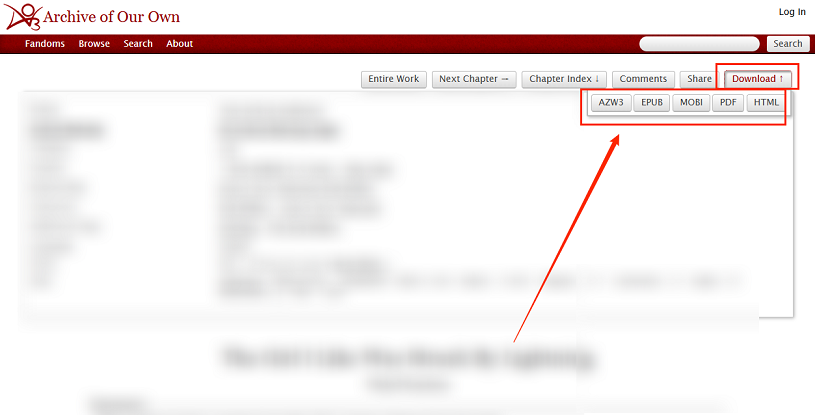
Later, you can read the downloaded PDF file in SwifDoo PDF or other reading apps or devices.
Option 2: Download Multiple AO3 Stories at Once
To batch download many stories, you can consider FanFicFare and Calibre. Here’s a guide for your reference.
Step 1. Download and install Calibre on your PC. Then, run Calibre and go to Preferences > Plugins to click “Get new plugins”.
Step 2. Then, search for and install FanFicFare. After installation, restart Calibre. Here, you can go to Preferences > Toolbars to add the FanFicFare icon to the toolbar for easy access.
Step 3. Next, copy the AO3 story URLs and make them one per line. Then, click the FanFicFare icon from the toolbar and click “Download from URLs”. Now, paste the list of copied URLs and click OK.
Step 4. FanFicFare will fetch and analyze metadata and then download the stories. Once done, add the downloaded fanfiction stories to Calibre.
#How to Download Fanfiction from FanFiction.net
Unlike AO3, FanFiction.net doesn’t include a built-in download icon. But don’t worry. There are workable ways to download fanfictions from FanFiction.net.
Option 1: Save FanFiction.net Stories as PDF
Step 1. Open the target stories, locate the chapter you want to save from FanFiction.net.
Step 2. Press Ctrl + P or Cmd + P to open the Print window.
Step 3. Open Destination and select Save as PDF. Adjust other print settings as needed. Finally, click Save.
Option 2: Download Using a Fanfiction Downloader
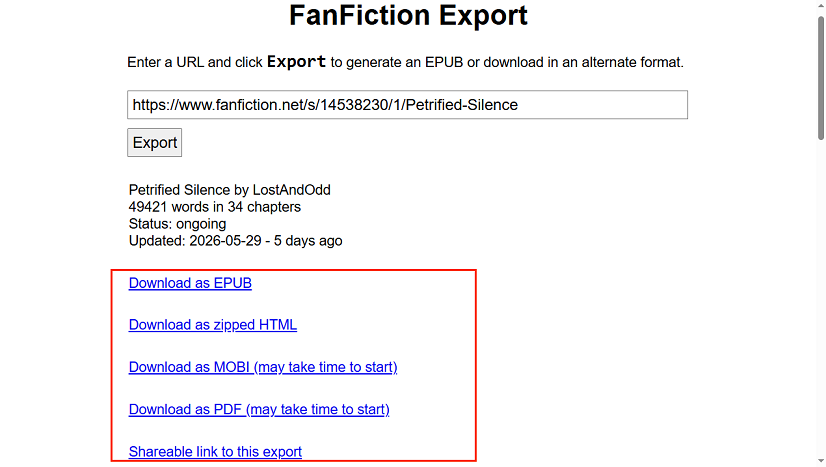
A third-party downloader can help you save stories from FanFiction.net efficiently. There are many popular, reliable downloaders available, such as FicHub, FicLab, or Sere’s Fanfic Downloader. Here, take FicHub as an example to show the exact steps for downloading a story from FanFiction.net.
Step 1. Go to FanFiction.net and copy the link of the target story.
Step 2. Visit FicHub and paste the copied link.
Step 3. Next, click the Export button. FicHub will fetch the metadata. Finally, you can choose to save the FanFiction story as a PDF, EPUB, or other formats.
BONUS: Read Downloaded Fanfiction PDFs in SwifDoo PDF
If you save fanfiction stories in PDF format, use SwifDoo PDF to get an enhanced reading experience. You can view the PDF in full-screen or side-by-side mode as needed. Moreover, SwifDoo PDF has a feature that reads PDFs aloud, allowing you to view stories without using your eyes. What’s more, it can translate PDFs so that you can view stories in any language.
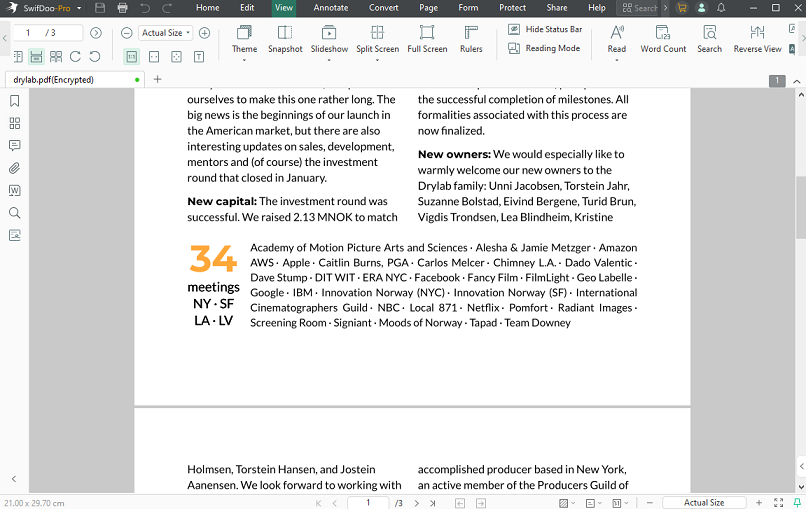
Beyond a PDF viewer, SwifDoo PDF is a PDF converter. It can perform many conversion tasks, such as PDF to HTML, PDF to EPUB, HTML to PDF, and more. You can install it and explore its wonderful features.
The Legal and Ethical Side of Downloading Fanfiction
When you are planning to download fanfictions, you need to take the following aspects into consideration.
- Respect authors’ rights: Some authors prefer their work to remain online-only. Always honor their requests.
- Avoid distribution: You can use the downloaded stories only for personal reading, not for re-uploading or commercial purposes.
- Respect the platform's terms of service: Make sure your downloading method complies with AO3, FanFiction.net, or other site policies.
Conclusion
How to save fanfiction stories for offline reading? Some fanfiction platforms like AO3 include a built-in download option. Additionally, there are other useful fanfiction downloaders from browser extensions, web-based services, and advanced command-line tools. All in all, there’s a fanfiction downloading method for every level of tech expertise.



