Why Copy Stamps for PDF?
In businesses, there are several instances when you may need to copy a stamp for a PDF from another source (PDF). Here are a few plausible reasons.
- Maintain consistency across documents
- Save time and effort, especially when handling bulk documents
- Required stamps can be standardized and reused to meet regulatory needs
- Company logos, signature stamps, or official seals can be consistently applied across all documents
- Helps match documents by version and tracks workflow stages across related files
- Keeps date, initials, and notes consistent
- Automates updates across multiple PDFs efficiently
Way 1. How to Copy a Stamp in Adobe Acrobat
Adobe Acrobat is a highly renowned software known for its comprehensive PDF management capabilities. It often emerges as a professional tool to explore more advanced PDF features. However, it allows you to copy and stamp PDFs with ease.
If you are well-versed in Adobe’s interface and functionality, the process is really simple. Please note that this feature is exclusive to Pro users and requires an upgrade to the premium version. However, it may take time for new users to learn.
Learn how to easily copy and paste a stamp in a PDF with Adobe Acrobat.
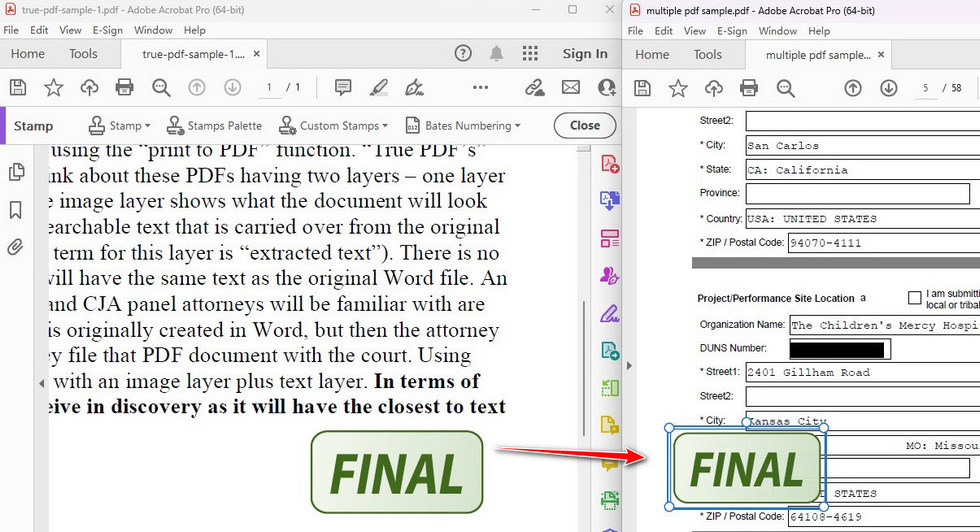
Step 1: Open the PDF document within Adobe Acrobat Pro.
Step 2: Tap on the stamp you want to copy. Press Ctrl + C to copy a stamp from a PDF.
Step 3: Press Ctrl + V to paste the stamp wherever you desire.
Way 2. How to Copy Stamp with an Online Tool
Various tools are available to create stamps online for PDF documents. You can use PDFCreator Online, Xodo PDF Reader & Editor, or StampJam to complete the job in minutes. These web-based tools offer free services and require no prior technical experience.
Additionally, most of these tools are ad-free and do not display pop-up windows. With a clean and navigable interface, they ease your experience working with stamps.
Check this simple guide to copy and paste a stamp in a PDF via PDFgear.
Step 1: Launch the PDFgear Online Editor. And select or drop the intended PDF with stamps into the interface.
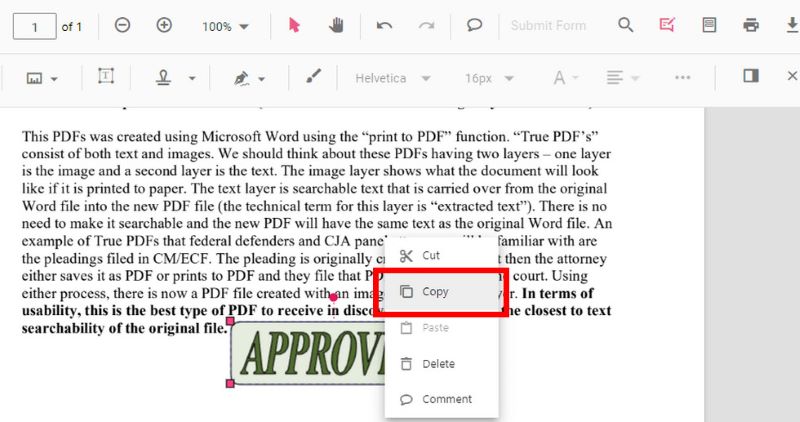
Step 2: Once the file uploads, right-click the stamp within the PDF. And tap Copy. Or hold the Ctrl + C keys to copy it.
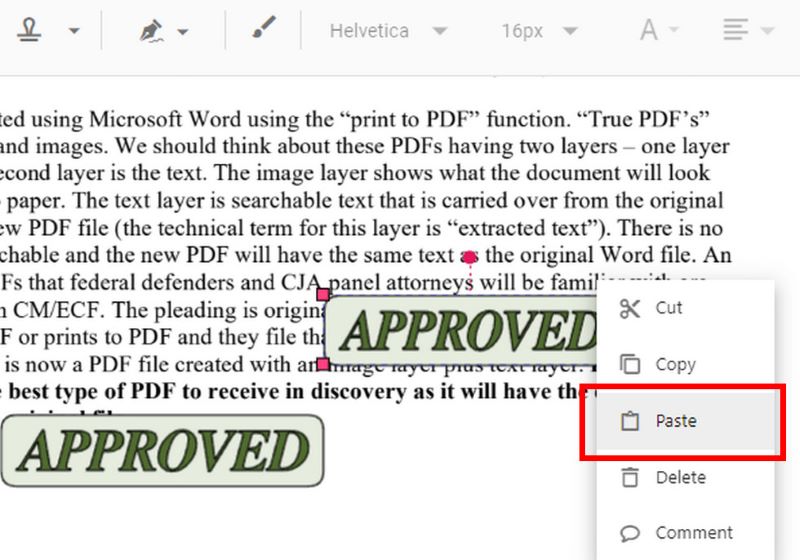
Step 3: Now, select the place. Select the location where you want to paste the copied stamp. Right-click on the targeted area and select 'Paste'. You can also press Ctrl+V to paste the stamp.
Bonus Tip: How to Create and Add Stamps to PDF Easily
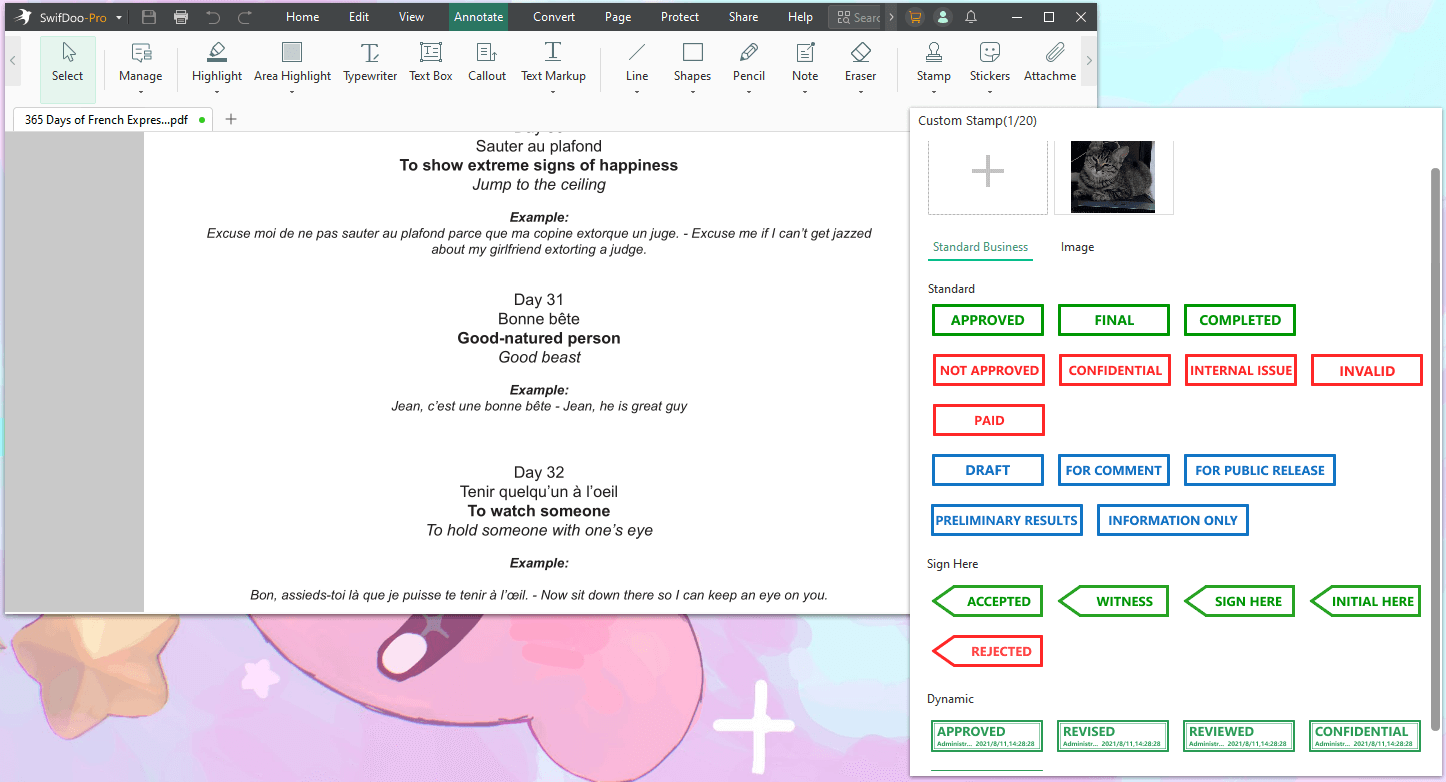
SwifDoo PDF is a lightweight yet powerful solution for creating and adding stamps to PDF files. It offers an easy stamp creation process thanks to its simple interface. It provides more than 20 built-in templates to stamp the PDFs. Based on your requirements, you can use custom or standard business stamps. If needed, you can also add images as stamps to your PDF documents.
Here’s how you can use SwifDoo PDF to create and add stamps to PDF.
Step 1: Download SwifDoo PDF and begin using it on your device. After that, open the PDF document of your choice.
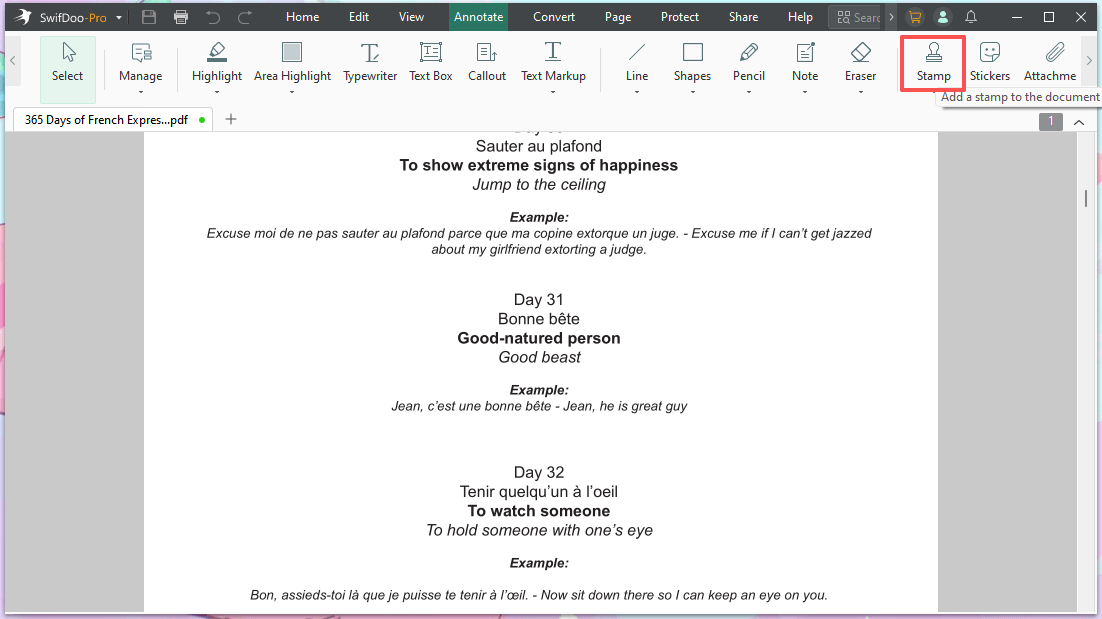
Step 2: Now, click the Annotate option in the top toolbar. Then, click "Stamp" in the secondary address bar.
Step 3: Choose a built-in stamp template.
Step 4: Tap OK. And position the stamp in the selected spot on the PDF.
Besides adding a stamp, SwifDoo PDF leverages many PDF annotation and other PDF management features. Other benefits of using SwifDoo PDF include:
- PDF markup tool to add arrows, lines, shapes, notes, and many other annotations
- Edit, compress, merge, and split pages and entire PDF documents
- Sign PDFs electronically or digitally with ease
- Convert PDF to/from other file formats
- View PDF content in various modes with a read-out-loud feature for multitasking
- SwifDoo AI to analyze and chat with PDF documents
Why not try SwifDoo PDF and see for yourself?
The Bottom Line
This post has discussed two simple ways to help you copy a stamp for a PDF. Whether you are seeking professional assistance or are interested in free ways, we have explored both methods for your convenience.
In addition, if you need to create or add stamps to a PDF, SwifDoo PDF can be your ultimate solution. Its built-in templates can help you apply one quickly in seconds. Try it today to manage all your PDF-related tasks.